
Instagram Partnership Ad Permissions and How to Revoke Them
- Instagram has two partnership ad permissions. Content-level lets an advertiser promote a specific post, story or reel you release. Account-level lets them create ads from your handle "without pre-exis
- Revoking is not one switch. Removing an account-level partner pauses its running ads; turning off a used ad code does not stop active ads; archiving a post does not remove ad code access.
- If your Instagram and Facebook accounts are linked, accepting an account-level request grants it on both.
- The permission settles who can run the ad, not for how long, for how much, or how it is disclosed. Meta says permission expiration dates are coming to its Creator Marketing Hub during the rest of 2026
A brand asks you to "approve the partnership ad request so we can boost the post." Which request you approve decides what they can do with your name. Instagram's Help Center puts it in two sentences: "Content-level permissions are more restrictive and are used for specific content promotions. Account-level permissions offer broader access and are more suitable for ongoing partnerships." The same page says creators and other partners "can revoke these permissions at any time." How you revoke, and what keeps running afterwards, depends on which one you gave.
What is the difference between content-level and account-level permissions?
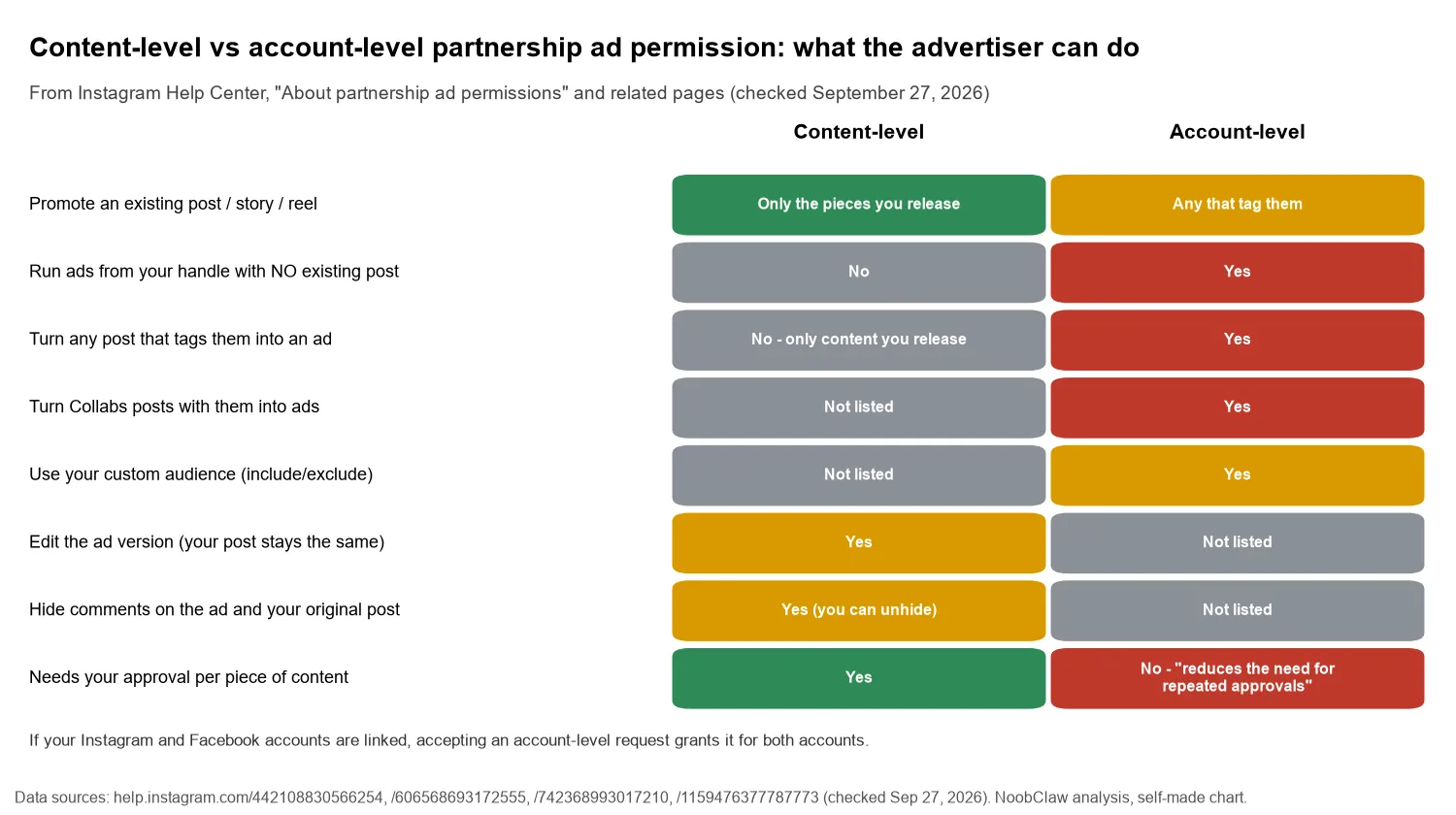
Content-level covers pieces you release. With it, an advertiser can create ads from your existing branded content when you turn on "Allow brand partner to boost," or from any post, story or reel "regardless of whether it's branded content or if the advertiser is tagged" when you share a partnership ad code. They can edit the ad version ("your original post will stay the same"), see insights on partnered content, and hide comments on the ad and on your original post. You can unhide those comments.
Account-level is a standing arrangement the advertiser requests. According to the Help Center, it lets them:
- "Create partnership ads, other ad types and marketing messages from a partner's handle without pre-existing content."
- "Create ads from any of the partner's existing content that tags the advertiser," including posts with the paid partnership label, @mentions, people tags or product tags, and "Instagram Collabs posts with them." If you co-post often, that last item reaches further than it sounds; how Collabs work is covered in the Instagram collab post limit.
- "Include or exclude their partner's custom audience in their partnership ad campaign."
The first bullet is the one to read twice. With account-level permission, an ad can carry your handle in its header even though you never posted that creative. The Help Center lists "reduces the need for repeated approvals for each piece of content" as a benefit, and for an ongoing retainer it is one. For a one-off deal, it is more access than the deal needs.
There is also a cross-app detail. If your Instagram and Facebook accounts are linked, the account-level page says that accepting a request gives the advertiser "account-level permissions for both accounts." The advertiser can also see whether your accounts are linked before they send the request.
Content-level names a post. Account-level names you. Price them as different products, because they are.
How do you revoke partnership ad permissions on Instagram?
The Help Center page on stopping an advertiser describes three separate controls. They do different things, and the difference catches people out.
1. Remove an account-level partner
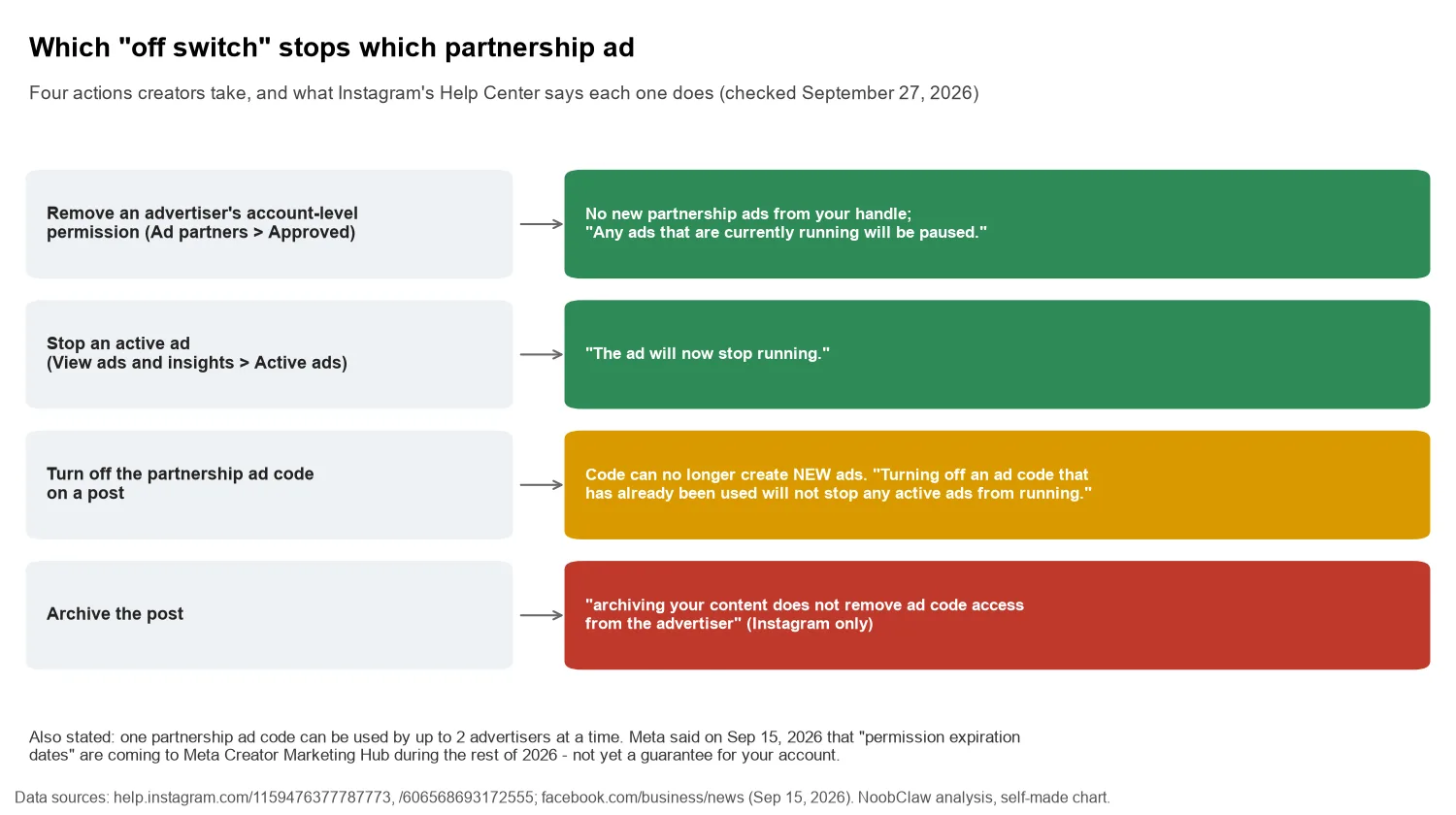
Profile, then Menu, then Professional dashboard, then Partnership ads. Under Manage ad permissions, open Ad partners, select the partner in the Approved tab, and tap Remove. Instagram says the advertiser "will no longer be able to create partnership ads from your Instagram handle," and adds: "Any ads that are currently running will be paused." Pending requests are approved or declined from the same Ad partners screen.
2. Stop an ad that is already running
From Partnership ads, open View ads and insights, then Active ads, select the partner, open the ad and choose Stop. "The ad will now stop running." This is the control for content-level ads that are live.
3. Turn off the ad code or boost toggle on a post
Open the post, story or reel, go to Partnership label & ads, and switch off Get partnership ad code or the boost permission. This stops new ads only. The Help Center is explicit: "Turning off an ad code that has already been used will not stop any active ads from running." To stop those, use step 2.
Two more lines from the content-level page are worth knowing before you hand out a code. "Ad codes can be used by up to 2 advertisers at a time." And, on Instagram only, "archiving your content does not remove ad code access from the advertiser." Archiving a post to hide it does not take it back from the brand.
What does the permission not decide?
The toggle answers one question: may this advertiser run ads with your handle? Four others stay open.
Duration. Today the permission is on until someone switches it off. That may change: in its September 15, 2026 Creator Week announcement, Meta said "content-level permissions and permission expiration dates" are coming to Meta Creator Marketing Hub, the tool that now brings creator discovery and partnership ads together, with new features "rolling out the remainder of this year." Until you can see an expiry field on your own account, the end date lives in your contract.
Disclosure. The paid partnership label is Meta's rule; advertising law is separate. The FTC's endorsement FAQ answers the question "is a platform's built-in tool enough?" with "Not necessarily," and says "the ultimate responsibility for clearly and conspicuously disclosing a material connection rests with the influencer and the brand – not the platform." How the label works on each app is in the paid partnership label on every platform, and the affiliate-tag version of the same question is in Instagram affiliate tags and disclosure.
A current case shows the disclosure risk is not theoretical. In Lupea v. Gymshark USA, Inc. (S.D.N.Y., No. 1:26-cv-05073, filed June 16, 2026), a proposed class action under New York consumer-protection law (General Business Law Section 349, plus unjust enrichment) alleges that Gymshark paid fitness creators on Instagram, TikTok and YouTube and that their disclosures fell short of the FTC's Endorsement Guides. A summary of the complaint by the law firm Frankfurt Kurnit sets out the claims. Gymshark moved on September 10, 2026 to dismiss, compel arbitration or strike the class allegations. These are allegations in a pending case, not findings. The suit targets the brand, but the posts at issue are creators' posts.
Usage and money. Whether a brand may re-cut your video, pull stills or run your face against a cold audience for months is a contract question. It is also a commercial one: Meta's CFO Susan Li said on the April 29, 2026 earnings call that growth in partnership ads came "with its revenue run-rate more than doubling year-over-year in Q1 to $10 billion." Brands are buying reach through creators' handles at scale; account-level access is part of what they are buying, and it belongs in your rate.
Eligibility. The permission does not make you eligible. Meta's eligibility page requires a professional account, compliance with community and monetization policies, and "an authentic, established presence," including "a sufficient follower base." If the tag option is refused, see branded content tag not eligible.
Three questions to settle before you approve
- "Content-level or account-level?" If the brand asks for account-level on a one-off deal, ask why. Content-level covers a single campaign.
- "Until when, and which content?" Put an end date and the list of posts in writing. Under content-level the list is built in; under account-level, name it anyway, because the permission reaches every post that tags the brand, Collabs included.
- "Who handles disclosure on the ad version?" The brand may edit the ad creative. Agree who checks that the edited version still discloses the relationship.
If you run several creator accounts, the same permissions pile up on each one. Put a recurring check in the calendar: open Ad partners on every account, remove partners whose deals have ended, then look at Active ads to confirm nothing is still running. Removing a partner pauses its ads, but ads already made from an ad code keep running after you turn the code off, until you stop each one in Active ads.
FAQ
Can a brand edit my content in a partnership ad?
The ad version, yes. Under content-level permission the Help Center says advertisers can "edit your content for ads and your original post will stay the same." What they may change, and for how long they may run it, belongs in your agreement, not in the toggle.
If I revoke permission, does the ad stop immediately?
It depends on the control. Removing an account-level partner pauses that partner's running ads. Turning off an ad code that has already been used does not stop active ads; you have to stop each one from Active ads. Archiving the post does not remove ad code access on Instagram.
Is a partnership ad the same as branded content?
Related, not identical. Branded content is your organic post with the paid partnership label. A partnership ad is the paid version an advertiser runs with your handle in the header, and Instagram notes that "branded content ads are now called partnership ads." You can post branded content that is never boosted, and the disclosure obligation applies either way.
Sources
- About partnership ad permissions — Instagram Help Center — checked September 27, 2026 — https://help.instagram.com/442108830566254
- Manage content-level permissions for partnership ads — Instagram Help Center — checked September 27, 2026 — https://help.instagram.com/606568693172555
- Manage account-level permissions for partnership ads — Instagram Help Center — checked September 27, 2026 — https://help.instagram.com/742368993017210
- Stop an advertiser from running partnership ads from your Facebook or Instagram account — Instagram Help Center — checked September 27, 2026 — https://help.instagram.com/1159476377787773
- Eligibility requirements for partnership ads and branded content — Instagram Help Center — checked September 27, 2026 — https://help.instagram.com/1372533836927082
- IAB Global Creator Week: Making it Easier for Businesses to Partner with Creators — Meta for Business — September 15, 2026 — https://www.facebook.com/business/news/iab-global-creator-week-making-it-easier-for-businesses-to-partner-with-creators
- Meta Q1 2026 Earnings Call Transcript — Meta Platforms, Inc. — April 29, 2026 — https://s21.q4cdn.com/399680738/files/doc_financials/2026/q1/META-Q1-2026-Earnings-Call-Transcript.pdf
- FTC's Endorsement Guides: What People Are Asking — U.S. Federal Trade Commission — undated FAQ, checked September 27, 2026 — https://www.ftc.gov/business-guidance/resources/ftcs-endorsement-guides-what-people-are-asking
- Lupea v. Gymshark USA, Inc., No. 1:26-cv-05073 (S.D.N.Y.) — docket via CourtListener — filed June 16, 2026 — https://www.courtlistener.com/docket/73489785/lupea-v-gymshark-usa-inc/
- Gymshark Hit With Class Action Over Alleged Influencer Marketing Practices (secondary summary of the complaint) — Frankfurt Kurnit Klein & Selz, Advertising Law blog — June 2026 — https://advertisinglaw.fkks.com/post/102n4pb/gymshark-hit-with-class-action-over-alleged-influencer-marketing-practices