Repurpose YouTube for TikTok and Shorts: What to Verify
- Select a complete viewer answer before selecting a clip.
- Check source rights and original value separately.
- One local script-to-video case does not prove clipping or audience results.
Repurposing an original YouTube video for TikTok or Shorts means choosing a useful idea, preserving its context and adapting the presentation for the destination. AI can assist with transcript review, script drafting and assembly, but a completed file does not establish audience demand, rights clearance or publishing success.
This article is a decision framework for original or properly licensed source material. It includes a bounded NoobClaw script-to-video case, not a tested automatic long-video clipping workflow. There is no supported view count, revenue result or percentage of cosmetic changes that guarantees a successful adaptation.
Choose the answer the short will deliver before choosing the section of the long video to reuse.
Decide which part has independent value
A strong candidate answers one question without requiring the viewer to have watched the whole conversation. Look for a claim accompanied by an example, a demonstration with its result, or an explanation with enough context to stand alone. A dramatic sentence is less useful if removing its qualification changes the meaning.
Consider a hypothetical ten-minute interview about improving a product demonstration. One section explains why an example failed and shows the corrected version. An adaptation could preserve the problem, the correction and the result. Cutting only the failure might attract attention while leaving viewers with the wrong conclusion.
Another candidate might depend on a diagram that occupies the full horizontal frame. Decide whether the visual can be redrawn or explained clearly in the new presentation. Cropping the original without checking the demonstration can remove the evidence the speaker refers to. A format conversion is not automatically an editorial adaptation.
Write a short brief before producing the file: audience question, main answer, evidence to retain, necessary qualification and source rights. This is our editorial framework, not a measured prediction of reach. If the answer cannot be expressed clearly without the surrounding segment, select another idea or use a longer presentation.
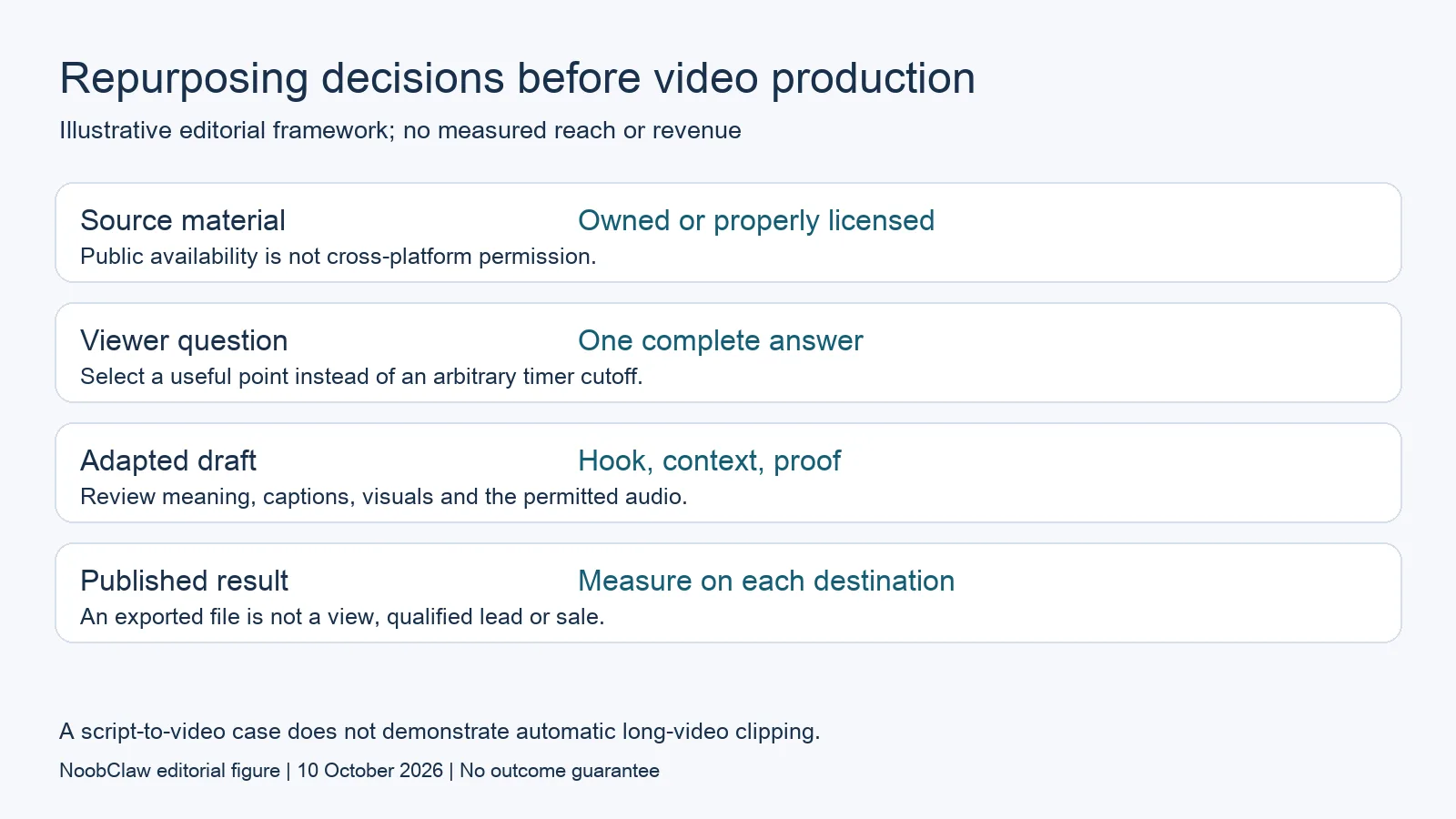
What AI can assist with and what needs review
A transcript can help an editor locate candidate arguments. A draft hook can help test whether the answer is understandable. Neither should be treated as a faithful record without checking the source. Names, numbers, negations and quotations are especially consequential when a short removes their original context.
Ask whether the opening promises the same thing the source actually establishes. An interviewee describing one example should not become an authority claiming a universal result. A draft that converts “we tried this once” into “this always works” needs revision even if the phrasing is more clickable.
Review the visuals against the narration. Generic stock footage may fill a timeline but fail to illustrate the point being made. In a demonstration, the relevant screen or product detail may be necessary evidence. Replacing it with unrelated imagery can reduce usefulness even when the export meets the desired dimensions.
Subtitles require an editorial check too. Confirm that the words match the intended narration and that the key qualification remains readable. A subtitle track existing in the file is not evidence that its timing, accuracy and display are acceptable for publication.
Rights and monetization are separate questions
YouTube's copyright guidance is a reason to check who can authorize the video, audio and other material. A clip being publicly viewable does not establish permission to copy it to another destination. Review the actual licenses and ownership rather than using visibility as consent.
The channel monetization policies separately examine original value, reused content and inauthentic content. Permission to use a source does not automatically establish monetization eligibility. Cosmetic changes or an added border are not a documented safe percentage for turning reused material into original value.
For your own recorded video, check any embedded material too: music, supplied footage, screenshots and contributions can have different permissions. The adaptation's destination matters to the permission you need. If that permission is uncertain, resolve it before publishing; this article does not make a legal determination for a particular clip.
Distinguish those rights questions from editorial value. You can have authorization and still produce a confusing short. You can add useful commentary and still need permission for the material. A single “AI repurposed” label does not answer both questions.
A bounded NoobClaw case
NoobClaw publishes this article and supplies the product in this example. Our public execution record covers one original English script of 441 characters assembled into a 32.6-second local MP4 at 1080 by 1920 and 30 frames per second. It demonstrates one script-assembly stage.
It does not demonstrate downloading a long YouTube video, finding its best moments, extracting clips or publishing them to TikTok or Shorts. Those stages were not tested in this case. Presenting the result as an end-to-end repurposing experiment would claim more than the record shows.
The sampled output included subtitles, while some stock images were generic or poorly matched to the narration. Voice audio was present, but this record does not establish a completed listening-quality approval. The local draft therefore still required human review. No platform views, customer sales or monetization results were measured.
If your source idea is better expressed as a new narration than as a direct excerpt, this assembly stage may be relevant to evaluate. The product page explains that specific job, and the separate guide contains operating instructions. This blog analysis does not substitute a script export for an untested clipping capability.

Choose a workflow and measure the actual result
If the original recording contains the necessary demonstration, evaluate a workflow that preserves it and supports the editing you need. If the source is an idea requiring a new narrative, evaluate script drafting and assembly. If the missing task is a publication queue, investigate publishing separately. Our Repurpose.io alternatives analysis distinguishes those jobs rather than ranking every tool as interchangeable.
After publication, keep the destination, date, approved version and actual metrics together. Compare like periods and define the action you care about. An exported draft is a production event; a view is an audience event; a verified lead or purchase needs its own evidence. Do not call clicks or plays sales.
Content appearing on several accounts also creates questions about audience context and authorization. See our same-video publishing analysis. Repeating a file is not a substitute for deciding why each audience should receive it, and no adaptation described here guarantees distribution.
FAQ
Can AI automatically turn any YouTube video into successful shorts?
This review supplies no such evidence. Candidate selection, context, material rights and output review remain distinct tasks. The NoobClaw case demonstrates one local script draft, not automated extraction or measured success.
Does changing colors or cropping make a clip original?
There is no supported cosmetic-change percentage that guarantees permission or monetization. Check the source rights and the adaptation's substantive value separately. Preserve the meaning and evidence of the original material.
Should I copy the same file to every destination?
Evaluate each audience, the permitted material and the intended presentation. Keep a reviewed version for each destination where adaptation is needed. A common source can support several useful answers without making every export or audience outcome equivalent.
Sources
Checked 10 October 2026: YouTube copyright guidance, channel monetization policies and NoobClaw's single public execution record. Interview examples are hypothetical editorial analysis. No reach, revenue or end-to-end clipping experiment is claimed.