Instagram Scheduled Post Failed: Publishing Checks
- "Failed" covers three different outcomes: the post never went out, it went out and got zero views, or it went out and was held back from recommendations. There is also a fourth state that looks like s
- Native scheduling and third-party tools follow different rules. Instagram's help page (checked September 26, 2026) allows up to 25 scheduled posts a day, up to 30 days ahead; several popular guides st
- API posts pass through a container that can stop at ERROR or expire after 24 hours. A tool that marks success before the final publish call can show a green tick for a post that never existed.
- Zero views after a successful publish is a different problem. Meta has never said scheduled posts are penalised; check Account Status and compare the same content posted by hand before blaming the sch
"Lately my scheduled posts have been getting zero views, no likes, no engagement etc... As soon as I delete them and manually post, they blow up." That is from r/InstagramMarketing on September 22, 2026. Its author calls it a scheduling problem. Someone whose tool shows a "failed" status also calls it a scheduling problem. They are not the same failure, and the fix for one does nothing for the other.
So the first job is sorting. A scheduled Instagram post can fail in three ways that matter:
- It never went out.
- It went out and got zero views.
- It went out and was held back from recommendations.
There is a fourth state people misfile as the first: the tool reports success, and the post is not on your profile. We cover it inside shape one, because that is where it comes from.
Which route scheduled your post?
Instagram posts can be scheduled three ways, and each follows its own rules. Knowing which one you used cuts the list of possible causes in half.
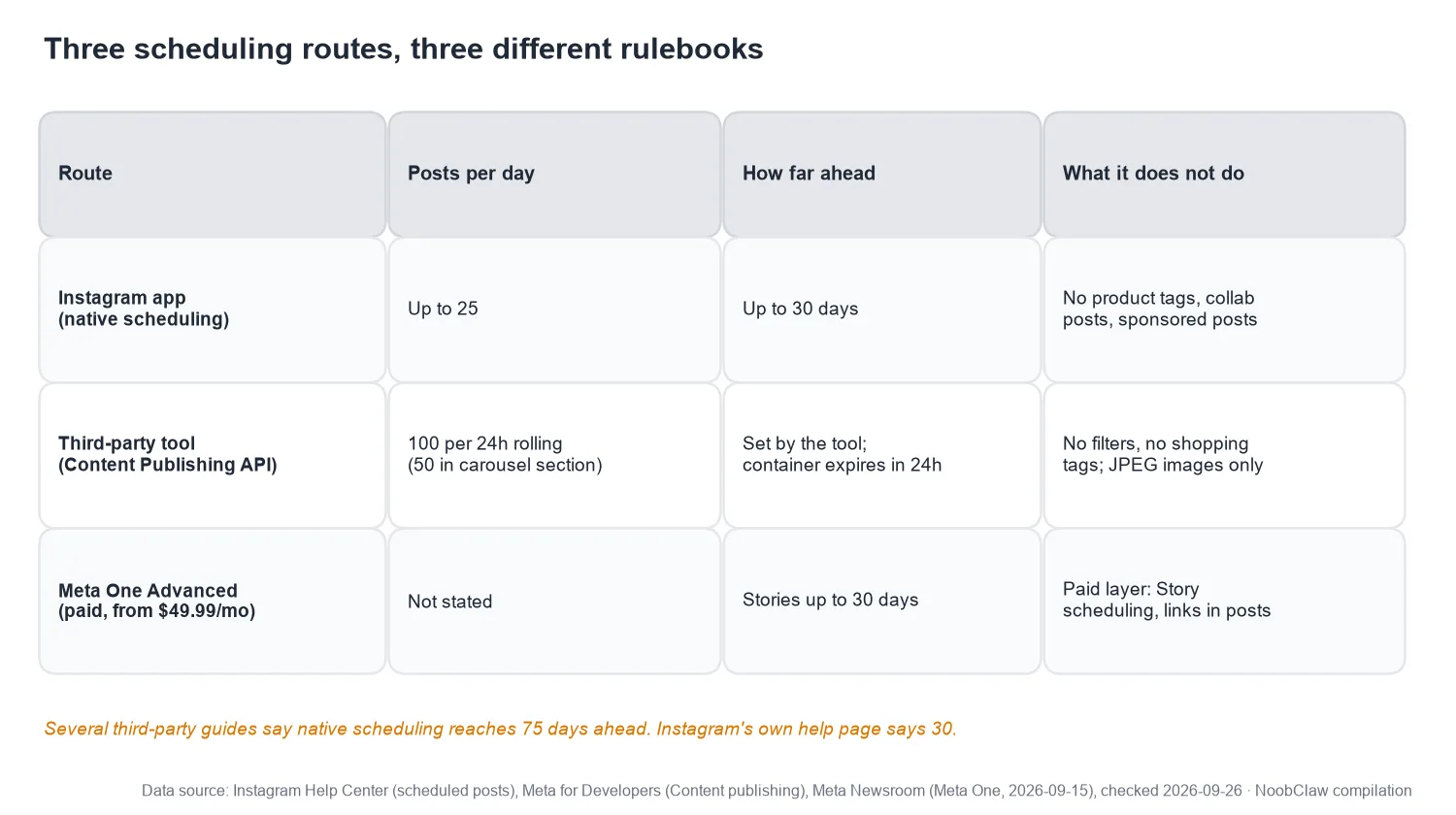
Native scheduling in the Instagram app. Instagram's scheduled posts help page says: "If you have a public Instagram account, you can plan ahead by scheduling reels, photos and carousel posts" and "You can schedule up to 25 posts a day, up to 30 days in advance." It also says "product tagging, collaborative posts, sponsored posts and fundraisers aren't compatible with scheduled content at this time." A scheduled collab post is not going to behave.
One thing we noticed while checking: widely read guides from Sprout Social and SocialBee still say native scheduling reaches 75 days ahead. The help page we loaded on September 26 says 30. Either the limit moved or the guides are stale. Plan to the smaller number. The page also says nothing about what happens when a natively scheduled post fails, so do not count on a notification.
Third-party tools. Buffer, Later, Metricool and similar schedulers publish through Meta's Content Publishing API, which has its own limits and its own failure states. In our reading, this is where most "failed to publish" messages originate, because Instagram's help page does not describe any failure message for native scheduling.
Meta One. Meta announced on September 15, 2026 that its Meta One Advanced tier, from $49.99 a month, includes "scheduling stories up to 30 days in advance". That is Story scheduling only. Posts and Reels are still free to schedule natively.
Shape one: the post never went out
For API-based tools, a post is not sent in one step. The tool first creates a media container, waits for Instagram to process it, and only then calls a separate publish endpoint. Meta's documentation lists five states a container can be in. Two of them end without a live post, and a third problem, the publishing limit, stops the final call.
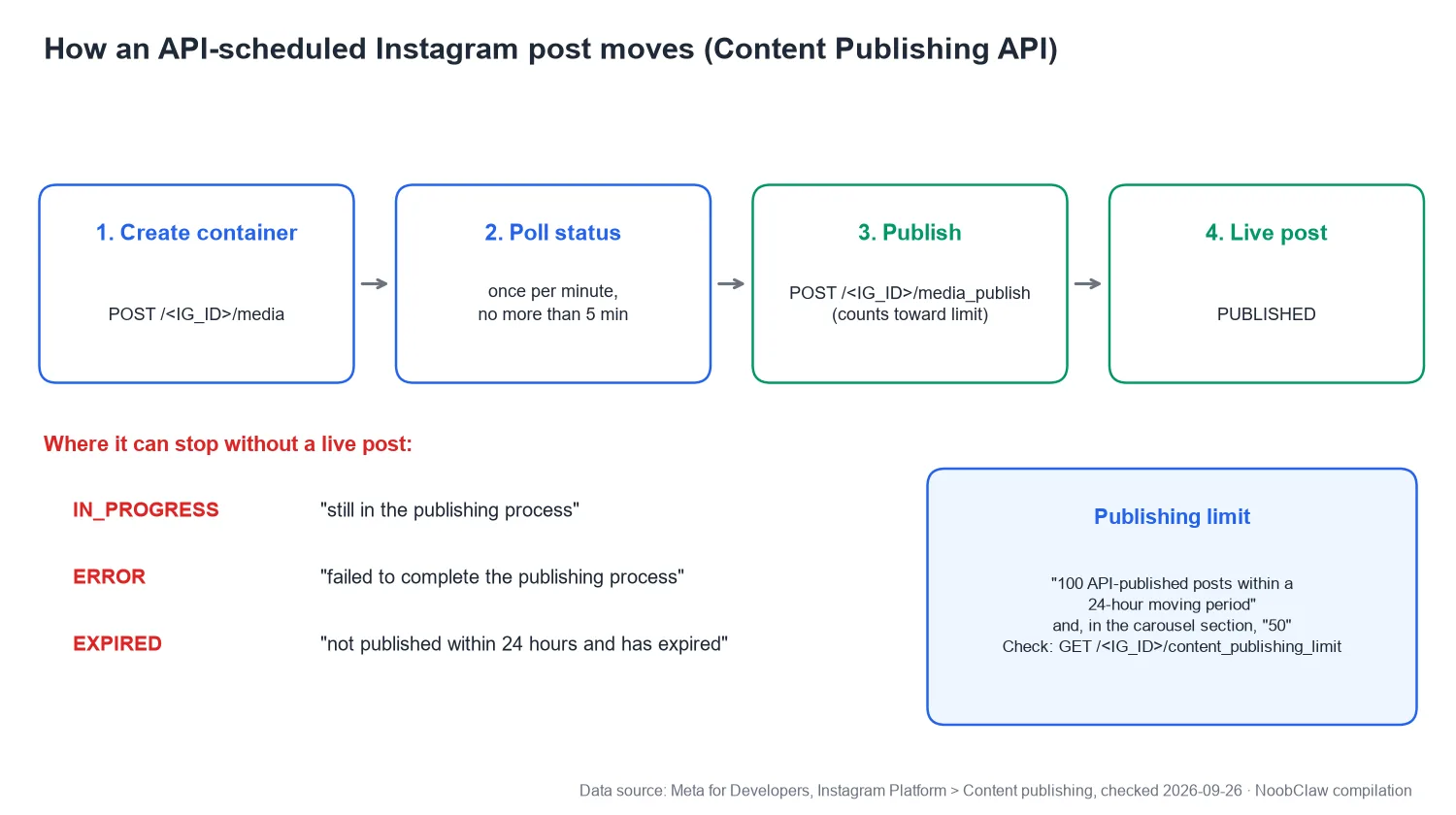
- ERROR: "The container failed to complete the publishing process." Usually the file. The documentation says "JPEG is the only image format supported," and that filters and shopping tags are not supported. A PNG, an odd video spec or a caption that breaks the request can end here, or be rejected before a container is even created. Either way, it will fail every time you retry.
- EXPIRED: "The container was not published within 24 hours and has expired."
- Over the limit. The same page says "Instagram accounts are limited to 100 API-published posts within a 24-hour moving period," and, in the carousel section, "Accounts are limited to 50 published posts within a 24-hour period." We have written about why those two numbers coexist. The window rolls, so there is no midnight reset. The allowance belongs to the account and is shared by every tool connected to it. You can read the account's real usage from the <code>content_publishing_limit</code> endpoint, which is worth asking your tool's support about.
Then there is permission. If the connection expired, the account changed type, the password changed or someone removed the app in settings, every post fails at every hour. A quota problem has good hours. A permission problem does not. Disconnect the account from the tool and connect it again from scratch; if the next post works, that was it.
The green-tick-but-nothing-there case. Because creating a container and publishing it are separate calls, a tool can record "success" after step one and never complete step three. Meta's documentation recommends checking a container's status "once per minute, for no more than 5 minutes." A tool that gives up earlier, or that treats "container created" as "done", will show a finished post while the container quietly reaches EXPIRED a day later. A user on r/automation described the general version of this on Reddit this week: "a token that expired so the job 'succeeded' with zero rows. nothing alerted because nothing failed." If your tool has an activity log or raw response view, look for the word EXPIRED or a missing media ID. That screen tells you more than the dashboard does.
Shape two: it published and got zero views
This is the Reddit post from the top. The post exists, and nobody sees it. Three explanations compete, and they need different checks.
A platform-side glitch. On September 23, a thread about Trial Reels stuck at exactly zero: the original poster wrote "It's not even showing up under my own hashtags," and at least two commenters reported zero views on the same day. Several accounts hitting zero at once looks more like an outage than a penalty. Meta did not announce anything. Before changing your process, check whether other people are reporting the same thing today.
A scheduling penalty. Meta has never said one exists. We went through the evidence in does Instagram penalise scheduled posts. The Reddit author's "delete and repost by hand" observation is one person's result, and deleting and reposting changes several things at once, including time of day and early engagement from people who saw the first attempt.
A test you can run. Take two comparable pieces of content. Post one by hand and schedule the other for the same hour on a different day, from the same account. Do it twice. If the scheduled ones consistently lag, you have evidence about your route. If they do not, the zero came from somewhere else.
A post that failed to publish and a post that published to nobody need different fixes. Retrying the first can help; retrying the second just creates duplicates.
Shape three: it published and was held back
A post can be live, visible to followers, and ineligible for Explore and Reels recommendations. Instagram's help page on recommendation eligibility puts the account-level version plainly: "If your account is not eligible to be recommended, none of your content will be recommended regardless of whether or not all of your content goes against our Recommendations Guidelines." Scheduling has nothing to do with it; the account's recent posts do. If you are scheduling reposts, Instagram's original content update (April 30, 2026) says accounts that mainly post unoriginal photos, carousels or Reels "will no longer be shown in places where we recommend content."
Professional accounts can see this in Account Status. If the panel is green, you are not in shape three.
A smaller cousin of shape three: the post goes out, but not as you built it. A Reel scheduled through a tool can arrive with its audio removed usually, according to the tools themselves, because the tool's licensed library is smaller than the app's. That one has its own guide: why your scheduled Reel lost its audio.
The five-minute sort
- Is the post on your profile? No: shape one. Yes: shape two or three.
- If it is missing, does it fail at every hour or only some? Some hours, and you publish dozens of posts a day: the rolling limit. Every hour, every post: permission; reconnect. Only this post: the file or caption; re-export as JPEG or a standard video and try a plain caption.
- Does the tool say success anyway? Look for an EXPIRED container or a missing media ID in its log.
- If it is live with zero views, is everyone reporting zero today? Wait a day before changing anything.
- Is Account Status green? If not, you are in shape three, and scheduling is not the cause.
Some operators publish without an API-connected scheduler at all. NoobClaw is one example: a desktop app that signs into your own accounts in separate browser profiles on your machine and publishes through your own logged-in session, so the failure you would debug is a browser session rather than a container status. That is a different mechanism, not an exemption. Meta's Account Integrity policy exempts scripting only through "authorized routes", and automating your own browser session is not one of them, so Instagram's rules on frequency, repetitive content and account behaviour apply just the same. The practical costs are real too: your computer has to be on at publish time and your logins have to stay valid. And it does nothing for shapes two and three, which are about the account and the content.
FAQ
Why did my scheduled post fail to publish on Instagram?
Sort it first. If the post is missing and fails only at some hours, you are probably hitting the rolling 24-hour API limit. If every post fails at every hour, the tool's connection has lost permission; disconnect and reconnect. If only one post fails, the file or caption is being rejected: Meta's API accepts only JPEG images and does not support filters or shopping tags.
How many posts can I schedule on Instagram per day?
Natively in the app, Instagram's help page says up to 25 posts a day, up to 30 days in advance (checked September 26, 2026). Through third-party tools, the Content Publishing API allows 100 API-published posts per rolling 24 hours in one section of Meta's documentation and 50 in another; plan to 50.
My tool says the post was published, but it is not on my profile. What happened?
API publishing is a two-step process: create a container, then publish it. If the tool recorded success before the publish step completed, the container can sit unpublished and expire after 24 hours. Check the tool's activity log for an EXPIRED status or a missing media ID, and ask support whether it confirms the final publish call.
Sources
- How to create and manage scheduled posts and Reels on Instagram — Instagram Help Center — accessed 2026-09-26 — https://help.instagram.com/439971288310029/
- Content publishing — Meta for Developers, Instagram Platform — accessed 2026-09-26 — https://developers.facebook.com/docs/instagram-platform/content-publishing
- Introducing Meta One — Meta Newsroom — 2026-09-15 — https://about.fb.com/news/2026/09/introducing-meta-one-subscription-service-more-features-ai/
- Account Integrity — Meta Transparency Center — accessed 2026-09-26 — https://transparency.meta.com/policies/community-standards/account-integrity/
- Recommendation eligibility on Instagram — Instagram Help Center — accessed 2026-09-26 — https://help.instagram.com/653964212890722
- Rewarding original creators on Instagram — Instagram for Creators — 2026-04-30 — https://creators.instagram.com/blog/rewarding-original-creators-on-instagram
- How to schedule Instagram posts — Sprout Social — accessed 2026-09-26 (states 75 days) — https://sproutsocial.com/insights/how-to-schedule-instagram-posts/
- How to schedule Instagram Reels — SocialBee — accessed 2026-09-26 (states 75 days) — https://socialbee.com/blog/schedule-reels-on-instagram/
- Scheduled posts getting ZERO views (user post) — r/InstagramMarketing — 2026-09-22 — https://www.reddit.com/r/InstagramMarketing/comments/1wnfdj4/scheduled_posts_getting_zero_views/
- Trial Reels getting 0 views today? (user post) — r/InstagramMarketing — 2026-09-23 — https://www.reddit.com/r/InstagramMarketing/comments/1wo0uoc/trial_reels_getting_0_views_today_stuck_at/
- The automation failures that hurt most never threw an error (user post) — r/automation — 2026-09-24 — https://www.reddit.com/r/automation/comments/1wott9p/