AI Content Generation for Social Media: Drafts to Video
- Choose the workflow by its output: post text, spoken narration or an assembled video draft.
- Two bounded tests produced five captions and one 32.6-second local video; no audience or business outcome was measured.
- Generated wording and stock scenes still need review. Profile requirements, internet access and credits depend on the selected workflow.
Choose an AI content workflow by the output you need to review: text for an existing post, narration for a planned video, or a rendered video draft. Keep generation, export and publishing as separate decisions. A tool that produces fluent text or a playable MP4 has not thereby established originality, platform permission, reach or sales.
For a creator working across accounts, this distinction affects where the time goes. If the footage already exists, another video-generation workflow may be unnecessary. If the idea is clear but the explanation is unfinished, a text draft is a useful starting point. If you need narration, visual material and subtitles assembled into a file, the prerequisites and review burden are different.
Which part of content production should AI handle?
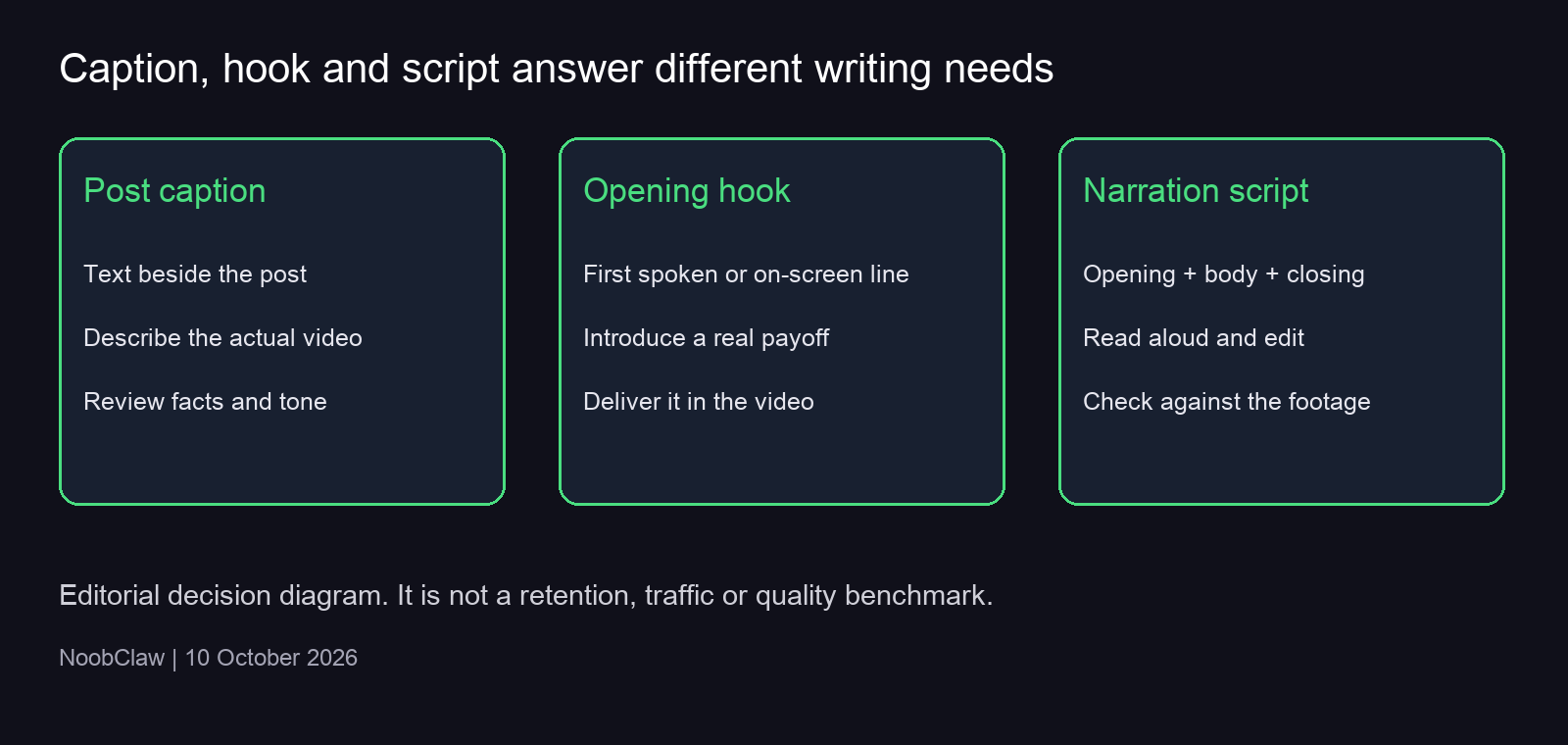
A post-caption tool returns text that introduces or contextualizes a video. A hook tool proposes an opening line. A script tool supplies the spoken explanation and a closing action. NoobClaw has existing caption, hook and script pages for these distinct text jobs. Choosing one does not automatically complete the others.
A desktop script-to-video workflow has a broader job: it combines supplied text with a selected voice, scene material and subtitles. That can be useful for a narrated explainer, but it adds decisions about visual relevance and timing. For a hands-on product demonstration, your own footage may convey details that generic stock cannot. Our judgment is to automate the assembly only when you can still inspect the claims and scenes that matter.
Account context can guide a brief, but it cannot supply missing evidence. A creator persona, niche or preferred tone is a writing constraint. It does not establish that the account holder performed a test, bought a product or achieved a result. Put substantiated material in the brief before asking for a more persuasive voice.
What our two actual NoobClaw tests show
On 9 October 2026, our public caption request asked for wording for a beginner video about organizing three social accounts and reviewing an AI draft. It returned five captions. The public request record shows the exact input and output; it did not operate those accounts, publish anything or measure a commercial result.
3 accounts, 1 AI draft, and your task list: a quick beginner walkthrough to stay organized.
This returned option is compact, but its implied walkthrough still has to exist. Another option used first-person wording. An editor needs to decide whether that experience claim is true of the person presenting the video. The practical lesson from this record is that even a brief explicitly excluding growth and safety promises does not replace a review of the generated language.
On 10 October, we tested a separate desktop stock-video workflow using an original 441-character English script. We selected strict reading, an existing connected profile, online visuals, an English Edge voice, subtitles, one output and local-only saving. The task produced an MP4 measuring 32.6 seconds at 1080×1920 and 30 frames per second, with an AAC audio stream. Sampled frames showed burned-in English subtitles. The desktop test record preserves the settings, measurements and boundaries.
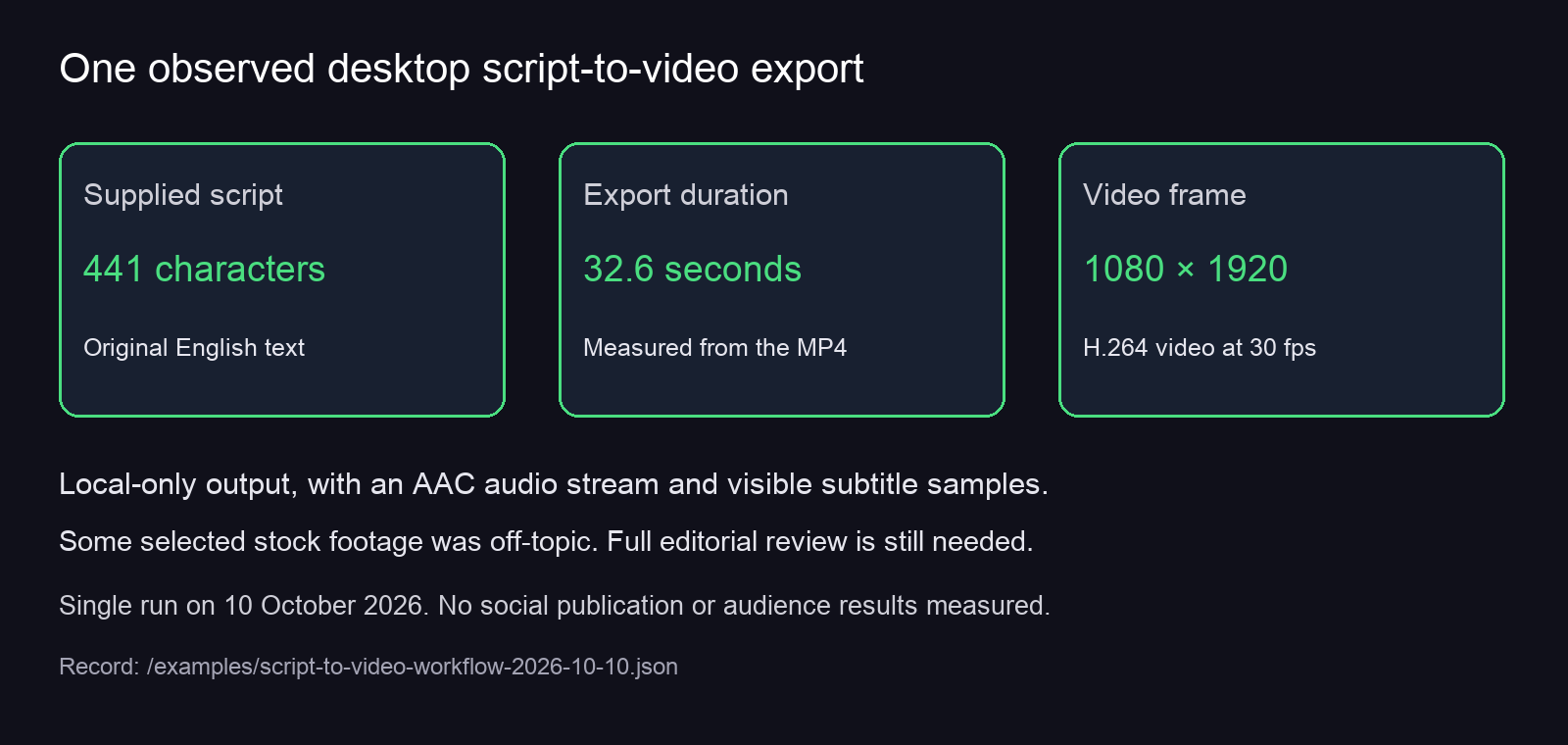
The output was a draft worth inspecting, rather than a finished edit we could endorse without changes. Some stock imagery was generic or off-topic. The interface’s Chinese-rate estimate was 98 seconds, substantially different from the exported English narration. Neither observation supports a universal speed or quality ranking; both show why a preview and actual playback matter.
Where human review changes the result
Review text against the source material first. Mark each personal experience, number, comparison and predicted outcome. Keep it only if you can substantiate it. A sentence about “my test” needs the actual test record; a customer claim needs the appropriate evidence and permission. A more specific fabricated number is still fabricated.
Then review the relationship between text and visuals. In our video, an image could be loosely associated with a keyword yet fail to explain the sentence being narrated. A scene about reviewing a draft needs to serve that point; a general financial screen does not automatically do so. Replace material that distracts from the explanation, rather than polishing a caption around it.
Finally, listen and watch the complete export. Our file inspection confirmed an audio stream and sampled visible subtitles; it did not independently approve pronunciation or every timing boundary. Check that the voice can be understood, that subtitle segments make sense and that the closing action follows the content. A successful task log and a successful editorial review answer different questions.
The same reasoning applies across accounts. Shared source facts can remain stable, while examples, tone and the next step vary with the actual audience. Avoid changing a factual event to make each version look different. Keep the source, chosen draft and review decision associated with the account that will use them, so later corrections are possible.
Choose a text tool or the tested desktop workflow
Choose a web text tool when you need a small draft you can edit and copy into an existing process. The current NoobClaw generator input is limited to 400 characters, and anonymous use allows up to five successful generations per tool subject to browser/IP allowance and rate limits. Signed-in generation uses account credits. Those conditions describe access, not a promise of unlimited production.
Choose the desktop stock-video workflow when the missing work is assembling narration, visual material and subtitles into a local file. In the tested wizard, an existing connected profile was required even for local-only output, and the strict-reading field displayed a 200–800-character range. Internet access was needed for the online workflow. The ability to save on your machine does not mean every service involved runs offline.
The script-to-video Guide gives the tested setup and output checks. Review current plans and credits before starting: downloading the app, selecting a free voice and paying for a task are separate conditions. Start with a bounded test whose output you can inspect before considering repeated production.
A manual recording or existing editor remains a sensible choice when you need your own demonstration footage, precise scene control or a particular delivery. The tested stock workflow offers assembly from a supplied script; it is not evidence for automatic long-video clipping, perfect scene matching or a complete approval and reporting suite.
FAQ
Does AI writing make platform publishing permitted?
Assess the destination and the method separately. A generation tool does not grant permission for automated account activity or certify that media meets a platform’s rules. This article’s demonstrations saved drafts or a local file; they did not test social publishing.
When should synthetic media be disclosed?
TikTok’s 13 April 2026 update reiterates that creators must label realistic AI-generated content. YouTube’s disclosure guidance distinguishes realistic synthetic or materially altered media from production assistance such as script help. Evaluate the finished media under the current destination guidance, rather than treating every AI-assisted caption as the same kind of content.
What should I measure after adopting a workflow?
Record whether a usable draft or export was produced, which parts needed correction, and the actual resources and time spent. If you publish later, report audience and business metrics separately. Our two records establish outputs under particular settings; they establish no follower growth, paid conversion or safety guarantee.
For more on selecting and editing the text outputs, read captions, hooks and scripts. For a separate tool-selection question, the Blotato vs Buffer analysis compares workflow choices. Keep the actual capability you need at the center of either decision.
Sources
- NoobClaw web-caption execution, 9 October 2026
- NoobClaw desktop video execution, 10 October 2026
- TikTok Newsroom: UK election update, AI-content labeling section, 13 April 2026
- YouTube Help: disclosing synthetic or altered content
Editorial correction, 10 October 2026: this revision removes earlier unsupported account-safety and platform-behavior assurances. It separates observed generation and export from publishing permission and audience outcomes.