AI Video Generators for TikTok Shop: Workflow and Limits
- TikTok Shop sellers and TikTok creators live under different systems — different compliance surfaces, different scores, different penalties. Tool choice follows from which one you are.
- TikTok ships a free generator itself (Symphony Creative Studio) that lives inside the ads and commerce stack, which makes it a natural fit for this side specifically.
- For Shop content the binding constraints are disclosure and product-claim compliance, not rendering quality — and violations there run on a points ladder, not a warning.
- The volume ceiling is on the publishing side regardless of tool: TikTok allows 6 API requests per minute per token and at most 5 pending shares in any 24 hours.
Before comparing any tool, answer this: are you a seller or a creator?
It sounds like a pedantic distinction. It is not. TikTok Shop and the creator side of TikTok have different compliance surfaces, different scoring systems, and different consequences — and a great deal of advice written for one gets applied to the other, which is how people end up optimising for a number that does not exist on their side of the platform.
Why this distinction keeps breaking things
We have hit this pattern repeatedly. A term looks like a general creator metric, has extensive official documentation, and turns out to belong entirely to the seller side:
- Account health — thoroughly documented, and it is a TikTok Shop seller score.
- Creator levels — looks like a growth ladder, is a Shop GMV tier system.
- Violation points — a real, published ladder, and it is a Shop mechanism.
When official documentation for a TikTok term is unusually detailed, check whose documentation it is. Detailed usually means commerce.
So if you are making videos for TikTok Shop, that detailed documentation is yours — which is unusually lucky, because it means your rules are actually written down.
What actually constrains Shop video (and it is not render quality)
Every serious AI video generator in 2026 produces adequate output. That has stopped being the differentiator. For Shop content, three other things decide whether the video works:
| Constraint | Why it binds | What to look for in a tool |
|---|---|---|
| Disclosure | Synthetic media and commercial content both carry labelling obligations, and they stack | Can it apply labels systematically rather than per-video? |
| Product claims | Generated scripts invent benefits. On the commerce side that is a compliance event | Can you constrain the script to a fixed claim list? |
| Consistency at volume | Shop catalogues need many videos, not one good one | Does it vary the angle, or just the b-roll? |
The middle row is the one that costs money. An AI script writer given a product name will cheerfully produce "clinically proven" or "results in 7 days" because those phrases are statistically normal in the training data. On the creator side that is a bad video. On the Shop side it is a violation with a points value.
The free option that is aimed squarely at this side
TikTok's own Symphony Creative Studio generates video, scripts and avatars at no cost. On the creator side we flagged that living inside the ads stack is a consideration; on the Shop side that is not a caveat, it is the point. You are already operating in the commerce context the tool was built for.
So the honest recommendation order for Shop sellers is:
- Try the first-party tool first. It is free, it is aligned with your context, and it has no integration cost.
- Move to a third-party generator when you need something it cannot do — usually volume, catalogue integration, or a specific visual style.
- Only then compare third-party tools, and compare them on the three constraints above rather than on render demos.
Our breakdown of the first-party option is in TikTok Symphony Creative Studio Is Free — And Its Price Is Somewhere Else.
The ceiling that applies whatever you choose
Catalogue-scale video production runs into a publishing limit that no generator controls. From TikTok's content posting API documentation:
"Each user access_token is limited to 6 requests per minute." · "There may be at most 5 pending shares within any 24-hour period."
Generate three hundred product videos and you still meet a five-deep pending queue at the other end. Plan the publishing schedule before you plan the render volume, because the render volume is the easy part to buy.
If you are on the creator side after all
Then most Shop-specific advice does not apply to you, including the violation-points ladder and the seller scores. Your constraints are different: retention, disclosure of synthetic media, and not publishing near-identical videos across accounts.
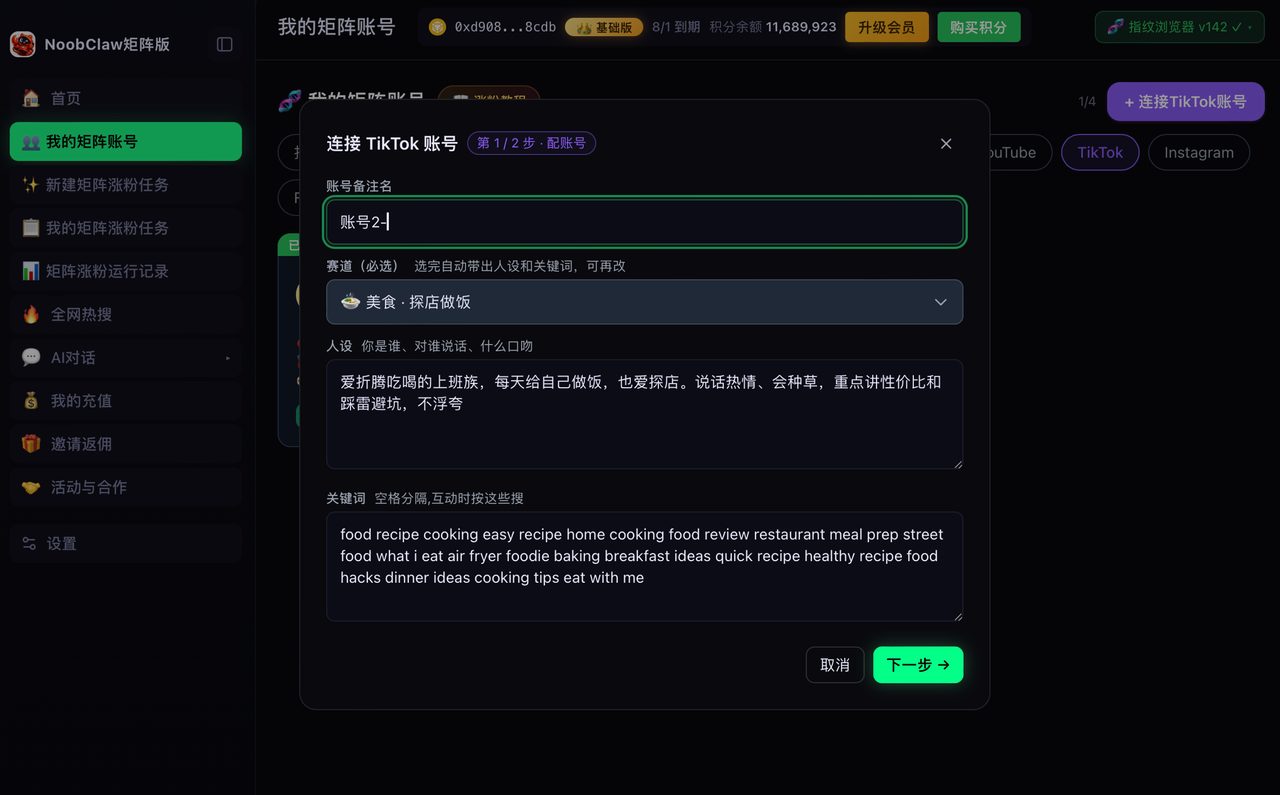
The multi-account version of that problem — several accounts in one niche each needing distinct content daily — is upstream of any generator. That is the gap NoobClaw fills: per-account niche, persona and keywords driving generation, published through your own logged-in sessions in locally isolated browser profiles. For a single Shop seller producing catalogue videos, the first-party tool plus a disciplined claim list is a better and cheaper answer.
A buying checklist for Shop video tools
Because the usual comparison criteria (render quality, style library, avatar count) are not the ones that bind here, use these instead:
| Ask | Good answer | Bad answer |
|---|---|---|
| Can I supply a fixed claim list the script must stay inside? | Yes, per product or per catalogue | "The AI writes it for you" |
| Can it apply required labels automatically? | Yes, as a setting | Manual, per video |
| Does it vary the angle or only the visuals? | Different scripts | Same script, new b-roll |
| Can I export and publish manually? | Yes | Publishing only through their integration |
| What does it need from my account? | Nothing, or an OAuth token | Your password |
Row four matters more than it looks. Manual export is your escape hatch from the API pending-share queue: if the tool can hand you files, you are never blocked by its integration, and you can publish at whatever rate the interface allows rather than what the API permits.
For commerce video, the tool that constrains what the script may claim is worth more than the tool that renders it prettier. One saves you a compliance event; the other saves you nothing measurable.
Row three is the one that decides long-run results. A catalogue of two hundred products filmed as two hundred variants of the same script reads as two hundred variants of the same script — to viewers as much as to any ranking system. The fix is not better rendering, it is a different angle per product: one video answers a question, one handles an objection, one shows a use case, one compares two options.
If you are also weighing generic AI video tools for this, the general version of the selection problem is in what you are actually buying, and the multi-account duplicate-content question is in this piece.
FAQ
Does TikTok penalise AI-generated Shop videos?
Generated video is not itself prohibited — TikTok publishes its own generator. What carries consequences is undisclosed synthetic media and unsupported product claims, and on the Shop side those run on a documented points system rather than an informal warning.
Do I need an AI avatar for Shop videos?
No, and avatars add a licensing and disclosure dimension you may not want. If you use one, confirm both the commercial licence for the likeness and the labelling obligation — they are separate requirements and both apply.
How many product videos can I publish per day?
Through the API, the pending-share limit above is the binding constraint. Publishing manually is not governed by that number, but there is no published manual daily cap either — and near-identical videos in a short window are the thing most likely to suppress the later ones, which is a distribution effect rather than a penalty.