Automated Social Media Posting Tools: What to Verify
- Specify the destination, content format and approval needs before comparing products.
- An accepted draft, a queue entry and a confirmed publication are different results.
- Current product features do not override platform conditions or guarantee growth.
An automated social media posting tool should be evaluated against a specific destination, reviewed content and an actual confirmation of the requested publication. A long platform list is not sufficient evidence for every workflow. Separate a creation task from a scheduling task and keep the account owner's responsibilities visible. This review has no recorded eight-tool test, seven account bans or surviving winner. It gives a practical selection framework using current official features and clearly hypothetical evaluation examples. Buffer is relevant to a publishing workspace; NoobClaw's cited execution record demonstrates a local draft. Those are different stages, not a measured account-safety comparison.
A publishing workflow needs confirmation at the destination.
Turn a platform list into an actual workflow requirement
A hypothetical small business wants to prepare a product explanation, approve it and publish a suitable version to two destinations. Write down the task at each stage. The brief needs verified product information; the draft needs editorial review; the publishing stage needs the appropriate method and account setup. A tool may cover several stages, but the buyer still needs evidence for each required operation. Do not choose solely by the number of platform logos on a landing page.
Specify the content format as well as the platform name. A text post, image and short video can need different preparation and review. Check whether the requested format is actually handled in the intended workflow. An image appearing in a preview does not demonstrate that a destination accepted the media. A local video export does not establish a publishing connection. These distinctions help the team identify whether it needs a creation product, a publishing workspace or both.
List who can create, approve, revise and confirm each piece. For a hypothetical two-person team, the writer may prepare the draft while an owner approves product facts and destination use. A workflow that bypasses that owner does not fit the stated requirement merely because it is fast. Ask the vendor to demonstrate the intended approval sequence and the behavior when an edit arrives after approval. Keep the actual observed result with the chosen configuration.
Define a useful failure state. An expired connection, rejected media item or unresolved response should remain visible to the operator. The application should not count every attempted action as a confirmed publication. Request a clear distinction between pending, failed and completed work, then reconcile the result at the destination. This is a buying criterion, not a claim that every product listed here has already demonstrated that behavior.
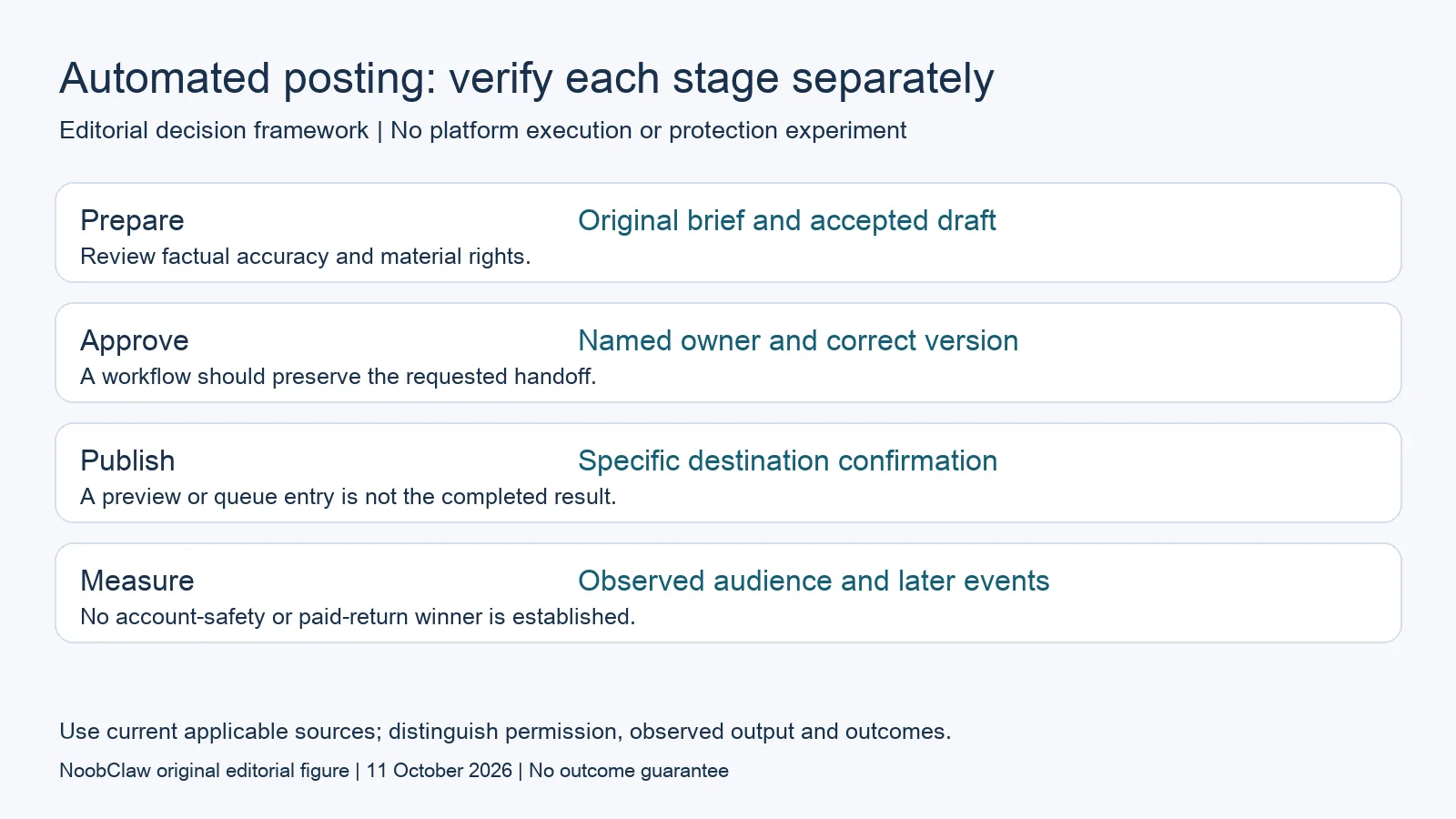
- Prepare: Original brief and accepted draft. Review factual accuracy and material rights.
- Approve: Named owner and correct version. A workflow should preserve the requested handoff.
- Publish: Specific destination confirmation. A preview or queue entry is not the completed result.
- Measure: Observed audience and later events. No account-safety or paid-return winner is established.
Compare current capabilities and their different units
Buffer's current official offer includes an AI Assistant, scheduling, analytics, community functions and API access. Free includes three connected channels and ten queued posts per channel. The first ten paid channels cost $6 each monthly on Essentials or $12 on Team; yearly billing uses different amounts. These are current vendor features and price units, not results of a publishing or quality test conducted for this article.
If a hypothetical team already has accepted content and needs a workspace, investigate whether the current plan and particular destination connection meet its requirements. Do not claim that the tool lacks generation merely because it is commonly described as a scheduler. Equally, the presence of an AI Assistant does not establish a full local video-production task. Compare the exact requested output and the work remaining after the feature completes.
NoobClaw publishes this article and offers its own content tools. The public example below shows a local script-to-video output with recorded limitations. Its current subscription has task-credit units that are not established as equivalent to a Buffer channel subscription. A buyer seeking that creation stage can inspect the artifact. A buyer seeking automated posting to a particular destination should request separate evidence for the method, format and confirmation rather than treating the local example as an integration test.
Platform conditions are part of that separate decision. X's current automation rules prohibit non-API website automation and impose conditions on specific automated actions. A browser or human-like description is not approval for X operations. Do not extend an X clause to every other platform without the relevant source, either. Keep each destination's actual requirements with its workflow. A supported product feature and permission for its intended use are related questions that still need distinct evidence.
A buying test should finish the required job, not manufacture a winner
For a hypothetical test, use one original brief whose product facts are already verified. Prepare the acceptance checklist and include a realistic revision. If the product claims to help create content, review the actual draft for accuracy, clarity and rights. If it claims to help publish, verify the intended account, content format and final destination result through a permitted method. A successful creation preview should not be presented as the completion of every later stage.
Test the handoff as well as the main action. A person should be able to identify the approved version and the operator responsible for the next step. Record what happens when a required field is missing or a connection is unresolved. Keep those observations with the actual test settings. Do not infer that every account or destination behaves the same way. A bounded test is useful precisely because it can identify what was demonstrated and what remains unknown.
Compare cost after establishing a sufficiently similar deliverable. A subscription price can look low while leaving essential editing or another service outside the purchase. A per-channel rate is not a per-video cost. A credit allowance is not a count of accepted pieces without actual consumption and rejection records. Use conditional estimates where appropriate and preserve their assumptions. This review has no measured cost comparison that establishes one vendor as universally cheaper.
After a real permitted rollout, keep publication confirmation, audience response and later business events separate. A calendar item is not a visible post, a visible post is not a qualified inquiry and an inquiry is not a paid sale. Report the period, baseline and sample when interpreting change. A quiet account or a positive audience response does not prove protection from restrictions. The purchase decision should rest on the required work and evidence, with no invented survival experiment or guaranteed return.
For the related content and workflow decisions, read Buffer Alternative for AI Content: Compare the Actual Job and Blotato Alternatives: Choose by the Workflow You Need. Each review has its own evidence and scope.
A documented local creation stage can be inspected
NoobClaw's public execution record documents one supplied 441-character script producing a 32.6-second local MP4 at 1080 by 1920 and 30 frames per second. It includes sampled subtitle checks and limitations: some stock visuals did not closely match the script, and full audio and visual review remained necessary. No destination upload, eight-tool test or account-survival observation appears in the record. An editor can use the actual artifact to judge whether that creation stage meets a brief. The operating guide explains the local controls and the current product offer supplies its advertised plan limits. A purchaser needing a different format or destination operation should ask for a corresponding record. The example demonstrates a concrete output while leaving later publishing, audience and commercial outcomes unresolved.
Inspect the public script-to-video execution record and the script-to-video operating guide. Check the current product offer against the task you need.

Frequently asked questions
Which automated posting tool guarantees account safety?
No such winner or guarantee is established here. Verify the specific workflow, current destination conditions and the actual evidence for the claimed operation.
Does a platform logo mean every format is supported?
No. Ask about the intended content format, account setup, publishing method and final confirmation. The advertised platform name alone does not settle those requirements.
Did NoobClaw outperform seven other posting tools?
No recorded eight-tool comparison is provided. The public example concerns one local creation task, with its limitations.
Sources
Official material reviewed on October 11, 2026. Document conditions apply to their stated service and scope; the editorial examples are explicitly hypothetical.