
TikTok Manage Keywords: How to Block and Suggest Keywords
- To manage keywords on TikTok, open a published video, tap the ••• menu and choose Manage keywords. The screen shows keywords TikTok added "based on popular searches" and lets you block them or suggest
- Blocking a keyword also blocks close variants (a creator reported that blocking "dance" blocks "dancing"). TikTok still reviews suggested keywords for relevance, so you cannot attach unrelated terms.
- Search is a small but high-intent slice of TikTok views. Metricool's 2026 study, as summarized by Net Influencer, puts it at 4% of views, against 73% from For You, while Adobe Express found 49% of US
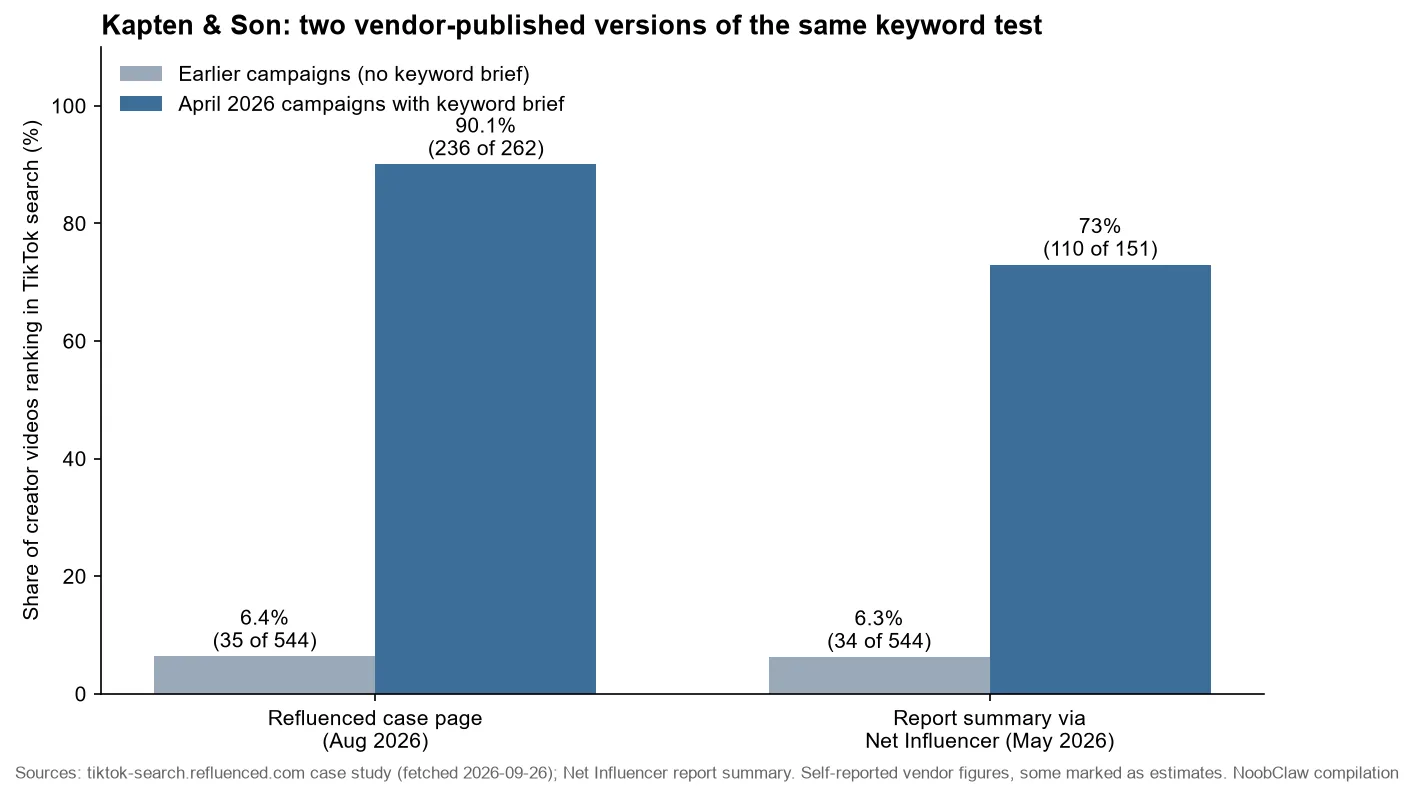
- Suggested keywords stick best when the video visibly supports them. In a vendor-published case, Kapten & Son went from about 6% of creator videos ranking in TikTok search to a large majority (73% or 9
To manage keywords on TikTok, open one of your published videos, tap the ••• menu and choose Manage keywords. The screen says: "This post displays keywords automatically added by TikTok based on popular searches. You can manage them at any time." From there you can block keywords that pull in the wrong viewers and suggest keywords you want the video matched to. TikTok still decides whether a suggestion is relevant.
We could not find a TikTok help-center or newsroom page for it when we checked on September 26, 2026 (TikTok's help center does not load for automated checks, so look in the app's own help menu too). Everything below comes from the in-app text as reported, the creators who documented it, and TikTok's official material on search and analytics.
Where is Manage Keywords on TikTok, and what does it change?
App researcher Jonah Manzano posted on April 24, 2026 that TikTok had "officially rolled out the ability to manage search keywords on your videos," noting that keywords were previously "automatically generated based on viewer behavior and search activity." Social Media Today reported it on April 26 and quoted the in-app text above, adding that TikTok "will still maintain oversight over any suggestions, so creators don't add non-relevant terms."
The steps:
- Open a video you have already published.
- Tap the three dots, •••.
- Choose Manage keywords.
- Block the terms that do not describe the video, then suggest the phrase you want it to be found for.
Two behaviours are worth knowing before you start. First, blocking is broad: Carolina Muñiz of Marketing4eCommerce, who found the option while uploading a podcast clip, reports that blocking "dance" also blocks "dancing." Block the exact wrong term, not a root word you might need later. Second, nobody has published a limit on how many keywords you can suggest or how long changes take to show up. Anyone quoting a number is guessing.
If you want to see which searches already reach a video, TikTok's analytics overview says the Overview tab shows "Traffic source" data and the "Search queries" that led viewers to your posts. For symptoms such as a video attached to an obviously wrong term, see fixing wrong TikTok search keywords.
Is managing TikTok keywords worth the time?
For most accounts it is a small lever with a high-quality audience behind it. Two numbers pull in opposite directions:
- People do search on TikTok. Adobe Express surveyed 807 US consumers (data collected January 2026) and found 49% had used TikTok as a search engine, up from 41% in its 2024 survey. The same report found Gen Z's preference for TikTok over Google fell from 8% to 4%, and 89% of Gen Z preferred Google overall. People use TikTok search alongside Google, not instead of it.
- Search is a small share of views. Metricool analyzed 2.31 million TikTok posts from more than 92,000 accounts. Per Net Influencer's summary, search delivered 4% of views in early 2026, against 73% from the For You feed, 11% from profiles and 10% from hashtags.
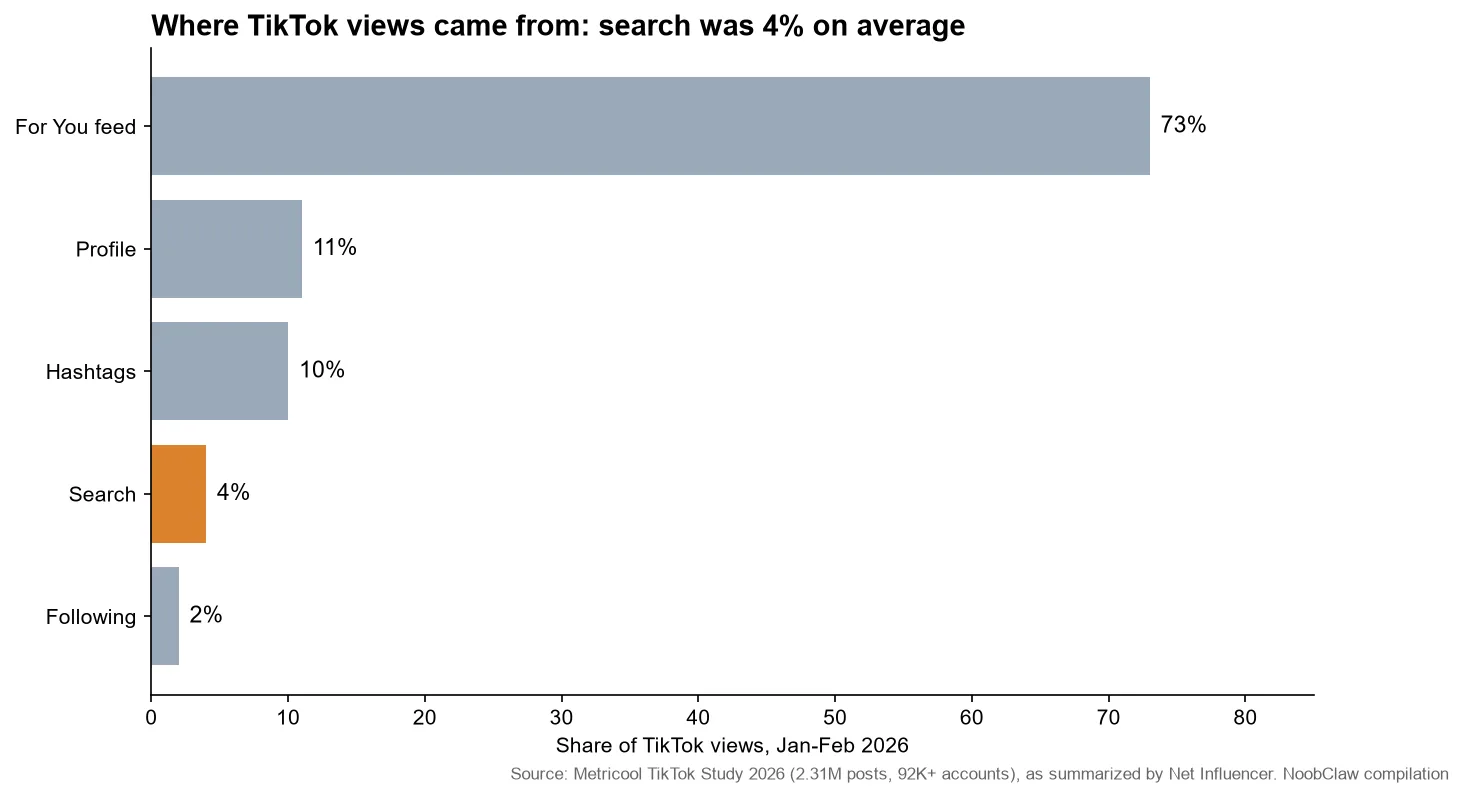
Our judgment: Manage Keywords pays off for videos that answer a question someone would type, such as tutorials, product reviews, comparisons and local recommendations. Adobe's respondents said the TikTok content they prefer when searching is video tutorials (61%) and product reviews (45%). For sketches and trend videos, 4% of views is not worth an afternoon of keyword edits. Check your own Search queries first; if a video already gets search traffic, cleaning up its keywords is worth a few minutes.
Manage Keywords corrects TikTok's reading of your video. It cannot make TikTok believe a video is about something it visibly isn't.
How do you pick keywords TikTok will accept?
Since TikTok checks relevance, make the keyword obvious in the places TikTok reads. Its recommendation explainer names "video information" such as "captions, sounds, and hashtags" as an input, and its Creator Academy advises: "Identify the search queries that led viewers to your post and include these in future titles on the same topic."
The clearest public case comes from a vendor. Influencer platform Refluenced, which ran the campaigns, published a case study on its client Kapten & Son, a backpack and accessories brand selling in the DACH market. Across four campaigns before April 2026, 35 of 544 creator videos (6.4%) ranked in TikTok search. For two April 2026 campaigns, creators were briefed "to mention specific keywords in the first 8-10 seconds of their video AND start their caption with the keyword." The case page reports 236 of 262 videos ranking (90.1%), with the per-campaign rows marked as approximate.
When we compared sources, the vendor's own numbers did not match. The version of Refluenced's "Found or Forgotten" report summarized by Net Influencer gave 34 of 544 before and 110 of 151 videos (73%) after. Both are self-reported, and the report link Net Influencer cited no longer loads. Read this as direction, not a benchmark. The mechanism, a keyword spoken early and repeated in the caption, matches TikTok's own advice.
A working checklist:
- Say the phrase early and put it on screen. The Kapten & Son brief asked for the keyword in the first 8 to 10 seconds.
- Lead the caption with it. Captions are named in TikTok's list of video information.
- Use one or two specific hashtags. Metricool's report, per Net Influencer, found posts with at least one hashtag got 5% more views than average and recommends targeted tags over #fyp or #viral.
- Take phrasing from TikTok's search bar autocomplete or TikTok's Creative Center trends, not from marketing vocabulary.
- Look for thin competition. Refluenced found 38% of the category keywords it tracked had no brand presence at all. A narrower phrase with weak results is easier to win than a head term.
Then open Manage keywords, block what drifted in, and suggest the exact phrase the video now supports. More tools for this step are in our TikTok keyword research tools guide, and Search Performance insights covers the analytics side.
Should you go back through old videos?
Selectively. The option sits in a published video's ••• menu; the reports do not say whether every older video has it, so open a few of your older posts first. Where it appears, your back catalog is the quickest place to start. Start with videos that already show search queries in their traffic sources, block off-topic terms that dilute them, then pick a few useful videos that never found an audience in the feed and suggest the query they actually answer. Our suggestion is to work in small batches and wait a couple of weeks before judging, since no processing time has been published.
For people running several accounts, this is a per-account, per-video chore; we found no bulk option. Tools that publish across accounts, NoobClaw among them, can make sure each account posts its own content from its own browser session, with captions written per account. The Manage keywords pass itself happens after publishing, video by video, and stays a human judgment, because relevance is exactly what TikTok is checking.
FAQ
Will blocking keywords reduce my reach on TikTok?
It can reduce reach from mismatched searches, which is usually the point. Keep in mind that blocking also removes close variants of the word, so block narrowly. If a blocked term was bringing in viewers who watched to the end, watch your Search queries data for a drop and unblock it if one appears.
Can I add any keyword I want?
No. TikTok keeps oversight of suggested keywords and screens out terms it judges unrelated. TikTok has not said how it judges relevance. Our working assumption is that it reads the same signals as search: spoken words, on-screen text and caption. If a suggestion does not stick, make those carry the phrase or pick a closer one.
How long do TikTok keyword changes take to show in search?
TikTok has not published a figure. Judge changes over a couple of weeks and on search-specific numbers (Search queries in your analytics) rather than total views, which the For You feed dominates.
Sources
- Post announcing Manage keywords rollout · Jonah Manzano on Threads · 2026-04-24 · threads.com
- TikTok lets users add relevant keywords to metadata · Social Media Today · 2026-04-26 · socialmediatoday.com
- TikTok rolls out new feature to manage keywords on your content · Marketing4eCommerce · 2026 · marketing4ecommerce.net
- Using TikTok as a search engine · Adobe Express · 2026-02-17 · adobe.com
- TikTok Study 2026 · Metricool · 2026-05-12 · metricool.com
- TikTok Content Volume Up Nearly 80% In Early 2026 · Net Influencer · 2026 · netinfluencer.com
- Kapten&Son case study · Refluenced · 2026-08-19 · tiktok-search.refluenced.com
- 4 In 10 Brands Are Invisible In TikTok Search, Report Finds · Net Influencer · 2026 · netinfluencer.com
- How TikTok recommends videos #ForYou · TikTok Newsroom · 2020-06-18 · newsroom.tiktok.com
- Understanding your analytics / Analytics: video performance · TikTok Creator Academy · accessed 2026-09-26 · tiktok.com/creator-academy