
Instagram Flag for Review: What It Means, Should It Be On?
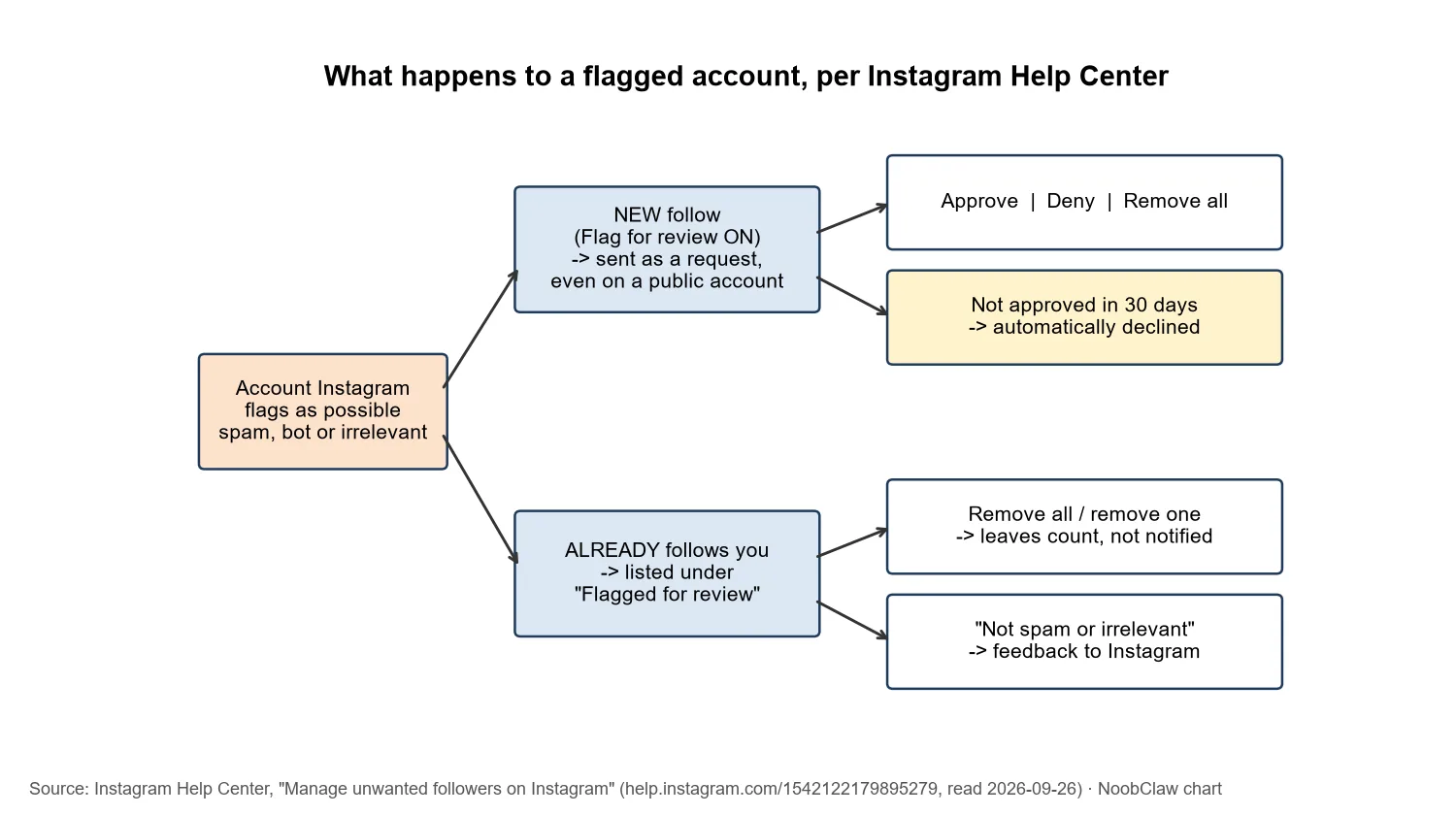
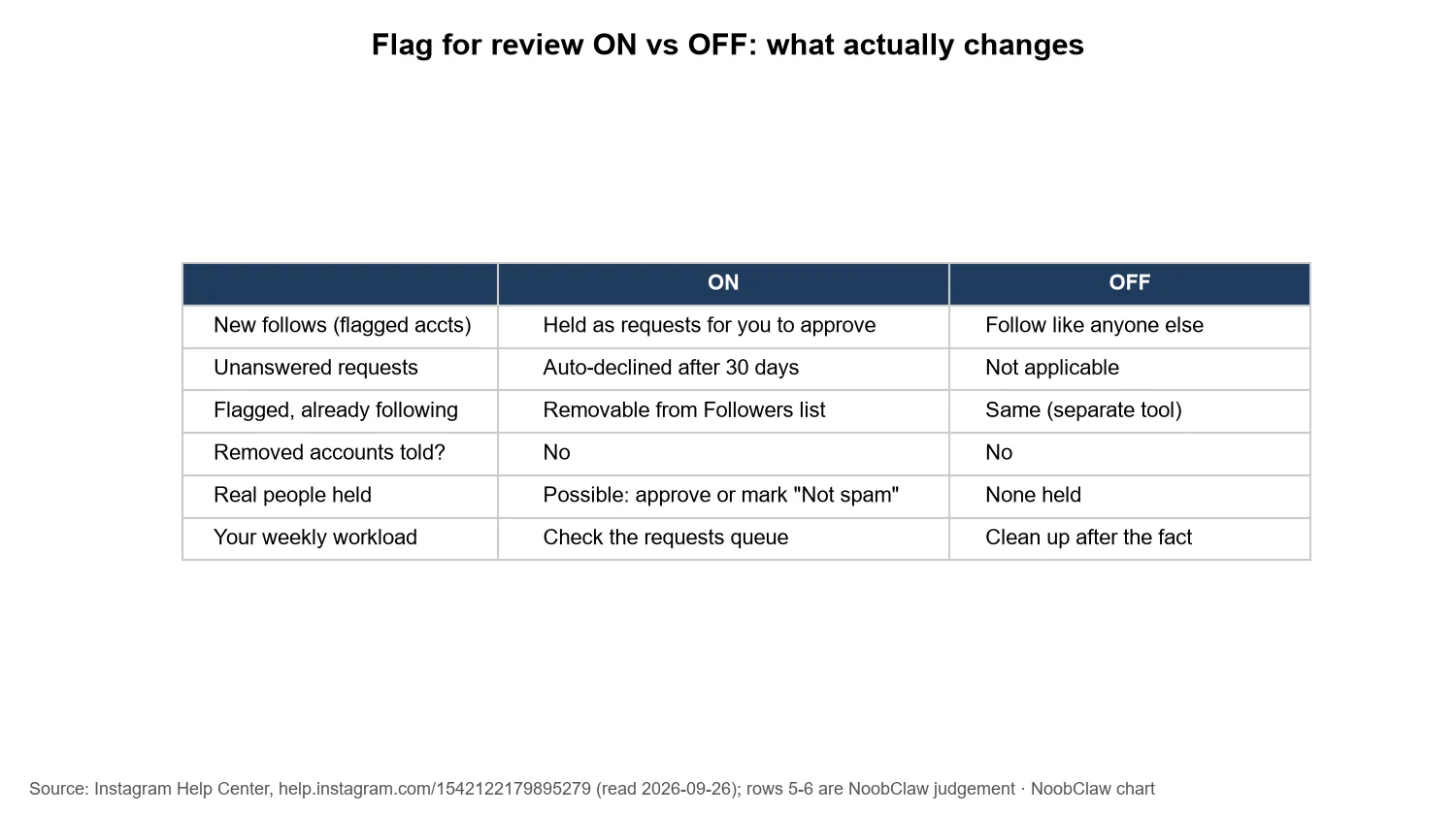
- Flag for review means Instagram holds follows from accounts it considers "potentially spam, bots or irrelevant". With it on, those follows arrive as requests you approve or deny, even though your acco
- Requests you do not approve within 30 days are automatically declined, so an unopened queue quietly turns away some real people.
- Turning it off (Profile, Menu, Follow and invite friends, Flag for review) lets flagged accounts follow you like anyone else. It does not remove flagged accounts that already follow you; that is a sep
- Our default: leave it on and check the queue weekly. Instagram itself says flagged accounts can affect your discoverability and engagement. Turn it off only if the queue is consistently full of real p
Somewhere in your Instagram settings there is a queue of accounts that tried to follow you and were held at the door. If you have never opened it, some of those requests have already expired: Instagram declines them automatically after 30 days.
We re-read Instagram's own Help Center article on this setting on September 26, 2026 and rewrote this page around what it actually says, because a lot of what ranks for "flag for review" comes from follower-selling panels with a reason to want it off.
What does "flag for review" mean on Instagram?
Instagram's wording: "Instagram may flag accounts if they're potentially spam, bots or irrelevant." With the setting on, "Even if your account is public, incoming follows from flagged accounts will be sent as a request, which you can approve or deny" (Manage unwanted followers on Instagram, Instagram Help Center).
Four facts from that page answer most of the questions people search:
- It is about them, not you. The flag is a judgement on the account trying to follow you. Nothing in the article describes it as a penalty or a mark on your profile.
- It is built for public accounts. "This feature is automatically available for any account that is set to public." Private accounts approve every follower anyway.
- The queue expires. "If you don't approve these follower requests within 30 days, they'll be automatically declined."
- Removal is silent. Flagged followers you remove are taken off your count and list, and "They won't be notified that they've been removed from your followers."
The article also gives a reason for the feature that is easy to miss. Reviewing flagged accounts lets you "stop flagged accounts from affecting your discoverability and your ability to build authentic engagement with real followers". That is Instagram, in its own Help Center, linking follower quality to how discoverable you are. It does not say how much, and we would not put a number on it, but it is a stronger statement than "it's cosmetic".
Where is the flag for review setting?
Per the same Help Center article:
- To turn the filter on or off: go to your profile, tap Menu, tap Follow and invite friends, then switch Flag for review. "You can turn this back on at any time."
- To review held requests: open your follow requests; the folder for flagged accounts lists requests you can approve, deny, or remove all at once.
- To clear flagged accounts that already follow you: go to your profile and tap Followers. If any are flagged you will see a Flagged for review notice; tap it to remove them one by one or all at once, or mark an account Not spam or irrelevant to tell Instagram it got one wrong.
The article opens with "This product or feature may not be available to you yet", so if your menu does not match, it may simply not have reached your account. We covered the missing-toggle case separately in flag for review option not showing.
What happens if you turn flag for review off?
Accounts Instagram flags can follow you straight away, like any other follower of a public account. Two things do not change:
- Existing flagged followers stay until you remove them. The removal tool lives under Followers, separate from the toggle.
- Removals stay silent. Instagram says removed followers "won't be notified". The article mentions no notification for switching the filter off either.
There is one side effect worth knowing about if you are tempted to flip other settings while you are there: Instagram warns that "a temporary limit, including approving follow requests on Instagram, may be placed on your Instagram account if you switch between your public and private accounts too often". Leave the account's privacy alone; the flag toggle is the only switch this decision needs.
Who wants it off, and why that matters
The clearest evidence of what this filter catches comes from the people selling followers. When we searched "instagram flag for review turn off" on September 26, 2026, much of the first page was follower-selling sites, and several of them tell buyers to switch the filter off before ordering, warning that otherwise the order stalls and no refill or refund is given.
That tells you two things. First, the filter works on exactly the traffic it is aimed at: bulk, low-quality follows get held. Second, a good share of "turn off flag for review" advice online has a commercial reason behind it. If you did not buy followers, that advice was not written for you.
It also connects to a longer pattern. Instagram announced back on November 19, 2018 that it would remove inauthentic likes, follows and comments generated by third-party apps (Reducing Inauthentic Activity on Instagram). Flag for review is the preventive version of the same idea: stop the accounts at the door instead of removing them afterwards, which is often what produces the sudden drops described in why you lose followers on Instagram.
Should flag for review be on or off?
An unopened flag-for-review queue is not neutral: after 30 days it has said no to real people on your behalf.
Our judgement: on, with a weekly look at the queue. The reasons are the facts above: Instagram links flagged accounts to discoverability and engagement, the filter targets the kind of follows panels sell, and the cost of leaving it on (a few real people held for review) is fixable by approving them.
The honest case for turning it off is narrower than most articles suggest. Automated classification makes mistakes: new accounts, people who never post and lurkers can look "irrelevant" to a filter, and they are still real humans. If you open the queue and it is consistently full of people who look like your audience, the filter is miscalibrated for you, and off is reasonable. Mark a few as Not spam or irrelevant first; that is the feedback channel Instagram gives you.
What not to do: leave the queue unopened for months. Because unanswered requests are declined after 30 days, an ignored queue turns away some real followers without you ever deciding to.
If you run several accounts. The weekly check multiplies. Two practical options: keep the filter on only for accounts that attract spam and switch it off where the queue is visibly clean, or fold the check into a routine that already opens each account. Instagram says "you can have up to 10 accounts logged in at one time" (see how many Instagram accounts you can have); past that, tools that keep each account in its own browser session, NoobClaw among them, save the logging in and out. Approving or denying should stay a human decision either way.
Worried that your own account, rather than your followers, has been flagged? That is a different system. Check Account Status, not this toggle.
FAQ
Does having flagged followers hurt my reach?
Instagram says reviewing flagged accounts helps stop them "affecting your discoverability and your ability to build authentic engagement". It publishes no size for that effect. The flag itself is a judgement about the other account, not a penalty on yours.
What happens to follow requests I never answer?
They are automatically declined after 30 days. Instagram's article doesn't say whether the person is told or what happens if they try again.
Should I remove flagged followers who already follow me?
Review first, then remove the ones that are clearly not real. Removal is silent and drops them from your count; use Not spam or irrelevant for anyone Instagram got wrong. Avoid handing your login to third-party "cleaner" apps: Instagram's 2018 crackdown targeted exactly the apps that ask for your password.
Next step: open Follow and invite friends, confirm Flag for review is on, then open the flagged requests folder and clear it. Put a weekly reminder on it.
Sources
- Manage unwanted followers on Instagram — Instagram Help Center — undated, read 2026-09-26 — https://help.instagram.com/1542122179895279
- Reducing Inauthentic Activity on Instagram — Instagram — 2018-11-19 — https://about.instagram.com/blog/announcements/reducing-inauthentic-activity-on-instagram
- Add or switch between multiple Instagram accounts — Instagram Help Center — read 2026-09-26 — https://help.instagram.com/589697191199472