
Instagram Series Feature: How to Get It and Set One Up
- You cannot get Instagram Series by asking. TechCrunch reported on June 2, 2026 that Meta is testing it with "select creators and content producers who have already shared serialized content on Instagr
- What the feature does, as reported: bundle reels "both new and old" into episodes, with "a new tab on the creator's profile", a tap-through from feed and the Reels tab, and a save-for-later option.
- What you can use today: the documented "Link a reel" option, which chains one reel to the next with a Watch Next button, plus naming and ordering habits that make a series obvious to a stranger.
- Series is a packaging layer. Nothing Meta has published says an episode gets more reach. It changes what a viewer does after finding you, not how many find you.
The direct answer to "how do I get the Instagram Series feature" is that, right now, you do not choose it; Meta does. Series has been a limited test since at least June 2, 2026, when TechCrunch first reported it. Meta confirmed the test to TechCrunch, and the report adds that "for the testing phase, Meta is working with select creators and content producers who have already shared serialized content on Instagram and Facebook." We checked the Instagram Help Center on September 28, 2026: the Reels section has no Series article, and there is no application, waitlist or setting that turns it on.
That leaves two useful things to do, and the rest of this page is about them. First, use the episodic tool Instagram has already documented for everyone, "Link a reel", which the Help Center describes as a way to "connect multiple reels on Instagram". Second, make your content look like what Meta says it is selecting for: an account that has "already shared serialized content". If Series widens, the accounts that already run in parts are the obvious next wave; if it never reaches you, you still end up with a profile a stranger can read in order.
How do you get the Instagram Series feature?
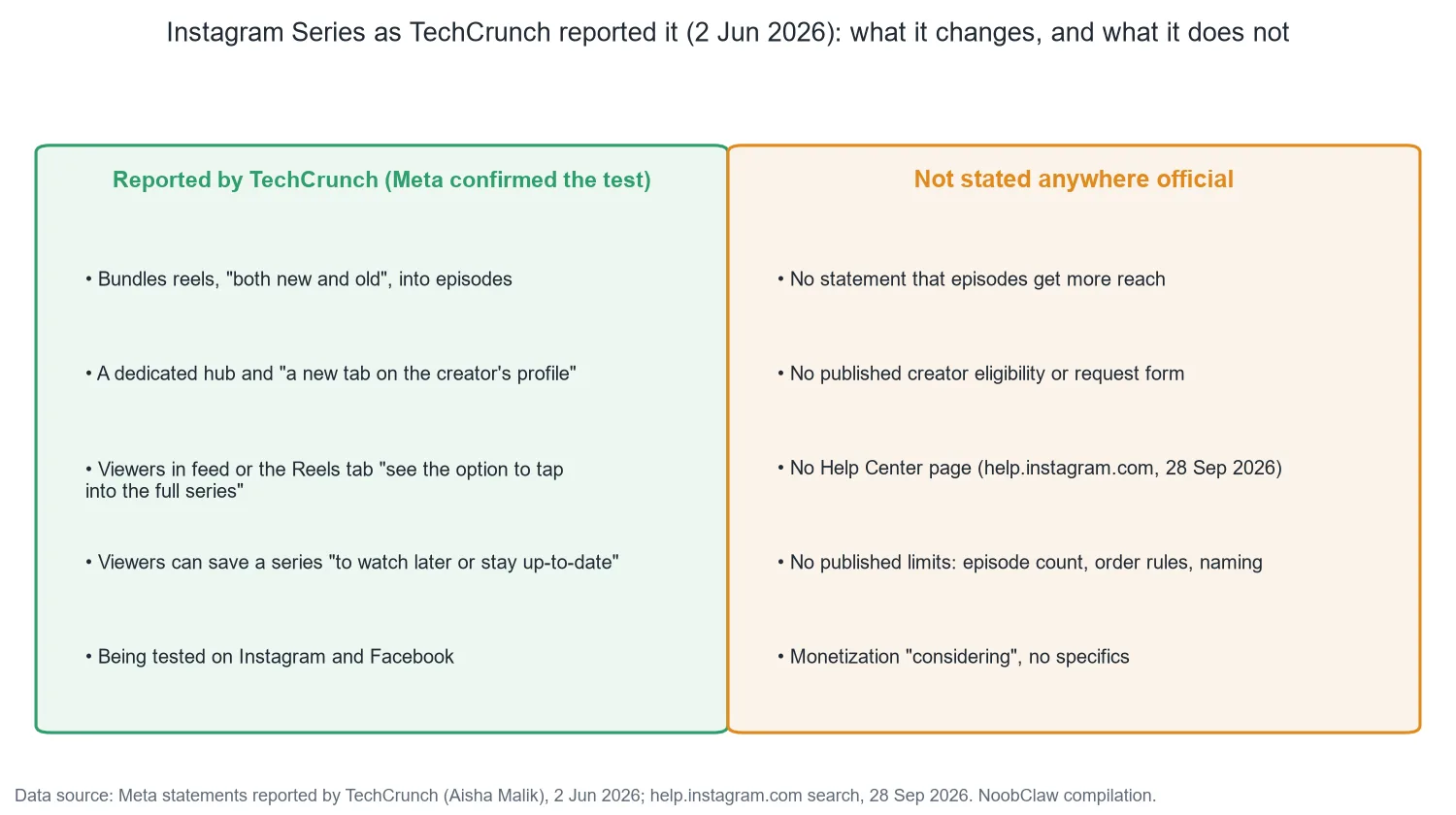
Here is everything TechCrunch reported about the test on June 2, and what is missing. Meta's direct statements to TechCrunch were two: that it is testing Series, and that it is considering monetization; the descriptions below are TechCrunch's wording:
- Who has it (TechCrunch's wording): "select creators and content producers" already posting serialized content, on both Instagram and Facebook.
- What it does: "Select creators will now be able to create a series using their Reels, both new and old." "Each Reel will become an episode in a bigger story with a dedicated hub on their profile."
- Where viewers meet it: "The series would appear in a new tab on the creator's profile with its own page", and "when viewers discover episodes of a series while scrolling their feed or the Reels tab, they will see the option to tap into the full series." Viewers "also have the option to save a series to watch later or stay up-to-date."
- Money: Meta "is considering ways to monetize the new feature, but didn't share specifics."
- Not stated anywhere: creator eligibility, a request path, episode limits, ordering rules, or any claim that episodes get extra distribution.
Meta's own example is a "10 days of healthier baking" run bundled into one series. The creator observations that have surfaced since, such as those reported by Russh in July 2026 from creator Julia Broome, describe the same shape and the same status: "At this stage, the Series feature appears to be in limited testing." NapoleonCat's September round-up (updated September 10, 2026) still describes the test as "limited to selected creators who were already posting serialised content". Russh also notes that Series itself shows a Watch Next button, which is a different button from the Link a reel one described below.
So if the option is not in your app, nothing is wrong with your account. It is the same "the switch is not there" situation as Trial Reels not showing: Instagram grants it, you cannot request it. The one thing worth ruling out is an unrelated account restriction, which takes seconds in Account Status.
What can you use instead while Series is in testing?
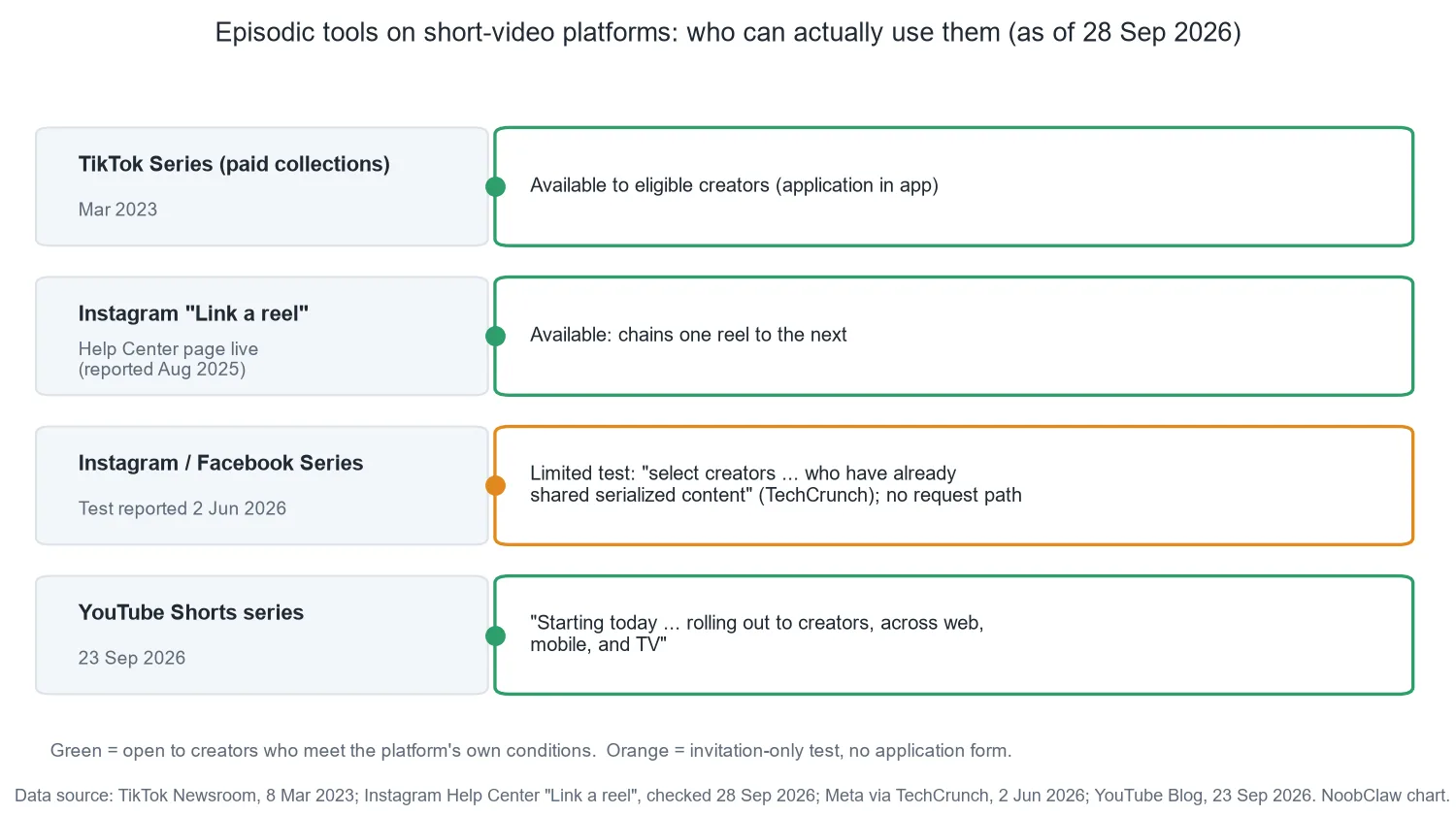
Instagram already ships one documented episodic tool. The Help Center page "Link a reel on Instagram" exists and summarizes the feature as connecting "multiple reels on Instagram, also known as linking a reel." The page body is rendered in-app, so the steps below come from August 2025 reporting rather than from Meta's text; treat the app as the source of truth for menu names:
- On a new reel's caption screen, scroll to Link a Reel and pick the reel it should lead to. For an existing reel, the option sits in the reel's three-dot menu as Add linked reel.
- Add an optional label of up to 15 characters, such as "Part 2".
- Viewers see a Watch Next button in the bottom left of the reel.
- Reported exclusions: reels shared to Close Friends or to subscribers only.
The difference from Series is structural. Link a reel is a chain: each reel points at the next one. Series, as Meta describes it, is a shelf: a hub with a tab, an order and a save button. A chain gives you the "next episode" behavior today and nothing else. It does not give you a profile tab, and a viewer who lands on episode four has no way to see there are three before it.
Elsewhere the format is already open. TikTok's Series, launched on March 8, 2023, is a paid product: "Collections of premium content behind a paywall", up to 80 videos of up to 20 minutes, and at launch "only available to select creators with applications to join opening in the coming months." YouTube's version is free and, as of September 23, 2026, "Shorts series is rolling out to creators, across web, mobile, and TV." If your episodes already live on YouTube, Shorts series is the one you can set up this week.
How do you set up a series once you have it?
Meta has not published steps, so we will not invent a menu path. What Meta's description does fix is the work that happens before you touch the app, and that work is the same whether you end up in a Series hub, a Link a reel chain or a Shorts series:
Write the promise first. A series needs a line a stranger understands in a few words: "every mistake I made freelancing", "cheap dinners for one". If you cannot write it, you have a category, not a series, and a hub will expose that rather than fix it. The test is whether a stranger can predict your next post.
Decide the order before adding the back catalogue. Meta says a series takes reels "both new and old". That makes your existing grid the raw material, and order is the whole point of the format: episodic content watched out of sequence feels broken, and the viewer blames you.
Treat episode one as the door. In a feed, a reel's life is measured in days. Inside an ordered hub, episode one is where every new viewer enters, which makes it the one video worth re-cutting, re-captioning and re-hooking after the fact.
Series does not get you found. It decides whether being found once turns into a second video.
Is Series worth building content around?
Our judgment: yes if your content already runs in parts, and no if you would be bundling standalone reels to look organized. The reasoning is in what Meta did and did not say. Everything in the description is about what happens after discovery: the hub, the tab, the tap-through, the save. Nothing says an episode is distributed differently. So Series can only improve the second visit, and it can only do that if the collection has a promise. "My videos" is not a promise; "opening a cafe, including the money" is. When a series does not work, the name is usually where it went wrong, and that is a one-line fix rather than a strategy rethink.
The exception is a reach problem. If nobody reaches episode one, packaging cannot help, and the honest first step is to check whether the account is still eligible for recommendations before restructuring anything.
For anyone running several accounts, one detail in Meta's test criteria matters more than the feature: the platform selected accounts by the shape of what they already post. A series per account means a distinct promise per account, planned as a run rather than filled as a slot, and that is the part that does not scale by copying one script across profiles. NoobClaw is one option for the production side of that: it generates and posts separate content for each Instagram account from your own logged-in browser, so each account can carry its own run without sharing episodes. It cannot make the Series tab appear; that decision stays with Meta.
FAQ
Why don't I have the Series feature on Instagram?
Because it is a limited test. TechCrunch reported on June 2, 2026 that Meta is working with "select creators and content producers who have already shared serialized content". There is no Help Center page and no way to request it as of September 28, 2026. Check that your app is current and your Account Status is clear, then stop looking for a switch.
Does adding a reel to a Series change its reach?
Meta has made no such claim. Its description covers a profile hub, a tap-through from feed and the Reels tab, and saving a series for later. Treat it as a retention and navigation feature until Meta says otherwise.
Can I link reels together without Series?
Yes. Instagram documents "Link a reel", which connects one reel to the next with a Watch Next button. It does not create a profile tab or an ordered hub, so it is a chain rather than a shelf, but it is available now.
Sources
- Meta tests 'Series' for episodic Reels on Instagram and Facebook — TechCrunch (Aisha Malik) — June 2, 2026 — https://techcrunch.com/2026/06/02/meta-tests-series-for-episodic-reels-on-instagram-and-facebook/
- Link a reel on Instagram — Instagram Help Center — checked September 28, 2026 — https://help.instagram.com/31179524024966208/
- How to Create and Link a Reel Series on Instagram — Techweez — August 22, 2025 — https://techweez.com/2025/08/22/instagram-adds-reels-linking-feature/
- Instagram 'Series' is the latest feature to launch on the app — Russh — July 17, 2026 — https://www.russh.com/what-is-instagram-series/
- Introducing a new way for creators to share premium content with Series — TikTok Newsroom — March 8, 2023 — https://newsroom.tiktok.com/tiktok-series-ph?lang=en-PH
- Made on YouTube: Shorts series and TV features — YouTube Official Blog — September 23, 2026 — https://blog.youtube/news-and-events/made-on-youtube-creators-shorts-series-tv-features/
- New Instagram Updates & Features — NapoleonCat — updated September 10, 2026 — https://napoleoncat.com/blog/instagram-new-features-and-updates/