Free TikTok Bots: Platform Tools and Automation Rules
- Sort a free TikTok bot by what it does, not by what it calls itself. TikTok's Community Guidelines, effective September 24, 2026, name bots or scripts that write fake reviews or comments or increase l
- TikTok does offer automation of its own. The Video Scheduler posts 15 minutes to 10 days ahead. The Content Posting API lets apps publish for you. Verified Business Accounts with Advanced Access can s
- The official posting API has published gates. An unaudited app can post for at most 5 users in 24 hours, and only as SELF_ONLY (visible to the owner). Direct Post also has a per-creator cap that TikTo
- Before you connect a free tool, check what it asks for. TikTok's U.S. Terms say to keep your password confidential. OAuth scopes show exactly what an app can read or post. In the U.S., the FTC's rule
Type free tiktok bots into Google and the results mix three very different things: a no-code DM chatbot, a GitHub repo that promises views, likes and follows, and, when we checked on September 26, 2026, a couple of "free follower generator" PDFs uploaded to university and government web servers. What decides your account's fate is what the tool does, and TikTok wrote that part down.
This page sorts the bots by function against TikTok's own text: the Community Guidelines effective September 24, 2026, the U.S. Terms of Service, and the developer rules for the official posting API. It explains what the rules say, not how to get around them.
Which free TikTok bots break the rules, and which ones are allowed?
Short version: bots that fake engagement are named in the guidelines one by one; bots that move your own content on a schedule have official versions.
TikTok's Integrity and Authenticity chapter (released August 25, 2026, effective September 24, 2026) lists these under Spam:
- "Using automation to run many accounts or send repetitive content"
- "Buying or selling followers or engagement for financial gain"
- "Using bots or scripts to write fake reviews or comments, or to increase likes or shares"
The same chapter also bans "trading, marketing, or providing access to services that artificially increase engagement," naming followers, likes, fake reviews and "using AI or bot accounts to drive traffic." It also bans sharing "how-to guides or tips for boosting engagement in fake or deceptive ways", which is why this article does not describe how those tools work.
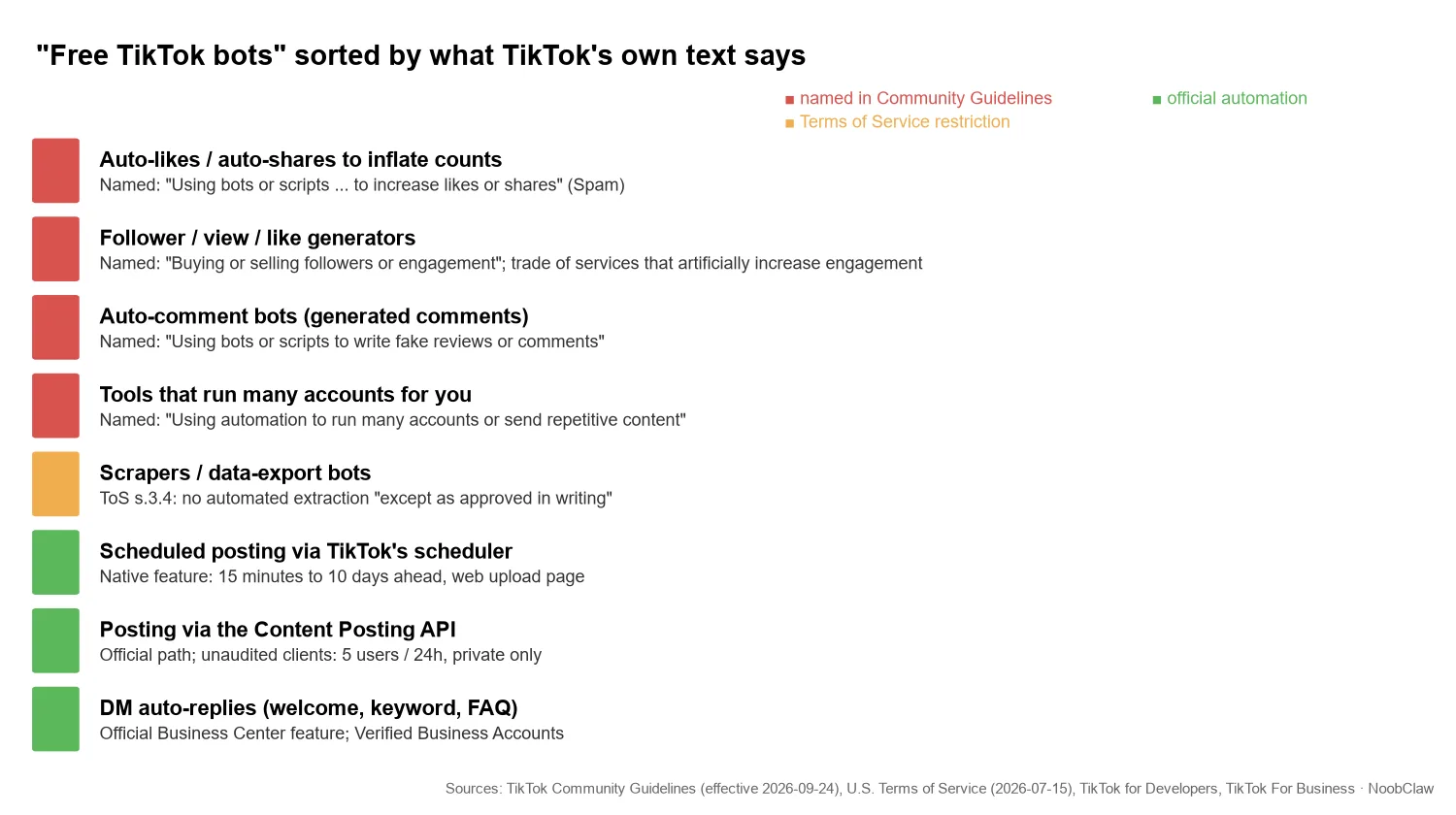
On multiple accounts, the same chapter says: "You can have multiple accounts—for example, for fan content or creative expression—but not to deceive others or break the rules," and follows it with "We strictly prohibit automation tools, scripts, or other tricks designed to bypass our systems." Our reading, from the line-by-line comparison of the update: several accounts are allowed; using automation to run many of them is named in the Spam list. The Spam line says "run many accounts or send repetitive content", so making each account's posts different does not take a tool out of that sentence.
What happens when TikTok catches fake engagement?
The written consequences are more varied than "you get banned".
First, the numbers can disappear. The guidelines say: "If we detect accounts or content with inauthentic metrics, we'll remove fake likes, followers, or other inflated signals." A follower bot can put the account at risk and still leave nothing behind.
Second, for deceptive account behavior TikTok lists three responses: ban your account, ban additional or new accounts you create, or restrict your account, "which could include limiting your ability to post new content, appear in top search results, or in the FYF." A restriction is quiet, which is one reason it can be read as a random "shadowban".
Third, the new part for anyone running more than one account. The Accounts and Features chapter now says that if someone seriously breaks the rules or tries to dodge enforcement, "we may ban all of their accounts, including associated accounts." That phrase is new in the September 24 version, as is "inauthentic behavior" as a named ban reason. TikTok does not publish how it decides accounts are associated, and nobody can honestly promise a setup that avoids it.
A follower bot does not buy followers. It buys a number that TikTok says it will remove, and it can put your linked accounts inside the ban radius.
In the U.S. there is also a legal layer. The FTC's rule on consumer reviews and testimonials, 16 CFR Part 465 (published at 89 FR 68077 on August 22, 2024), makes it an unfair or deceptive practice under §465.8 to sell, or to buy, "fake indicators of social media influence" that the buyer knew or should have known were fake and that misrepresent influence "for a commercial purpose." Its definitions cover followers, views, likes and comments "generated by bots." The FTC's announcement says it can seek civil penalties against knowing violators. This is a summary, not legal advice; the regulation text governs.
What automation does TikTok actually give you for free?
If what you want is the hours back rather than fake numbers, TikTok has three official tools.
1. The Video Scheduler
TikTok For Business describes its Video Scheduler as letting you "schedule videos anywhere from 15 minutes to 10 days in advance of publishing," from the web upload page, and adds: "You'll need a Business Account in order to access desktop scheduling." (Published 2021-07-16, modified 2025-07-22.) It covers posting while you sleep, not batching a month ahead. Our free TikTok scheduler breakdown compares it with third-party options.
2. The Content Posting API
This is how any app, including third-party schedulers, officially publishes to your account. Its published rules explain most "the free tool posted but got zero views" complaints. According to TikTok's Content Sharing Guidelines (last updated August 4, 2026):
- Unaudited apps: "Unaudited API Clients can allow up to 5 users to post in a 24 hour window," the accounts must be private at the time of posting, and content goes out as <code>SELF_ONLY</code>. Zero views is expected.
- Posting cap: each creator account has a 24-hour limit on Direct Post, "typically around 15 posts per day/ creator account", and it "is shared across all API Clients using Direct Post." A second tool does not add a second allowance.
- Rate limit: the Direct Post reference says "Each user access_token is limited to 6 requests per minute."
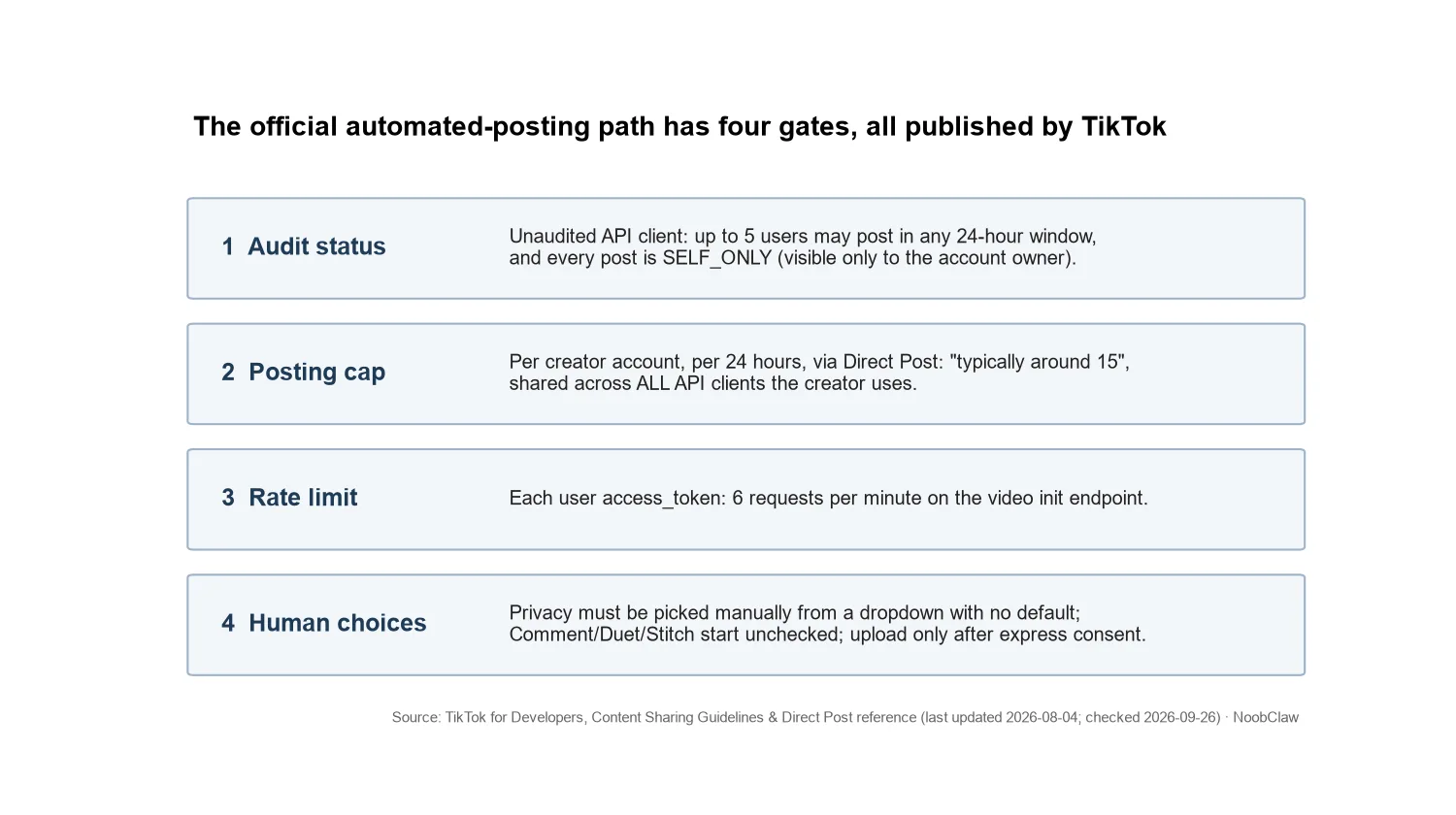
What we noticed reading the same document: even the official path keeps a person in the loop. Apps must let users "manually select the privacy status from a dropdown and there should be no default value"; Comment, Duet and Stitch must start unchecked; and apps "must only start sending content materials to TikTok after the user has expressly consent to the upload." The same section says API clients "should facilitate authentic creators to post original content" and lists "an app that copies arbitrary contents from other platforms to TikTok" as not acceptable; and, under the rule that API clients must serve a wide audience rather than internal or private use, it also rules out "a utility tool to help upload contents to the account(s) you or your team manages." In our reading, the API was built for creators publishing original work, not for hands-off account farms (see our Content Posting API access guide).
How this hits Postiz Cloud users: the project's GitHub issue #1854 (opened August 7, 2026, still open when we checked on September 26) reports that TikTok posts were accepted and scheduled, then failed at publish time with "Daily active user quota reached", which TikTok returns as <code>reached_active_user_cap</code>. The quota belongs to the vendor's shared developer app, so a customer "cannot resolve it" alone.
3. DM auto-replies
For answering messages, TikTok's Business Center help page lists four types of automatic direct messages: welcome message, keyword reply, suggested question and chat prompts. It also states that these "are only available to TikTok Account with Advanced Access and Verified Business Account (VBA)," not to general accounts. Generated comments on other people's videos are a different matter, covered in free TikTok bot comments.
What does a "free" TikTok tool cost you?
Your password. TikTok's U.S. Terms of Service (last updated July 15, 2026) say it is important "that you take reasonable steps to keep your account password confidential and that you do not disclose it to any third party," and "Do not give others access to your account ... without our permission." A tool that asks for your password is asking you to break that line. Section 3.4 of the same Terms also bans extracting data "using any automated system or software, including automated 'bots,' except as approved in writing," which covers most free scrapers.
Your permissions. A legitimate app never sees your password; it asks for OAuth scopes, and TikTok publishes what each scope unlocks. <code>video.publish</code> means "Directly post content to a user's TikTok profile"; <code>video.upload</code> only sends a draft for you to finish in TikTok; <code>user.info.stats</code> reads your like, follower, following and video counts. A caption helper asking for <code>video.publish</code> wants more than it needs.
Your content. The same Content Sharing Guidelines say apps "should not superimpose ... any brand name, logo, watermark, other promotional branding, link or promotional text" on content shared to TikTok, and that doing so "may also lead to deleted content or disabled accounts." A free tier that stamps its logo on your video is an account risk, not just an eyesore.
Some tools need none of this. NoobClaw's free TikTok tools (caption, hashtag, hook, script and idea generators plus money and engagement calculators) are web pages that need no TikTok login and never touch your account.
Before connecting anything, ask four things. Does it fake a number? Does it want your password? Is its API client audited? Do its scopes match its job, with no watermark? A yes to either of the first two ends the search.
FAQ
Are free TikTok bots allowed?
It depends on what the bot does. The guidelines effective September 24, 2026 name bots or scripts that write fake comments or inflate likes and shares, buying or selling engagement, and using automation to run many accounts. Scheduling through TikTok's Video Scheduler or a Content Posting API app is official, as are DM auto-replies for Verified Business Accounts with Advanced Access.
Why did my free TikTok scheduler post a video that nobody can see?
If the tool's API client has not passed TikTok's audit, its posts are restricted to <code>SELF_ONLY</code>, visible only to you, and it can serve at most 5 users in 24 hours. That is a published rule, not a shadowban. To go public, switch the account to public, then set the post to "Everyone".
Is there a free TikTok bot for LIVE?
TikTok's developer webhook events include no LIVE events, and the Accounts and Features chapter says LIVE creators are responsible for what happens in their sessions "even when it involves third-party tools." The options and their limits are covered in free TikTok bots for LIVE.
Sources
- Community Guidelines: Integrity and Authenticity — TikTok — released 2026-08-25, effective 2026-09-24 (checked 2026-09-26) — Link
- Community Guidelines: Accounts and Features — TikTok — released 2026-08-25, effective 2026-09-24 — Link
- U.S. Terms of Service — TikTok USDS Joint Venture LLC — last updated 2026-07-15 — Link
- Content Sharing Guidelines — TikTok for Developers — last updated 2026-08-04 — Link
- Content Posting API: Direct Post reference — TikTok for Developers — checked 2026-09-26 — Link
- Scopes overview — TikTok for Developers — checked 2026-09-26 — Link
- Introducing Video Scheduler — TikTok For Business — 2021-07-16 (modified 2025-07-22) — Link
- About automatic messages for TikTok accounts — TikTok For Business Help Center — last updated May 2026 (checked 2026-09-26) — Link
- 16 CFR Part 465, Rule on the Use of Consumer Reviews and Testimonials — U.S. Federal Trade Commission (eCFR) — 89 FR 68077, 2024-08-22 — Link
- Federal Trade Commission Announces Final Rule Banning Fake Reviews and Testimonials — FTC — 2024-08-14 — Link
- Webhook events — TikTok for Developers — last updated 2026-08-04 — Link
- Postiz Cloud TikTok Direct Post fails with reached_active_user_cap (issue #1854) — gitroomhq/postiz-app on GitHub — 2026-08-07 — Link