Free TikTok Schedulers: Native Tools, Queues and Trial Caps
- The TikTok business article documents a web scheduling window; it is not a test of every current account.
- A permanent free tier and a time-limited trial are different offers, and either can have quantity limits.
- Missing auto-publish wording is an unanswered feature question, not proof of reminder-only behavior.
A free TikTok scheduler is useful only if it handles your actual account, format and workflow at the volume you need. Begin with the documented native option, then identify the specific task a third-party tool would add. A queue, a reminder, a trial and a generation allowance are different products even when their landing pages all say free. Compare their conditions and verify the final item rather than assuming a calendar entry means publication.
Plan the content separately from the permission and the final published result.
What TikTok’s own business article documents
The retrieved TikTok For Business article describes scheduling from the web upload page between fifteen minutes and ten days ahead. It states a Business Account requirement, a default time zone based on the computer and deletion followed by re-upload for changes after scheduling. These are the inspected article’s instructions, not a present authenticated-account test. We have not established a maximum number of waiting items for your account.
Check whether those documented conditions fit the actual interface you can use. Record account type, available upload controls, intended media format and time zone. If you find a different current control or limit, preserve that observation and consult its applicable source rather than making a universal claim from one article. A dated product explanation is helpful evidence, but it does not certify identical availability for every user or workflow.
In a hypothetical brief, a creator has seven reviewed videos and wants to publish one daily during a week away. The relevant questions are whether the chosen surface supports each item, whether the desired dates fit, and whether any person must finish the action. A blank calendar is not a capacity guarantee. Keep prepared assets, waiting items and actually published videos as separate counts in the plan.
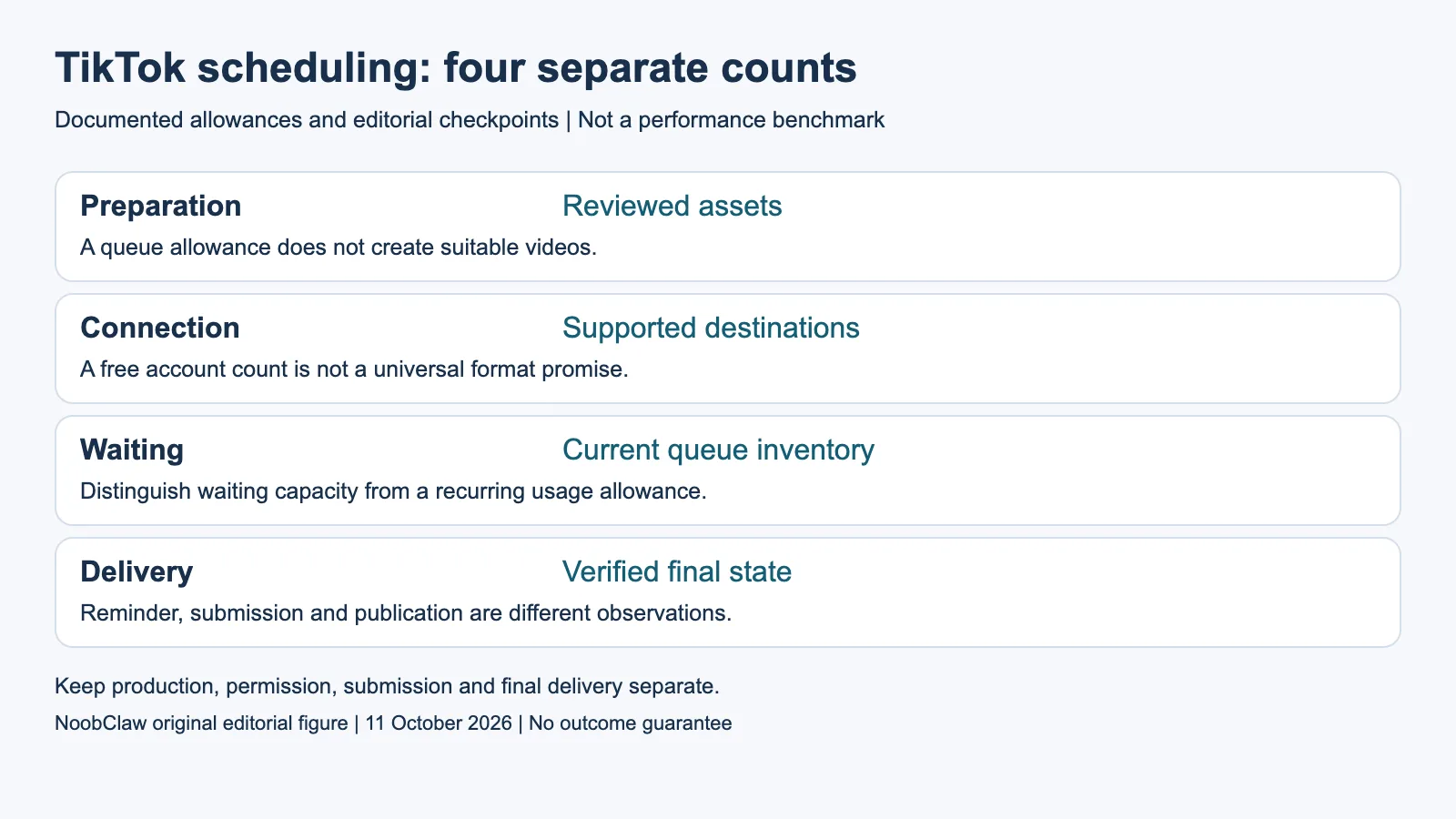
- Preparation: Reviewed assets. A queue allowance does not create suitable videos.
- Connection: Supported destinations. A free account count is not a universal format promise.
- Waiting: Current queue inventory. Distinguish waiting capacity from a recurring usage allowance.
- Delivery: Verified final state. Reminder, submission and publication are different observations.
Compare four meanings of a free offer
A permanent free plan usually needs its own connection and quantity checks; a trial also has an end date and may restrict features or volume. A credit allowance describes a metered resource whose counting rule must be identified. A reminder tells a person when to finish an action. None of these descriptions establishes a universal vendor cost, and a notification is not proof of a cost-free architecture.
Buffer’s current Free plan lists three channels, one user and ten waiting scheduled items per channel. Treat those as connection and queue units, then verify TikTok account, format and publishing support for the intended action. Do not silently reinterpret the waiting cap as a monthly allowance. A slot becoming available after an item publishes is different from a budget resetting on a calendar date.
For each candidate, retain the exact offer and question you still need answered. If auto-publishing is not specified for the selected tier and format, ask or inspect the current documentation; do not conclude that it is reminder-only. If a trial says full access, verify any named volume or integration limits. The trial’s duration is only one condition, not evidence that everything except time is unlimited.
Verify the mechanism and final state
TikTok’s official Content Posting API guidance distinguishes client and creator limits and specifies conditions for unaudited and audited use. A vendor’s free price does not remove platform requirements. An unaudited Direct Post client has particular private-visibility and user-count conditions; do not infer those conditions merely from a login wall on a public URL. Check the actual integration and status evidence.
For an illustrative evaluation, prepare an item you have the right to use and define the intended result before scheduling it. Keep the destination, approved caption, intended audience, selected time and visible queue state. After the action, inspect the final item if available. A reminder, an accepted submission and a publicly accessible item are different observations. This article has not performed a trial publication for any scheduler.
If a scheduled item is missing, start with the recorded workflow state and any returned message. Determine whether it remains waiting, requires human completion, failed during submission or has another documented state. Do not diagnose a reach penalty from absence alone. Before repeating a write after an interruption, reconcile the first outcome where possible. Unknown is a valid incident state; it is not a published item or a zero-reach result.
Pay only for the missing task
A hypothetical comparison may find that a shorter queue works if you replenish it regularly, while another workflow needs a longer planning horizon or more destinations. State which trade-off you can accept. A shorter waiting capacity is not automatically unsuitable, and a larger allowance is not automatically better value if you never use it. Estimate your own preparation and review effort rather than presenting a claimed vendor limit as personal productivity data.
Keep content production outside the scheduler comparison when it is the actual bottleneck. A scheduler holding ten items cannot create ten suitable videos just because the slots exist. Review the brief, script, media relevance, sound, subtitles and rights before treating an asset as ready. A prepared local file does not demonstrate publication, and an externally visible item does not by itself establish growth or a paid conversion.
NoobClaw’s public creative record supports evaluation of one local script-to-video result. It does not establish unlimited scheduled posting, compliance of every browser action or TikTok delivery. If your missing task is caption, hook or script drafting, evaluate that limited text deliverable. If it is reliable scheduled publication, require the appropriate supported route and an observed final result. The useful product choice follows the task you have identified.
For the related content and workflow decisions, read No Views on a New TikTok Account: Checks and Evidence and Free Social Media Schedulers: Queue Limits and Plan Fit. Each review has its own evidence and scope.
NoobClaw publishes this article. Its script-to-video guide and public creative execution record document a local video result, not external-platform publication. Check the current product offer against the supported action you need.

Frequently asked questions
Is a trial unlimited except for its end date?
No. Review its volume, credit and feature conditions. A time-limited offer can also restrict integrations or require a paid plan for particular actions.
Does missing auto-publish wording mean reminder-only?
No. Treat the exact tier-and-format capability as unverified until the vendor’s current documentation or a bounded observation resolves it.
Does the documented native window apply to every account today?
This article reports the inspected TikTok business instructions. Confirm the current controls and conditions in your own interface before relying on the plan.
Sources
Sources inspected on October 11, 2026. Meta Graph API v19 was read in its retrieved German-language official body. Instagram Help and Meta Terms were read in their retrieved Chinese-language rendered bodies; the inspected account, app and regional scope is retained. TikTok policy versions were parsed from the complete official original-language payload through Google Translate public transport after original-site access failed; the cited access link is that transport, not a direct-origin HTTP200 claim. The current policy chapters do not certify a historical diff. Reused same-day primary copies retain their original receipts and are not new GETs. Workloads are illustrative; local creative output does not demonstrate publication, protection or paid conversion.