TikTok Keeps Logging You Out? Check Security and Evidence
- Shared logout timing does not establish the cause.
- Review official security controls and actual account notices.
- Preserve evidence before resets and avoid guaranteed recovery claims.
If TikTok keeps logging you out of several accounts, the shared symptom does not identify the cause. Start by reviewing the accounts' security information and any actual notices, then record whether the problem is limited to one app or also affects another already authorized session. Do not assume that silence proves a harmless storage problem, or that a logout proves punishment.
TikTok's official Security Checkup brings together backup authentication, two-step verification, logged-in device management and suspicious-activity alerts. Those are relevant controls to review when access behaves unexpectedly. This article separates the evidence to collect from the diagnosis that evidence can support; it does not promise a particular fix or recovery time.
“All my accounts logged out” is an observation. Keep that observation separate from a claim about security, app storage or enforcement.
Review the account evidence first
TikTok's Security Checkup announcement describes reviewing logged-in devices, removing unrecognized devices, checking unusual activity and maintaining backup login methods. Its 2026 privacy and security update continues to describe these controls. The announcements explain available functions; they do not establish which cause is most common for repeated logouts.
If you find an unfamiliar device or unexpected account changes, use the official account security and recovery process. If you see a restriction or review notice, preserve its wording and use the route it supplies. A generic tutorial should not overrule an account-specific message.
If you find no notice, write “no notice found” rather than “not restricted.” The absence of a message in the places you checked is limited evidence. It does not establish that every account is unaffected, that cookies caused the logout, or that TikTok has associated accounts through a specific mechanism.
Record which accounts were affected and which remained accessible. “All accounts” is useful only when the list is explicit. A remembered pattern from yesterday can be different from the pattern you can verify today, particularly when several people operate a business profile.
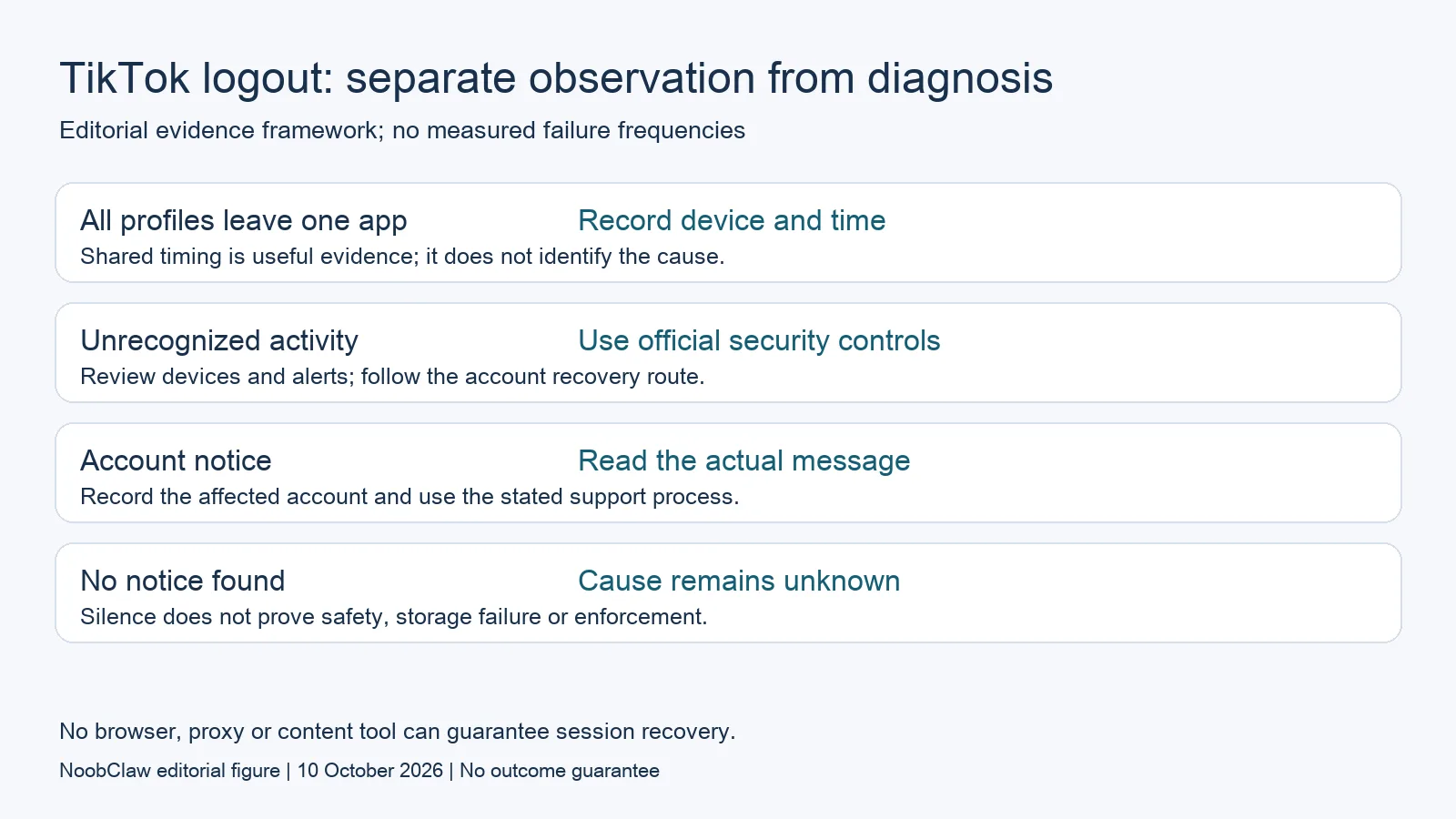
Distinguish an app symptom from an account symptom
Shared timing in one app is worth recording, but it is not a complete diagnosis. Note the device, app version, approximate time and action immediately before the logout. Also note whether the app crashed, the network disconnected or another person reported an access change. These are observations to investigate, not claims that any one event must cause a logout.
An already authorized session on another device can provide a comparison without introducing a new tool. If that session remains accessible, record the difference. If it also loses access, record that too. Neither result proves the backend mechanism; it narrows the description you can give support.
A hypothetical example illustrates the distinction: three profiles disappear from a phone's account list while an existing desktop session still shows one profile. The supported description is that the observations differ across contexts. It is not “TikTok's shared token was deleted,” because that requires information the user has not observed.
A second example is a profile accompanied by an explicit security alert while other profiles merely request login. Treat the alert as account-specific evidence. Do not combine every symptom into one story about a ban, nor dismiss the alert because the other profiles lack one.
Avoid changes that erase your evidence
Before reinstalling an app, clearing data or changing several settings, preserve the error wording and information about locally held work. An intervention that removes the original state can make the next observation harder to interpret. Verify how your drafts are stored before relying on them as a backup.
Our editorial recommendation is to change one relevant thing at a time, after reviewing the official guidance and your recovery access. Record what you changed and what happened afterward. This is a troubleshooting method; it does not imply that a particular update, cache operation or network change will restore sessions.
A successful login once is evidence of that login, not proof that the repeated problem has ended. If it recurs, the time and sequence become useful. Avoid promising a cure based on a single brief success, and avoid repeating the same destructive reset without understanding what it removed.
Keep content questions separate. Posting the same video across TikTok accounts concerns publishing context and platform rules. A logout observation alone does not establish that duplicated content caused the session change, just as a login count does not establish permission to publish any material.
What to send through official support
Prepare a concise record: affected profile names, device and app context, timestamps, exact messages, whether a known authorized session behaves differently, and the steps already attempted. Include the observation that motivated each change. That makes the account problem understandable without guessing an internal detection system.
Keep passwords, recovery codes and authentication tokens out of screenshots and public forum posts. A support record should describe the error and relevant context, not expose credentials. Use the official in-app or help route appropriate to the account, and retain the response for the next comparison.
If you operate profiles for clients, confirm the authorized operator and recovery contact for each one. Another person's legitimate change can be important context. Do not ask colleagues to share passwords merely to test a theory about sessions; access responsibility is a separate management question.

NoobClaw publishes this article and sells content tools. Those tools are not account-recovery products, and this review does not show that they prevent logouts. A browser, proxy or content-generation product should not be recommended as a guaranteed security remedy. Even another platform's documented account limits answer a different question and cannot explain TikTok session behavior.
FAQ
Does being logged out mean TikTok banned my accounts?
The symptom alone does not establish a ban. Review the actual account notices and security information. If a notice supplies an appeal or support route, follow that route rather than inferring an enforcement decision from logout timing.
Is clearing cache or reinstalling guaranteed to fix it?
No guarantee is supported here. Preserve the observed state and understand local draft storage before removing app data. A successful login after a change does not establish why the original problem occurred or whether it will recur.
What official security tools are relevant?
TikTok describes backup authentication, two-step verification, device management, activity alerts and passkeys within its security guidance. Review the controls available to your account; menu wording and availability can vary. They do not identify a universal cause of repeated logouts.
Sources
Checked 10 October 2026: TikTok's 17 March 2025 Security Checkup announcement and 2026 privacy and security update. Troubleshooting examples are hypothetical editorial analysis, not a controlled logout experiment or recovery claim.