YouTube Automation Tools: Creation, Upload and Scheduling
- Choose a tool for an inspectable creative or publishing task, not a promised subscriber increase.
- YouTube documents an authorized video-upload API and native scheduled publishing; neither guarantees audience response.
- Artificial increases in views, likes, comments or other metrics conflict with the current fake-engagement policy.
- No five-tool survival comparison, safe interaction quota or browser-based growth experiment is established here.
YouTube automation tools can help with different stages of a creator's work, including preparing a script, producing a file, uploading it and coordinating release. Compare the stage you actually need, the artifact it produces and the current conditions for the publishing method. A tool that generates views, likes or comments to inflate metrics solves a different problem and conflicts with YouTube's fake-engagement policy. A pacing setting does not change that purpose.
Track the script, local file, uploaded resource and public video separately. Completing one stage does not prove that the next stage succeeded or that viewers will respond.
Choose the production stage that needs help
A creator who already has a finished video does not need the same demonstration as a creator starting with an outline. Write down what you can supply and what you need back. For a script assistant, the input might be confirmed facts and a planned explanation; the output should be editable text. For a video tool, the input might include a reviewed script and owned assets; the output should be a file you can inspect. For a publishing tool, the requirement includes the actual destination and release state.
Keep acceptance criteria close to the work. A script should not invent product tests or personal experience. A video should match the intended narration, show relevant material and leave enough time to read its text. An uploader should identify the channel and returned resource. A scheduler should preserve the approved version and requested release time. A long list of software actions is less useful than evidence that the one stage blocking you has been completed correctly.
Some products cover several stages, but their names do not establish the boundaries. Ask what remains for the creator to do: review stock material, correct subtitles, provide rights information, select the channel or approve release. Record a missing stage as missing instead of describing the demonstration as fully automated. This allows a fair comparison without pretending every tool is an interchangeable channel-growth system.
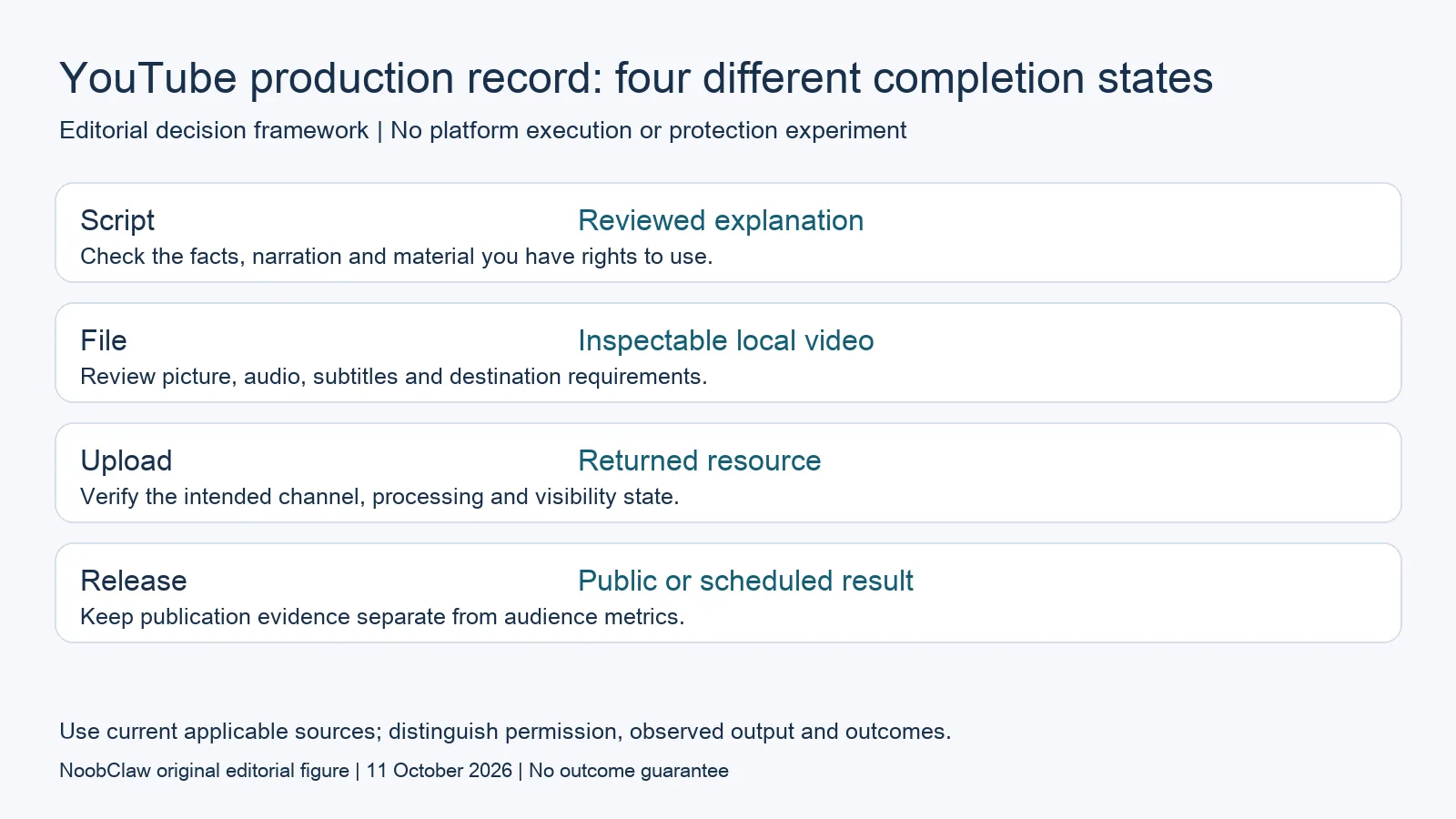
- Script: Reviewed explanation. Check the facts, narration and material you have rights to use.
- File: Inspectable local video. Review picture, audio, subtitles and destination requirements.
- Upload: Returned resource. Verify the intended channel, processing and visibility state.
- Release: Public or scheduled result. Keep publication evidence separate from audience metrics.
Separate creative assistance from artificial engagement
YouTube's current fake-engagement policy prohibits artificially increasing views, likes, comments or other metrics, including through automatic systems. It also addresses promotion of services that inflate metrics. That is a restriction on the activity's purpose and method, not a statement that adding random pauses makes the activity acceptable. A task that prepares your own creative material is different from a task designed to manufacture the appearance of audience interest.
Do not buy a view count or a set of promotional comments to solve a production bottleneck. Ask whether the tool creates content for viewers or creates metrics about content. If it advertises a subscriber outcome, require the period, baseline, measurement definition and a record of other activity before assessing the claim. A real observed increase still does not isolate the effect of one feature or prove that another creator will obtain the same result.
We have no preserved five-tool experiment demonstrating that a browser-only product protected accounts or improved watch time. There is also no established daily interaction quota or rest-day formula in this review. Separate profiles, local execution and timing controls can describe software behavior, but they do not supply evidence of a recommendation advantage or permission to inflate metrics.
Check the documented upload and scheduling methods
YouTube's current videos.insert reference documents an authorized method that uploads a video and can set metadata. The response returns a video resource when successful. Inspect that returned identity and its state; a resource ID alone does not establish that the right channel has a processed, publicly accessible video. Official API support is also a direct counterexample to the claim that any API dependency makes a creator tool unsuitable.
For native scheduling, YouTube Help describes choosing a date, time and time zone for a private video to become public. Verify those values in the actual workflow. A video intentionally private before its scheduled release is different from an unexpected visibility result. If the upload completes but the public result is unclear, preserve the returned evidence and inspect the existing video before retrying. Repeated upload attempts can create additional resources without resolving the first question.
Evaluate which component owns each setting. The approved file, title, description, visibility and release time should be attributable to a clear step. If a tool covers only file production, publication still needs an authorized method and separate confirmation. If it covers upload as well, ask how it handles a failed request or an uncertain result. This is a task-selection review; it does not claim that a particular account or API project has passed a live publishing test.
Use NoobClaw's public local result at its actual scope
NoobClaw publishes this review and sells content software. Its public execution record uses a 441-character English script and reports a local 32.6-second, 1080 by 1920 MP4 at 30 frames per second, with voiceover and subtitles. These are observations from one recorded creative workflow. They are not a YouTube upload experiment, an endorsement of every stock clip or a forecast of views and revenue.
Use that example to inspect the creation stage: compare the supplied script with the visible subtitles and recorded output properties, then review the actual video before choosing it for your use. Some observed stock material needed additional relevance checking. A successful render does not complete a full audio and visual review or establish rights for every asset. Keep the remaining checks attached to the output instead of calling the file ready solely because it exists.
If your goal is a longer YouTube explanation, require a demonstration of that specific input length, structure and output before inferring capability from a short vertical example. Likewise, do not infer long-video clipping, translation, dubbing, platform publication or channel analytics from the recorded creation result. A bounded product example is more useful when it identifies what was observed and what still needs a separate check.
For the related content and workflow decisions, read AI Content Generation for Social Media: Drafts to Video and YouTube API Upload Private? Check Status and Current Rules. Each review has its own evidence and scope.
A hypothetical production handoff, without invented growth
Suppose a creator has a reviewed explanation of a feature they actually use. The production assistant returns a local video draft. The creator corrects one subtitle and replaces an irrelevant visual, then records the approved file. An authorized upload step returns a video identity for the intended channel. The creator inspects processing, visibility and the planned release time, and later records the public URL. This is a hypothetical handoff, not a campaign we ran. It illustrates why a local export, an upload response and publication are separate outcomes. If the final post receives little attention, the record still establishes which production steps succeeded; it does not establish that the publishing method caused a hidden account penalty. Audience analysis begins with its own defined metrics and observation window.
NoobClaw publishes this article. Its script-to-video guide and public creative execution record document a local video result, not Instagram or YouTube publication. Check the current product offer against the supported action you need.

Frequently asked questions
Does YouTube prohibit all automation tools?
YouTube documents video-upload APIs and native scheduling while separately restricting fake engagement. Evaluate the exact action and current conditions rather than treating the word automation as a complete diagnosis.
Can a returned video ID prove public publication?
No. Inspect the intended channel, processing, visibility, schedule and actual public result. A valid resource identity establishes one stage of the workflow.
Does slower browser activity guarantee authentic growth?
No such guarantee is established. Timing settings do not turn artificial metric inflation into genuine viewer interest or prove a recommendation benefit.
Sources
Official material reviewed on October 11, 2026. Document conditions apply to their stated service and scope; the editorial examples are explicitly hypothetical.