
TikTok Caption Generator
Describe what your video actually shows. Generate up to 5 post-caption drafts, choose a tone, then edit and copy the one that fits.
Text input only, up to 400 characters. Describe material you can substantiate; avoid private account information.
Anonymous visitors can make up to 5 successful generations per tool, subject to the shared browser/IP allowance and rate limits. Signing in uses account credits; it does not unlock unlimited free generation. Check current plans and credits before using the desktop app. Plans and credits.
Try a specific video idea
These examples fill the input; generation starts only when you press the generate button.
What this tool gives you
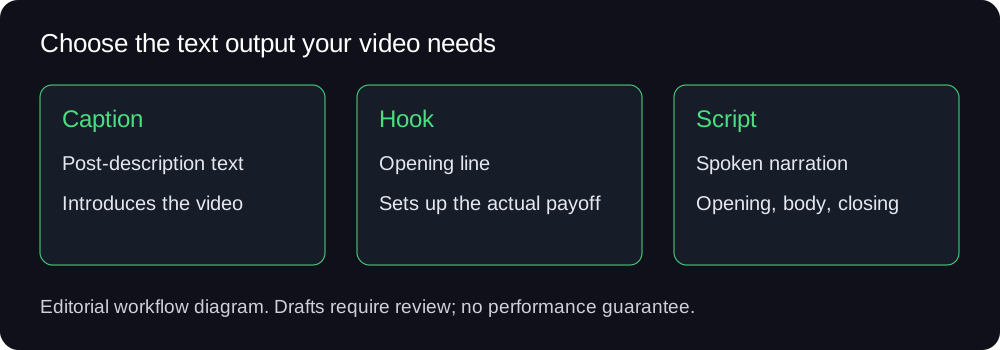
Post-description text. Keep the wording tied to the material you will actually show. A text draft does not measure or guarantee views, retention or followers.
An example and how to review it
New to juggling socials? Here's a simple way to organize 3 accounts, check an AI draft, and track your tasks.
Actual first option returned by our public caption tool on 9 October 2026. The input described a workflow; this generation did not execute those account tasks.
Check that every personal claim and number is true, that the wording matches the footage and that the reader or viewer gets the promised answer. Cut a detail if the video cannot support it.
Actual caption-generation record · Desktop video test and limits
From a draft to a video you can review
In one desktop test, a supplied English script produced a 32.6-second, 1080×1920 video draft with an audio stream and visible subtitles. Some stock footage was generic or off-topic; the output needed human review. This web page itself returns text.
See the desktop workflowCheck plans and credits
Desktop use requires installation, internet access and the selected workflow prerequisites. A free download does not mean unlimited free generation.
FAQ
Does this add subtitles to my video?
This page generates text for the post description. It does not upload a video, transcribe speech or burn subtitles into footage.
How do I get a caption that matches my video?
Name the audience, what is shown and the detail you can support. Pick a tone, then remove any invented personal experience, numbers or promises before copying.
Is the TikTok caption generator free?
Anonymous visitors can make up to 5 successful generations per tool, subject to the shared browser/IP allowance and rate limits. Signing in uses account credits; it does not unlock unlimited free generation. Check current plans and credits before using the desktop app.
Will it publish the caption for me?
This web tool returns drafts for you to copy. Posting and desktop tasks are separate steps; review the content and current platform rules first.
Choose a related tool
- TikTok Hook Generator — opening-line drafts
- TikTok Script Generator — spoken narration drafts
- TikTok Hashtag Generator — draft tags to review alongside the post
- All TikTok tools