
TikTok Automation Bot Rules: What TikTok Bans, Allows and Caps (2026)
- TikTok's rules for automation bots live in three documents that answer three different questions: the Community Guidelines (what a bot may do, effective September 24, 2026), the U.S. Terms of Service
- The Guidelines allow multiple accounts "but not to deceive others or break the rules", and "strictly prohibit automation tools, scripts, or other tricks designed to bypass our systems". The Spam list
- The only numbers TikTok publishes are API-side: 5 users per 24 hours and private-only posts for unaudited apps, a per-creator cap "typically around 15 posts per day", 6 requests a minute per token. "1
- Enforcement starts with automated review; a For You feed restriction shows in the analytics tool and can be appealed from the in-app Safety Center. TikTok publishes no rule for how it decides accounts
Search "tiktok automation bot" and the top results are two Selenium repositories on GitHub, a few tool round-ups and a forum thread about building one. Most carry a "safety rules" section with the same numbers: one post a day, a few interactions, a rest day, no posting at night. An earlier version of this page did too. None come from TikTok. What TikTok has written down sits in three documents, each answering a different question, as they stood on September 28, 2026.
Two things this page does not do: describe how bots imitate people or avoid detection (the Guidelines ban "sharing how-to guides or tips for boosting engagement in fake or deceptive ways"), or give you a safe daily number, because TikTok never has.
What does TikTok's rulebook say an automation bot may and may not do?
The Integrity and Authenticity chapter of the Community Guidelines, released August 25, 2026 and effective September 24, 2026, contains two sentences that have to be read together. First: "You can have multiple accounts—for example, for fan content or creative expression—but not to deceive others or break the rules." Second, a few lines later: "We strictly prohibit automation tools, scripts, or other tricks designed to bypass our systems. These can result in content removal, account bans, or other enforcement." Quoting either alone misleads.
The Spam list in the same chapter names the behaviours:
- "Using automation to run many accounts or send repetitive content"
- "Posting a large amount of irrelevant material"
- "Buying or selling followers or engagement for financial gain"
- "Using bots or scripts to write fake reviews or comments, or to increase likes or shares"
Note the first line's or. Running many accounts by automation is named on its own; keeping each account's content different does not lift a tool out of that sentence. The circumvention list adds "spreading violative content across multiple accounts" and "using another account to avoid restrictions, such as comment blocks or FYF-ineligible content restrictions".
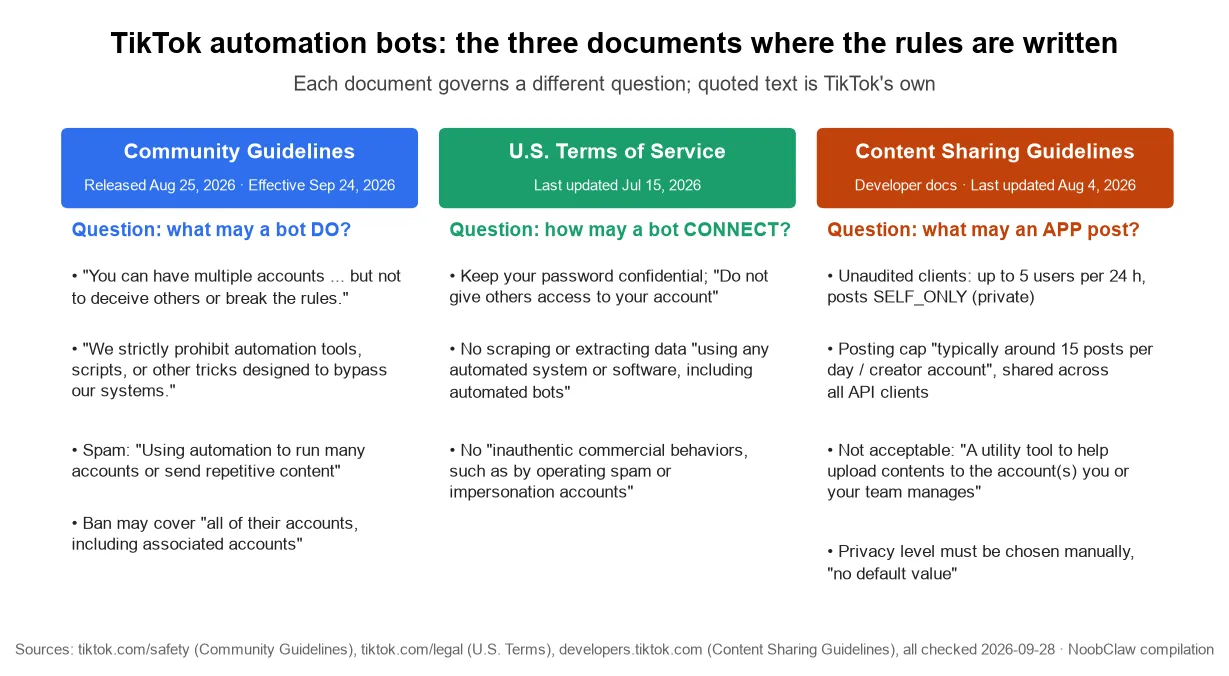
The U.S. Terms of Service (last updated July 15, 2026) govern the connection rather than the behaviour. They ask you to keep your password confidential and say: "Do not give others access to your account, or transfer your account to anyone else, without our permission." They prohibit scraping or extracting data "using any automated system or software, including automated 'bots,' except as approved in writing", and "inauthentic commercial behaviors, such as by operating spam or impersonation accounts". A bot that asks for your password is inside those sentences before it has done anything.
The third document is for apps. TikTok's Content Sharing Guidelines (last updated August 4, 2026) list what a posting integration may not be: "An app that copies arbitrary contents from other platforms to TikTok" and "A utility tool to help upload contents to the account(s) you or your team manages". The official posting API keeps a human in the loop: the privacy level must be chosen from a dropdown with "no default value", and the app "must only start sending content materials to TikTok after the user has expressly consent to the upload".
Which "safety rule" numbers are real, and which are invented?
Here is every number we could trace to a TikTok page, next to the numbers that circulate as bot safety rules.
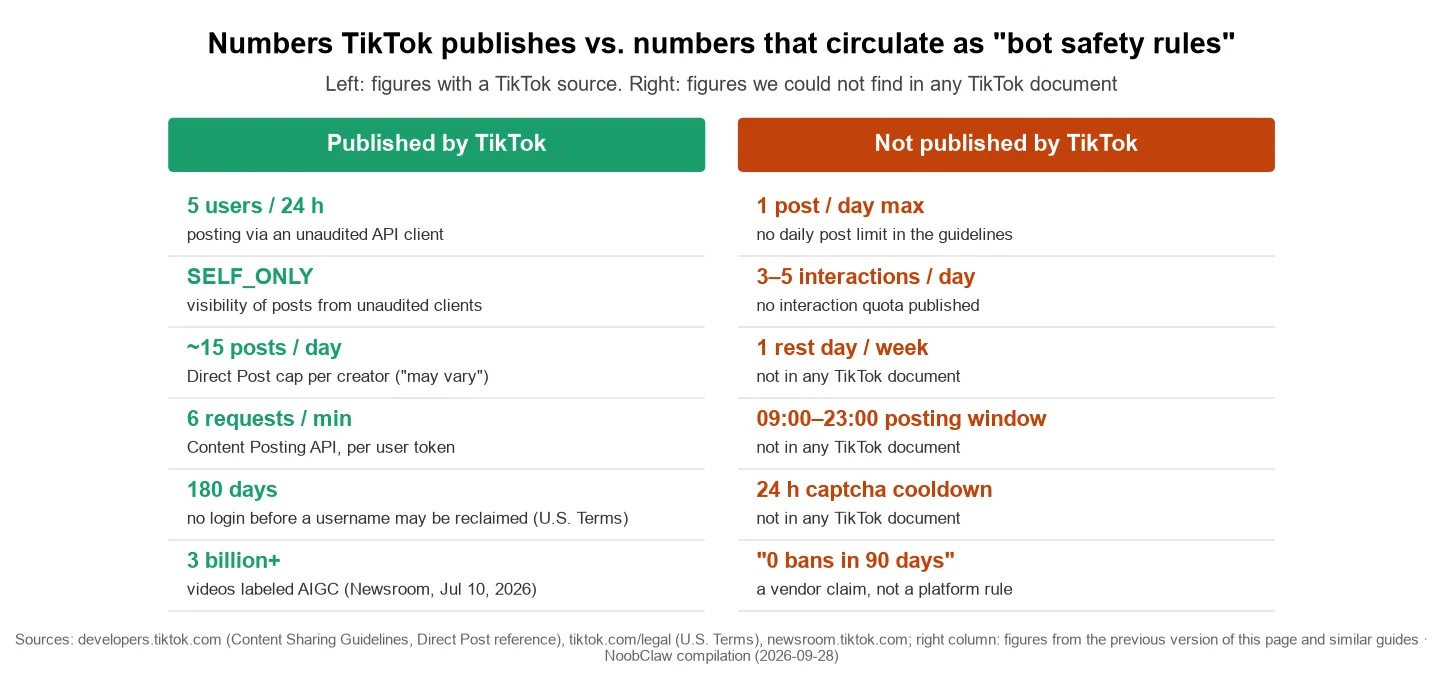
Published. The Content Sharing Guidelines say an unaudited API client "can allow up to 5 users to post in a 24 hour window" and "can only post contents in SELF_ONLY viewership". For all clients: "The upper limit may vary among creators (typically around 15 posts per day/ creator account) and is shared across all API Clients using Direct Post." The Direct Post reference adds 6 requests per minute per user token; the U.S. Terms allow a username to be reclaimed after 180 days without a login. On July 10, 2026 TikTok's newsroom said it had "labeled over 3 billion videos as AIGC" and was "testing improved detection systems to target accounts dedicated to posting AI-generated spam".
Not published. A daily post limit for ordinary accounts, an interaction quota, a rest day, a posting window, a captcha cooldown, or any "bans in 90 days" figure. The Guidelines describe behaviours ("a large amount of irrelevant material", "repetitive content") and leave the counting to TikTok. A number a guide gives for these is the author's habit, not a platform rule.
One pattern in the published numbers matters. Every cap is written against the API, and every API cap is a gate on the vendor's app, not on your account. That is why the same tool can work for one customer and fail for the next: a Postiz Cloud user reported on August 7, 2026 that scheduled TikTok posts flipped to ERROR at publish time with "Daily active user quota reached", which the reporter traced to the vendor's shared developer app hitting its daily active-user cap. The issue was still open on September 28. The five-user limit is unpacked in the five-user ceiling, and the rate limits in 600 per minute and 6 per minute.
TikTok publishes caps for apps and behaviours for people. Any "safe number" for a person came from a blog, not from TikTok.
What happens after a bot gets an account flagged?
The Enforcement chapter describes the sequence. "Content first goes through an automated review process. If content is identified as a potential violation, it will be automatically removed, or flagged for additional review by our moderators. Additional review will occur if content gains popularity or has been reported." If content is made ineligible for the For You feed or otherwise restricted, "this information will appear in the TikTok analytics tool", and if you believe it was an error "you may appeal the decision", with the status shown in the in-app Safety Center. By TikTok's own description, a quiet reach drop with nothing in analytics is not an enforcement action you can appeal; the analytics entry is the evidence.
For deceptive account behaviour the Integrity chapter lists three responses: ban your account, "ban additional or new accounts you create", or restrict the account, "which could include limiting your ability to post new content, appear in top search results, or in the FYF". The Accounts and Features chapter carries the sentence that changed on September 24: "If someone seriously breaks the rules or tries to dodge enforcement, we may ban all of their accounts, including associated accounts." The last three words are new; the sentence-by-sentence comparison is in what changed on the 24th. TikTok does not publish how it decides two accounts are associated, so a vendor promising that its isolation setup keeps a ban from spreading is promising something TikTok has not defined.
And a restricted account must not be replaced: "If your account is restricted or banned, you may not create or use another account to get around it."
Is there any TikTok automation that is not a bot?
Yes. The Guidelines do not prohibit automation; they prohibit automation "designed to bypass our systems" and the spam behaviours above. TikTok itself provides scheduling from the web upload page (15 minutes to 10 days ahead per the 2021 announcement; the upload page shows the current window) and, for TikTok Accounts with Advanced Access and for Verified Business Accounts, four kinds of automatic direct messages (welcome message, keyword reply, suggested questions, chat prompts), which the page (last updated May 2026) says "are not available to General TikTok Accounts". The audited Content Posting API is the sanctioned way for a third-party app to publish. Which tasks are worth automating is covered in what to automate and what never to touch; free tools sorted by what they do are in free TikTok bots.
Even a vendor selling automation draws a line here. Blotato's own help page tells customers: "Connecting a brand new account to automation is the fastest way to get shadowbanned or flagged as a bot", and sets a minimum manual warm-up of 4 weeks for TikTok. That is a vendor's rule, not TikTok's.
Where does a desktop tool like NoobClaw sit? It posts and engages on TikTok from a browser on your own computer, logged in with your own session, so it uses no posting API and asks for no password; each account gets its own browser profile and its own generated content, and you can keep videos local for review before publishing. Those are facts about how it works, not a compliance verdict: the Guidelines name "using automation to run many accounts" as spam, and whether a use is "designed to bypass our systems" is TikTok's call. Anyone who says otherwise is selling the 90-days-zero-bans story this page used to tell.
FAQ
Does TikTok allow automation bots at all?
TikTok allows multiple accounts and offers its own scheduling, an audited posting API and DM auto-replies for Advanced Access and Verified Business accounts. It "strictly prohibit[s] automation tools, scripts, or other tricks designed to bypass our systems" and lists automation used to run many accounts, send repetitive content, or fake engagement under Spam. TikTok decides where a tool falls.
How many posts or actions a day are safe with a TikTok bot?
TikTok publishes no such number for ordinary accounts. The only published figures are for apps on the posting API: 5 users per 24 hours and private-only posts for unaudited apps, and a per-creator cap "typically around 15 posts per day". Daily limits in guides are the authors' own.
If a bot gets one account restricted, are my other accounts affected?
They can be. Since September 24, 2026 the Guidelines say TikTok "may ban all of their accounts, including associated accounts" for serious violations or attempts to dodge enforcement. TikTok does not publish how association is determined.
Sources
- Community Guidelines: Integrity and Authenticity — TikTok — released August 25, 2026, effective September 24, 2026 — https://www.tiktok.com/safety/en/policies-and-engagement/integrity-authenticity
- Community Guidelines: Accounts and Features — TikTok — effective September 24, 2026 — https://www.tiktok.com/safety/en/policies-and-engagement/accounts-features
- Community Guidelines: Enforcement — TikTok — effective September 24, 2026 — https://www.tiktok.com/safety/en/policies-and-engagement/enforcement
- U.S. Terms of Service — TikTok USDS Joint Venture LLC — last updated July 15, 2026 — https://www.tiktok.com/legal/page/us/terms-of-service/en
- Content Sharing Guidelines — TikTok for Developers — last updated August 4, 2026 — https://developers.tiktok.com/doc/content-sharing-guidelines
- Content Posting API: Direct Post reference — TikTok for Developers — checked September 28, 2026 — https://developers.tiktok.com/doc/content-posting-api-reference-direct-post
- Helping people spot and understand AI generated content on TikTok — TikTok Newsroom — July 10, 2026 — https://newsroom.tiktok.com/helping-people-spot-and-understand-aigc-on-tiktok?lang=en-150
- Introducing Video Scheduler: Now You Can Plan TikToks in Advance — TikTok For Business — July 16, 2021 (modified July 22, 2025) — https://ads.tiktok.com/business/en-US/blog/introducing-video-scheduler-now-you-can-plan-tiktoks-in-advance
- About automatic messages for TikTok accounts — TikTok Business Help Center — last updated May 2026 — https://ads.tiktok.com/help/article/navigate-auto-message-business-accounts?lang=en
- Social Accounts (warm-up guidance) — Blotato Help Center — checked September 28, 2026 — https://help.blotato.com/settings/social-accounts.md
- Postiz Cloud TikTok Direct Post fails with reached_active_user_cap (issue #1854) — gitroomhq/postiz-app on GitHub — August 7, 2026, open as of September 28, 2026 — https://github.com/gitroomhq/postiz-app/issues/1854