TikTok Residential Proxies: What a Provider Can Prove
- Separate network requirements from platform authorization.
- A connection test cannot establish protection from enforcement.
- Request documented service terms and a bounded trial before buying.
A residential proxy is a network service, not a TikTok permission or account-protection certificate. Choose a provider only for a legitimate network requirement you can explain and test. A claim about connection continuity does not demonstrate that an account workflow is allowed, that a device is a different person, or that a creator will receive more views. This review offers a purchasing and evidence framework; it does not rank vendors from an undocumented experiment. No residential-proxy comparison or TikTok enforcement experiment was performed for this article.
A provider can substantiate its service; it cannot grant a platform's permission.
Begin with the network job, not an account-survival story
Write down the actual problem before shopping: an organization might need an approved connection path for its own staff, a stable route to an authorized service, or troubleshooting evidence for an unreliable network. Those are hypothetical business requirements, not reasons to impersonate another audience or bypass a restriction. If the only specification is ‘make many accounts look unrelated,’ the proposal has skipped both account ownership and the permitted use of the destination. A supplier's product category does not answer either question.
For a hypothetical distributed team, the first useful comparison might be whether the service supports the team's devices, whether administrators can revoke access, and whether its support process explains a failed connection. Keep these criteria separate from marketing language about being residential, premium or undetectable. A label is not the result of a test. Ask the supplier to identify what is included in the offer, what is excluded, the applicable use conditions and the evidence it can provide. Do not turn an availability statement into a promise about the behavior of a third-party platform.
Account security deserves its own record. TikTok's official Security Checkup describes backup contact methods, two-step verification, device review, suspicious-activity alerts and passkeys. These are controls for access and account review. They do not substantiate a residential provider's claim that its connections are approved for multi-account automation. A creator dealing with unfamiliar activity should use the official controls rather than first purchasing a new network identity.
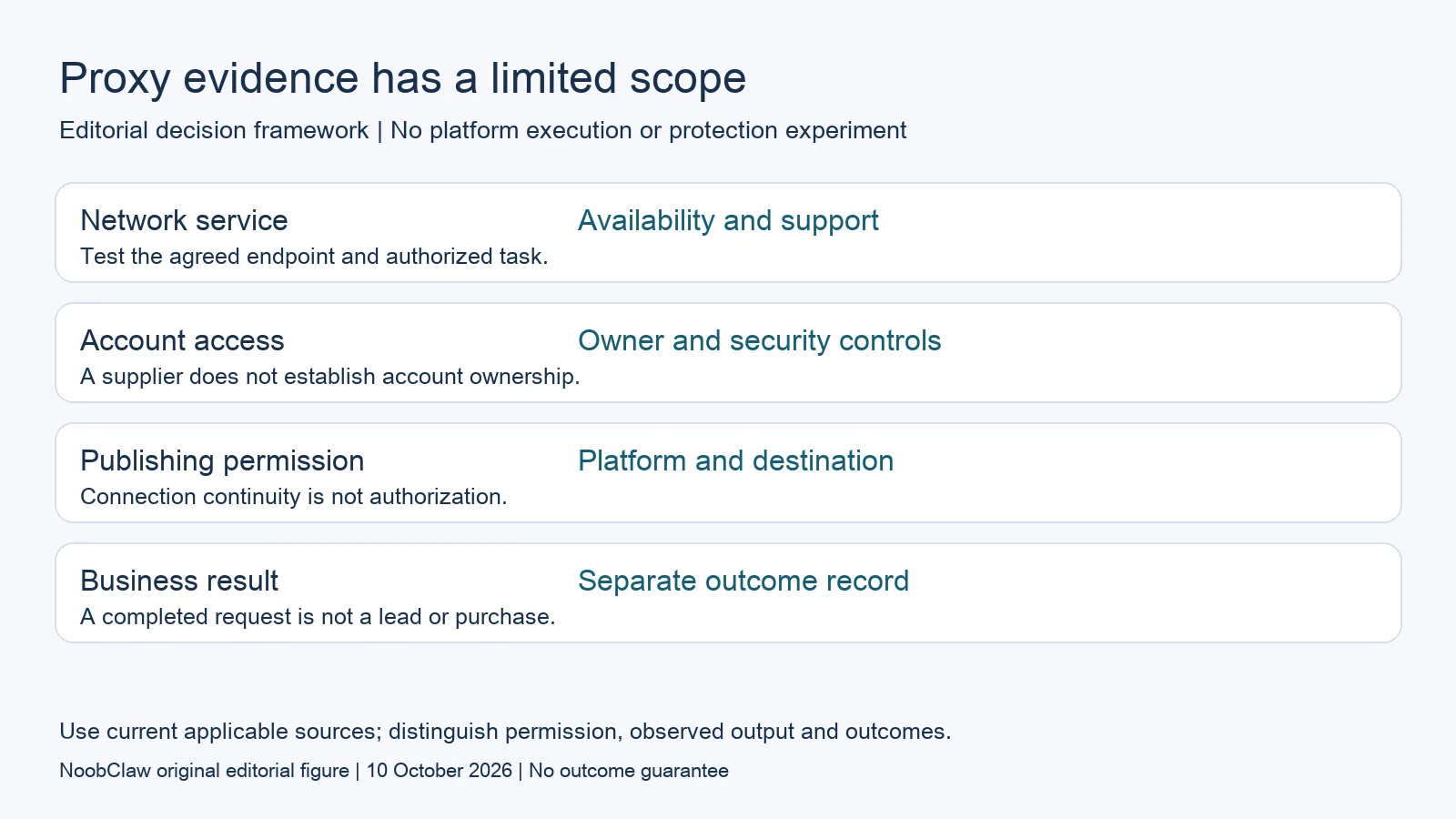
- Network service: Availability and support. Test the agreed endpoint and authorized task.
- Account access: Owner and security controls. A supplier does not establish account ownership.
- Publishing permission: Platform and destination. Connection continuity is not authorization.
- Business result: Separate outcome record. A completed request is not a lead or purchase.
Define a trial that measures the advertised service
A useful trial records the agreed endpoint, the authorized task, the observation period, the configuration and the actual failures. For example, a team could evaluate whether its permitted connection stays available during a specified work session and whether support responds with an intelligible diagnosis. That would be a service trial. It would not be a controlled comparison of TikTok's moderation or recommendation systems. Keep the conclusion attached to the test instead of expanding ‘this request completed’ into ‘this account is protected.’
Ask for the billing unit before calculating cost. A quotation might count usage, connection capacity, an allocated resource or an agreed service period. Use the supplier's current contract and checkout rather than a copied historical price. An affordable advertised unit can become a different purchase when retries, unused capacity or another required service enter the plan. This article supplies no current provider prices because it has not verified a comparable set of vendor offers. A made-up ranking would give the buyer less useful information than that limitation.
Preserve unsuccessful observations too. Record an interrupted task as an interruption with its context; do not assign it to an account penalty unless the destination supplies relevant evidence. Conversely, a quiet session does not prove approval. A trial can help a purchaser reject an unsuitable service without estimating an unpublished platform detection threshold. That is a defensible decision even when no conclusion about creator reach follows.
Keep browser organization and permission in separate columns
Chrome's profile documentation describes keeping browser information such as history, passwords and settings separate. It also warns that a person with device access can switch to another profile. Neither statement establishes that a profile is a separate physical person or a security boundary against someone using the computer. Pair an account with a clearly recorded owner and approved work purpose; do not sell ordinary session organization as evidence that the destination cannot recognize an operation.
Consider a hypothetical agency with two clients and three destinations. Its review sheet can identify who owns each account, who may prepare content, who approves a final version and which publishing method is authorized. A network supplier occupies one part of that sheet. It cannot supply the client's rights to a video, the recipient's consent to a message or the platform's approval of an automated action. Separating these responsibilities makes a failed requirement visible before the team spends on a larger configuration.
Content decisions should remain observable. A different audience may need a different explanation, original example or format. Those are editorial reasons to adapt material, not a technique for hiding a coordinated operation. The caption, hook and script review separates the kinds of draft a writer may need before preparing a video. For an actual logout symptom, use the evidence-focused logout review rather than diagnosing the problem from the proxy label. Neither content preparation nor a network supplier establishes publishing permission.
For the related content and workflow decisions, read TikTok Caption vs Hook vs Script: Choose the Right Draft and TikTok Keeps Logging You Out? Check Security and Evidence. Each review has its own evidence and scope.
What our public product record does and does not establish
NoobClaw publishes this review and sells content tools. Its public execution record documents one supplied script producing a local MP4 draft. That is an output observation, not a residential-proxy test. The record does not contain multiple provider trials, an account approval experiment, moderation outcomes or a measured improvement in audience response. Use it only to evaluate the documented drafting stage. A purchaser can inspect a draft's meaning, visuals and subtitles before considering any destination. Our recommendation is to request evidence at the same granularity: a network claim needs a network record; a publishing claim needs a publishing record; a commercial-result claim needs a separate measured outcome. An input file or exported draft supplies none of those later results by itself. The product guide provides operating details for the documented local creation task; it should not be mistaken for a platform's endorsement of another workflow.
Inspect the public script-to-video execution record and the script-to-video operating guide. Check the current product offer against the task you need.

Frequently asked questions
Which residential provider is best for avoiding TikTok bans?
No provider ranking or protection result is established here. Define the legitimate network need, examine current service conditions and run a bounded trial. Account permissions and platform rules remain separate checks.
Does a stable connection prove an account is safe?
It proves only the continuity observed in that particular trial. Preserve the task, time and failures. Without a platform notice or other relevant evidence, neither connection stability nor a failure establishes an enforcement outcome.
Should I buy a proxy before investigating a logout?
Start with the actual symptom and official account controls. Record the affected device, account and notice. A different network service is not a guaranteed diagnosis or recovery method.
Sources
Official material reviewed on October 10, 2026. Document conditions apply to their stated service and scope; the editorial examples are explicitly hypothetical.