TikTok Caption vs Hook vs Script: Choose the Right Draft
- Captions introduce posts, hooks open videos and scripts supply narration; choose the missing output.
- One caption request returned five drafts; a separate desktop test exported one local video. Neither measured TikTok performance.
- Review claims, footage and current allowances before copying a draft or starting a desktop workflow.
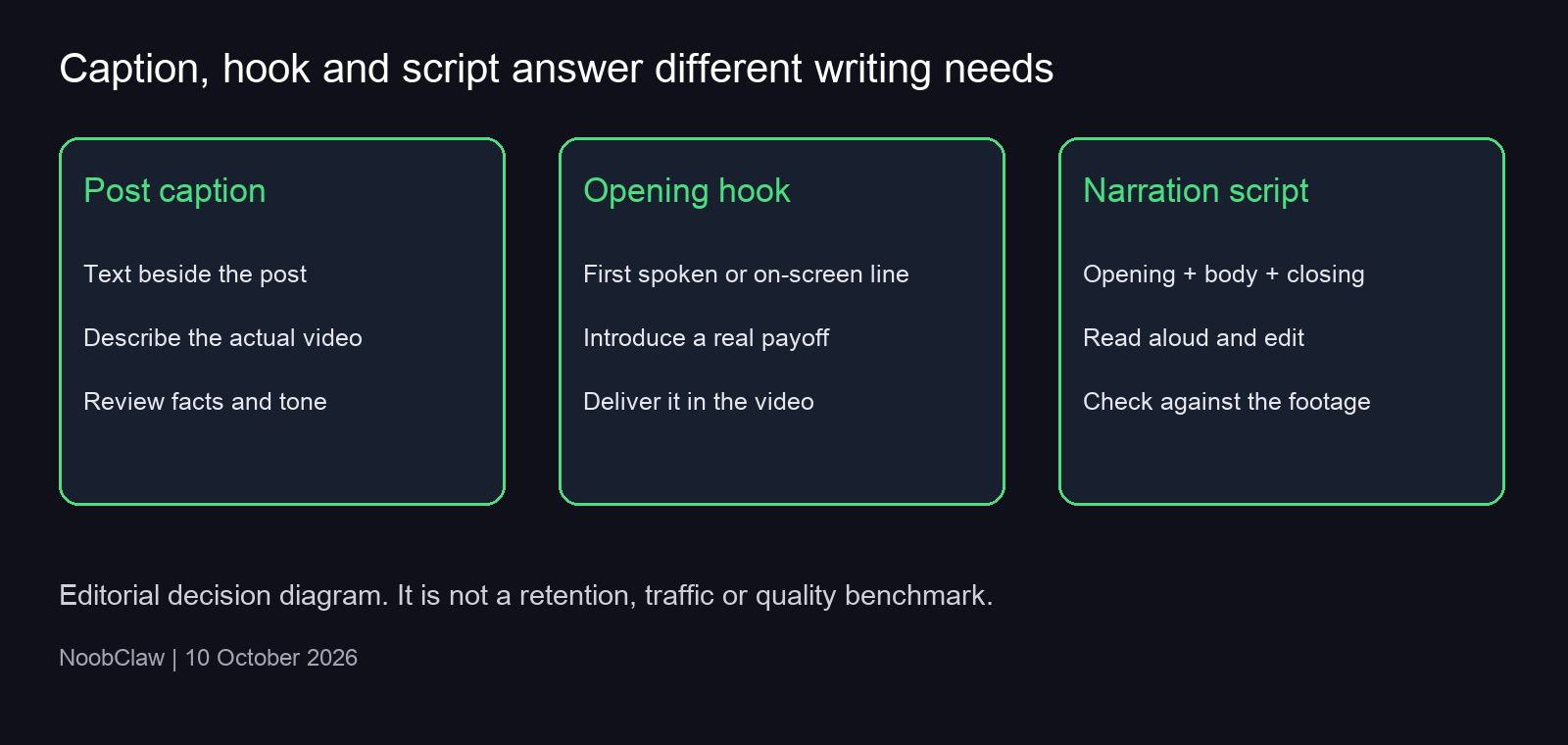
A post caption introduces the video beside the post. A hook opens the spoken or on-screen message. A script supplies the narration that follows. Choose an AI generator for the missing part of your work, then check its output against the video you will actually show. A convincing opening that promises evidence your footage cannot deliver is a poor draft, however fluent it sounds.
Our useful evidence here is limited and inspectable: one web-caption request returned five drafts, and a separate desktop run turned a supplied English script into one local video. Neither execution measured TikTok retention, views or followers. The decision below follows the differences in output and the editing problems visible in those records, rather than assigning generators unsupported quality scores.
Caption, hook and script: which one do you need?
If the footage is already finished and you need text to introduce it, start with the TikTok caption generator. Give it the subject, viewer and relevant detail. A caption can summarize the value of the video or add context that is hard to convey inside it. It does not replace the narration, and this text tool does not transcribe speech or add subtitles to a file.
If you know the explanation but cannot find a clear first line, use the hook generator. Evaluate each candidate by the question it raises and the answer you can actually provide. An opening about a cable falling behind a desk works only if your footage demonstrates that problem or its solution. A claim about saving money requires a substantiated saving, not a more dramatic adjective.
When the spoken explanation is missing, use the script generator. Its opening, body and closing action need to work together. The selected duration is a writing target; your language, delivery and edits determine the recorded length. A closing request should follow the explanation naturally: invite the viewer to try the demonstrated step or read a relevant resource.
TikTok’s 2025 advertising playbook separates the opening, selling points and closing action, and discusses the first 3–6 seconds. That is an advertising framework, not proof of a universal organic-video deadline or a NoobClaw performance result.
What one actual caption generation tells us
On 9 October 2026, our editorial team submitted a beginner-video brief to the public caption tool. The brief described organizing three social accounts, reviewing an AI draft and recording task status. It explicitly asked the generator to avoid growth, safety, revenue and measured-performance promises. The request returned HTTP 200 and five text options. The timestamped request and response preserves all five.
New to juggling socials? Here's a simple way to organize 3 accounts, check an AI draft, and track your tasks.
This first option names the intended reader and the activity. It is suitable for consideration if the finished video really covers those steps. The number three came from the brief; it is not evidence that the tool connected or operated three accounts. The request generated wording, not the workflow described by that wording.
Another returned option began with a first-person account of organizing those accounts. That creates an additional editorial question: did the person presenting the video actually do it? A prompt asking for cautious wording did not remove every possible experience claim. Our judgment is to select or rewrite a candidate that describes the demonstrated task without inventing a personal history.
There is a useful tradeoff here. A conversational draft may sound more personal, while a descriptive draft may be easier to substantiate. Neither style is inherently the winner. Keep a personal statement when it is true and relevant; otherwise use a concrete explanation of what the viewer will see. Five returned choices provide options to edit, not five independently validated pieces of content.
Compare drafts against the same real video
Start with a brief that constrains the answer: what the video shows, who needs it and the detail that distinguishes it. “A beginner desk setup showing how one cable clip keeps a charger within reach” gives a generator more useful boundaries than “write something viral.” Add the tone after those facts. Style can change the presentation, but it should not change the underlying event.
Then read each opening alongside the footage. A question needs an answer; a surprising statement needs support; a personal anecdote needs a real speaker and event. Remove invented durations, money amounts, customer outcomes and claimed tests. For our three-account brief, an additional promise about follower growth would be outside the supplied material, even if it made the line sound more exciting.
Our editorial selection criteria are clarity, factual support and consistency with the payoff. You can compare a direct explanation with a question-led version and choose the one that makes the sequence easiest to follow. This is a judgment about a draft. It becomes a performance claim only when supported by an appropriately recorded publication and measurement.
If you later compare published videos, preserve the actual captions, dates, footage changes, audience context and available metrics. Different distribution or editing can accompany different wording. A before-and-after difference alone cannot isolate the hook’s effect. This article does not prescribe a magic number of variants or claim that TikTok punishes inconsistent hook performance.
When a text draft becomes a desktop video
A separate NoobClaw desktop test on 10 October used our own supplied English script, not a generated web-script response. We selected an existing profile, strict script reading, online stock visuals, an English Edge voice, subtitles and one local-only output. The file measured 32.6 seconds at 1080×1920 and 30 frames per second. Its audio stream was present, and sampled frames showed English subtitles. See the test record and limitations.
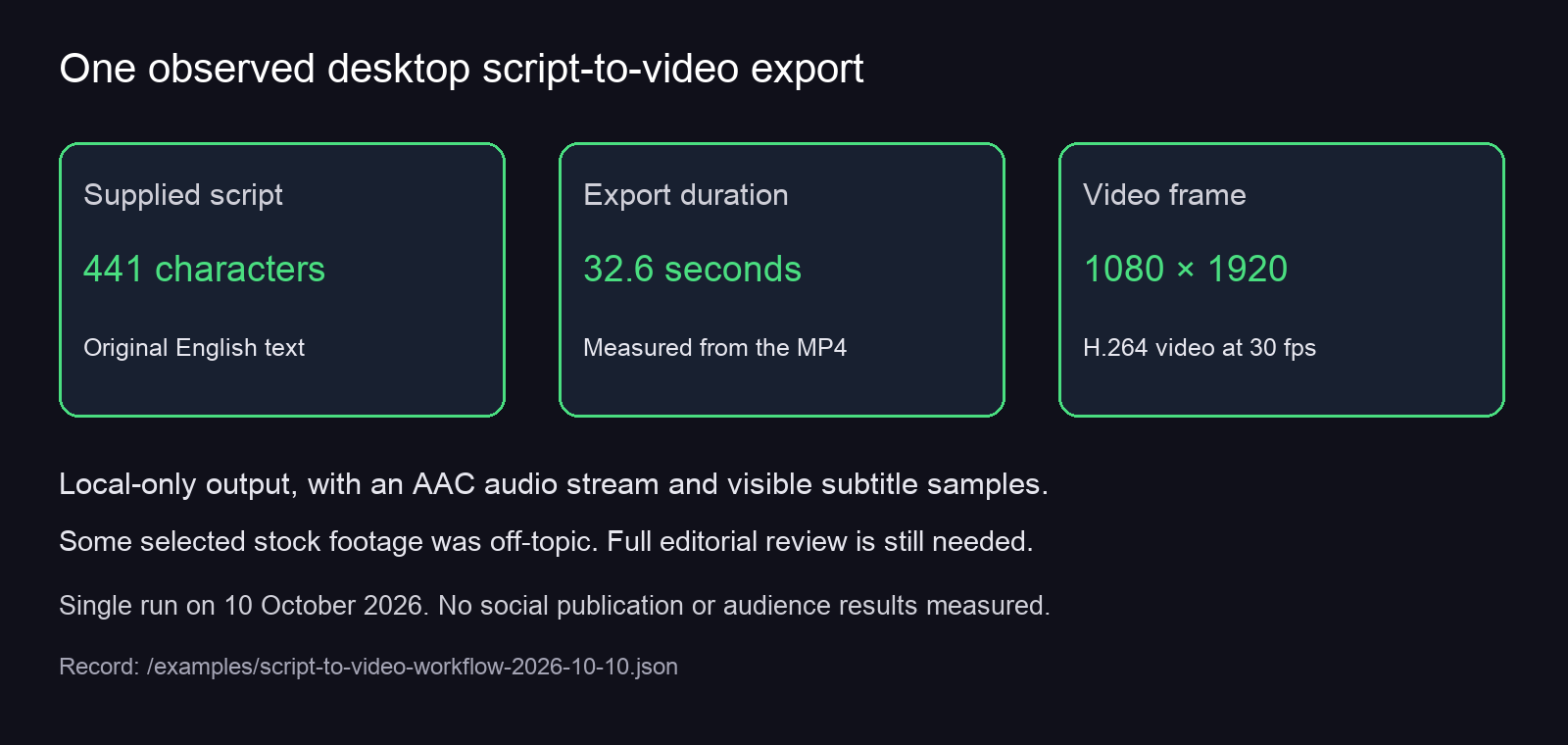
The important limitation was visible: some automatically chosen stock footage did not closely match the narration. Export success therefore answered one question—whether this configured workflow could produce a file—while leaving scene selection, audio review and publication decisions to a person. A polished caption cannot fix an unrelated scene inside the video.
Use the desktop script-to-video Guide when that is the work you need. It explains the tested profile requirement, script limits and local-only setting. Check current plans and credits; the web tools’ anonymous allowance, account credits and desktop task charges are separate conditions. A free download is not unlimited free production.
FAQ
Can a caption generator also produce subtitles?
Check the output before choosing a tool. NoobClaw’s web caption page returns post-description text. The separately tested desktop workflow burned subtitles into a narrated video. These are different jobs with different inputs and prerequisites.
How many drafts should I generate?
Generate only what you can meaningfully review. Our recorded caption request returned five, but that does not establish an optimal count. Anonymous use currently has a limited per-tool allowance; signing in uses account credits. Improve the brief when all candidates share the same unsupported assumption.
Does using AI text mean I should label the whole video as AI-generated?
Assess the actual media, not the name of the writing tool. TikTok’s 13 April 2026 update reiterates that creators must label realistic AI-generated content. A text-generation request alone does not establish what the finished media contains. Review the current guidance for the material you intend to publish.
For the broader production decision, see AI content generation for social media. If choosing between writing and scheduling products, the existing Blotato vs Buffer analysis provides another workflow comparison; evaluate the specific capability you need.
Sources
- NoobClaw caption request and response, 9 October 2026
- NoobClaw desktop export record, 10 October 2026
- TikTok SMB advertising creative playbook, 2025
- TikTok Newsroom: UK election update, AI-content labeling section, 13 April 2026
Editorial correction, 10 October 2026: this revision removes the earlier version’s unsupported first-person performance figures, cross-tool quality ratings and algorithmic-penalty claims. The current evidence covers the two bounded product demonstrations described above.