Deleting and Reposting TikToks: What to Check First
- We found no TikTok rule that penalizes it as such. Deleting and uploading again creates a new post, and its views, likes and comments start from zero.
- Deletion is not final for 30 days. TikTok's Help Center says Restore brings the post back with "all associated comments and likes", so if you regret a delete, restore instead of reposting.
- It is bad in two cases: the video was removed or restricted by TikTok (reposting it can count as another violation or as dodging enforcement), and when you repost the same file hoping for a different
- It is the right call when the file itself is wrong: a factual error, broken audio, something in frame that should not be there. That is a corrected video, not a repost.
Deleting a TikTok and posting it again is not listed as a violation; we found no TikTok rule that penalizes deleting and reposting as such. It is still usually a bad trade, for a plainer reason: the reposted video is a brand-new post, so its views, likes and comments start at zero, and the content has already had one run through the recommendation system.
Two facts change the answer depending on your situation, and most answers to this question leave both out. First, a delete is reversible for 30 days, with likes and comments intact. Second, if TikTok removed or restricted the video, reposting it is a different act from reposting a flop. This page covers what resets, when reposting is harmful, and when it is the correct move.
What actually resets when you delete and repost a TikTok?
Everything attached to the old post. A new upload is a new object: new post ID, new comment section, zero views. Nothing visible transfers from the deleted post to the new one: TikTok offers no way to carry views, likes or comments across to a new upload.
What is not widely known is that the deleted post does not vanish immediately. TikTok's Help Center section on deleting says: "When you delete a post, it remains in our system for up to 30 days before being permanently deleted." During that window you can open Profile, then Menu, Settings and privacy, Activity center, Recently deleted, and tap Restore. The same page adds: "Once you restore a recently deleted TikTok post, you'll also recover all associated comments and likes." One exception on that page: a Duet or Stitch cannot be recovered if the original creator deleted their video along with its Duets and Stitches.
So the real comparison is between four options, not two. The page promises that comments and likes come back on restore; it does not mention the view counter, so we mark that as the same post returning rather than a documented number.
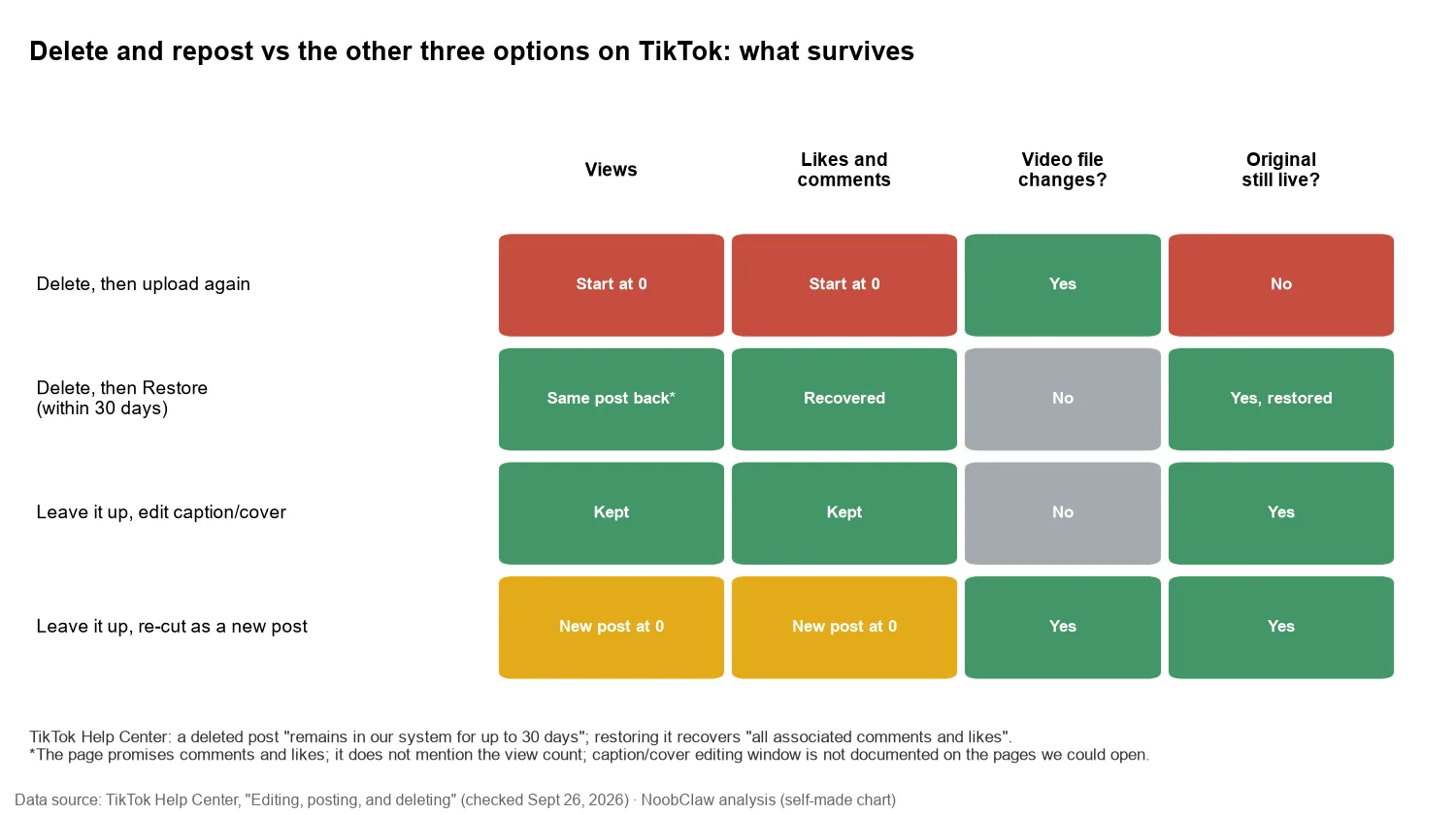
Two practical rules follow. If you deleted in frustration an hour ago, restore it; reposting the same file throws away the likes and comments you can still get back. If you want to change the caption or cover, edit the live post; the details and limits of in-place editing are in what editing a TikTok after posting changes. Delete-and-repost is only needed when the video file itself has to change.
When is deleting and reposting actually bad?
When TikTok removed or restricted the video
This is the case that can hurt the account, not just the post. TikTok's account rules list "Repeated rule violations" and "Trying to avoid enforcement" among the reasons it may ban an account. Re-uploading a video TikTok took down is the same content breaking the same rule again. And moving it to your other account is named directly: the circumvention list includes "Using another account to avoid restrictions, such as comment blocks or FYF-ineligible content restrictions". If you think the removal was wrong, the route TikTok provides is an appeal, which you can track in the in-app Safety Center.
Low views are not proof that anything was restricted. The For You standards say "If a video isn't getting many views, it also doesn't necessarily mean it broke a rule," and the enforcement chapter says that if content is made ineligible for the FYF or otherwise restricted, "this information will appear in the TikTok analytics tool." Check before you delete. A restricted video needs an appeal or a real edit, and a reposted copy of it is the same content with the same problem.
The check has a limit, and users notice it. One TikTok user wrote in a public Trustpilot review (dated September 14, 2026) that TikTok "will shadowban your video without any reason or explantion even if they come up green under there system." That is one person's account, not a TikTok finding, and it cannot tell you why that video stalled. It is still the right caution: analytics tell you whether a restriction was applied, not whether a video will be recommended. A green status is not a reason to delete and repost, and it is not a promise that the repost will do better.
When you repost the same file to "give it another chance"
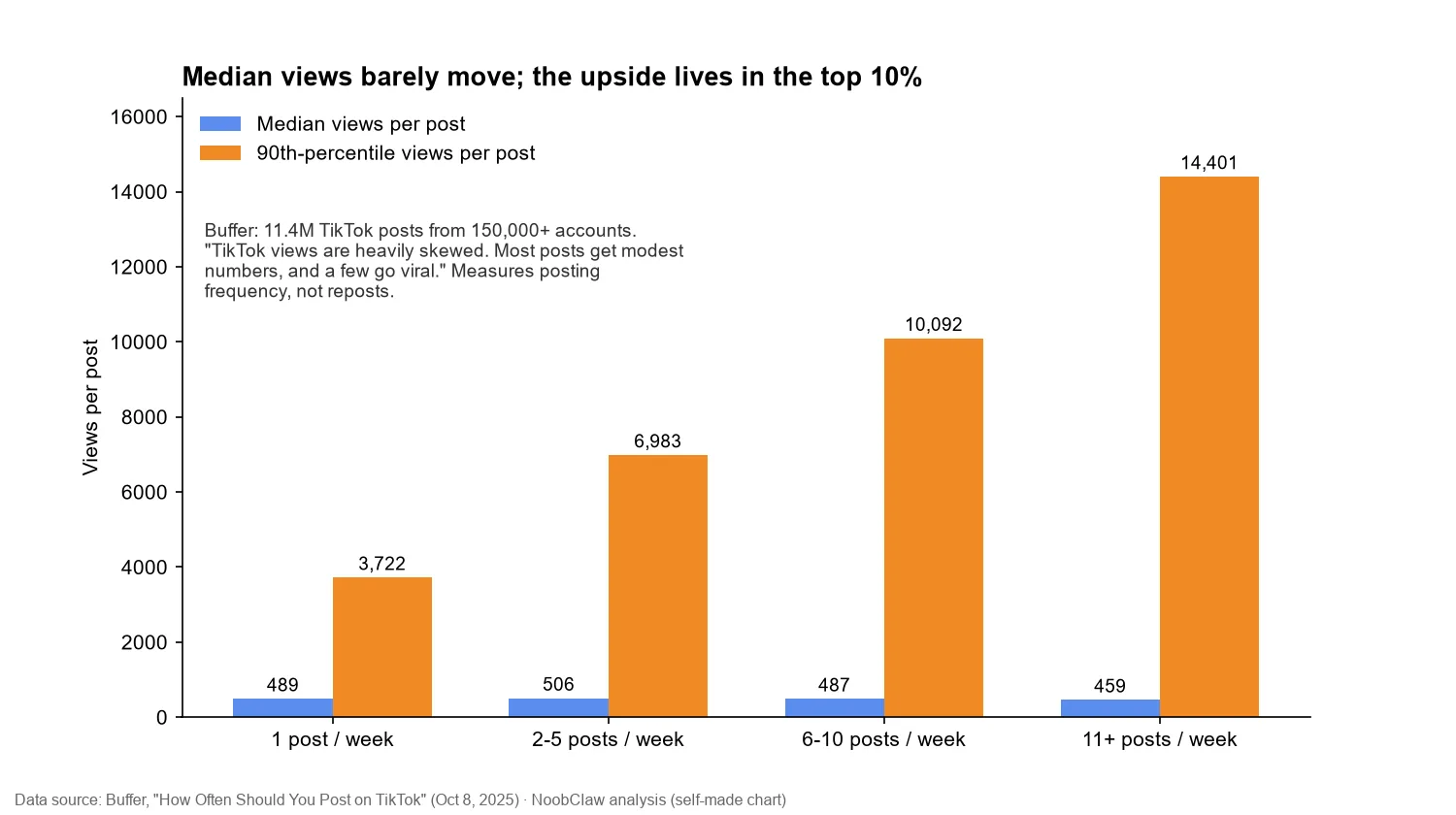
This is the common case. Buffer analysed 11.4 million TikTok posts from more than 150,000 accounts (published October 8, 2025) and found median views per post of 489 at one post a week, 506 at two to five, 487 at six to ten and 459 at eleven or more, while the 90th percentile rose from 3,722 to 6,983, 10,092 and 14,401. Buffer's own summary is that TikTok views are "heavily skewed. Most posts get modest numbers, and a few go viral."
Be careful what that proves. Buffer measured posting frequency, not reposts, so it cannot tell you what a repost will do. What it does show is that a modest result is the normal outcome, not evidence that the video was robbed. Our judgment from there: a repost of the same file is another try with content that has already been shown once, and a re-cut with a new hook, new first frame or new structure is a genuinely different try. That is the case for spending twenty minutes editing instead of pressing upload again.
Deleting is reversible for 30 days. Reposting is not. If you are unsure, the post you can still restore is worth more than the one you are about to upload.
When is deleting and reposting the right call?
When the file is wrong, not when the number is disappointing:
- A factual error you cannot fix with a caption: a wrong price, a wrong name, a claim you no longer stand behind.
- A technical fault in the video: audio that does not play, on-screen text hidden under the app's buttons, a watermark you did not mean to leave.
- Something in frame that should not be public: a phone number, a document, a person who did not agree to appear.
In each of these the new upload is a corrected video. It will go through review like any new post; the enforcement chapter says content "first goes through an automated review process", with additional review "if content gains popularity or has been reported." That is also a quiet reason not to treat reposting as free: the second upload is judged afresh.
What happens if deleting and reposting becomes a habit?
One repost is bookkeeping. A profile where many uploads are re-runs of earlier ones is a different signal. TikTok's For You rules exclude "unoriginal or reused material without anything new", and the Accounts chapter adds that "accounts that don't break the rules still post a lot of content that's ineligible for the FYF" can themselves be made ineligible and "harder to find". TikTok has not said whether re-runs of your own videos fall under "reused material". Our judgment is that a routine of reposting the same files is the one version of this habit where that question could start to matter, and it is easy to avoid.
The same logic scales badly across accounts. Moving the video to a second account instead of reposting it on the first is covered in posting the same video on two TikTok accounts; for operators running several accounts, the point is that each account needs its own supply of new videos, which is what NoobClaw's per-account generation is for: every account works from its own niche and persona instead of recycling one file.
FAQ
How long should I wait before reposting a deleted TikTok?
We found no TikTok rule that sets a waiting period, and no timer resets anything. The one interval that matters is TikTok's own: for 30 days after deleting, you can restore the original with its comments and likes instead of reposting. If you are reposting because the video was wrong, post the corrected version whenever it is ready. For stalls that look like a fixed number, see why TikTok videos seem stuck at 200 views.
Is TikTok's Repost button the same thing?
No. The Repost button pushes someone else's video to your friends; TechCrunch reported TikTok testing it in January 2022 as its version of a retweet. It creates no new upload. This page is about deleting your own video and uploading the file again.
Is posting the same video twice without deleting better?
It keeps the original's history, but the two copies compete for the same viewers. That trade is covered in can you post the same video twice on TikTok. In most cases a re-cut beats both options.
Sources
- Editing, posting, and deleting (deleting a post; recovering deleted posts) — TikTok Help Center — checked 2026-09-26 — tiktok.com/support/faq_detail?id=7636670084584479253
- Accounts and Features — TikTok Community Guidelines — effective 2026-09-24 (checked 2026-09-26) — tiktok.com/safety/en/policies-and-engagement/accounts-features
- Integrity and Authenticity — TikTok Community Guidelines — effective 2026-09-24 (checked 2026-09-26) — tiktok.com/safety/en/policies-and-engagement/integrity-authenticity
- Enforcement — TikTok Community Guidelines — effective 2026-09-24 (checked 2026-09-26) — tiktok.com/safety/en/policies-and-engagement/enforcement
- For You feed standards — TikTok Community Guidelines — effective 2026-09-24 (checked 2026-09-26) — tiktok.com/safety/en/policies-and-engagement/fyf-standards
- How Often Should You Post on TikTok (11.4M posts) — Buffer (Kirsti Lang) — 2025-10-08 — buffer.com/resources/how-often-should-you-post-on-tiktok
- TikTok tests its own version of the retweet with a new Repost button — TechCrunch — 2022-01-04 — techcrunch.com
- TikTok reviews (user review by Thomas Rolén, single-party statement) — Trustpilot — 2026-09-14 — trustpilot.com/review/www.tiktok.com