
Instagram Broadcast Channel Requirements: A 10-Second Check
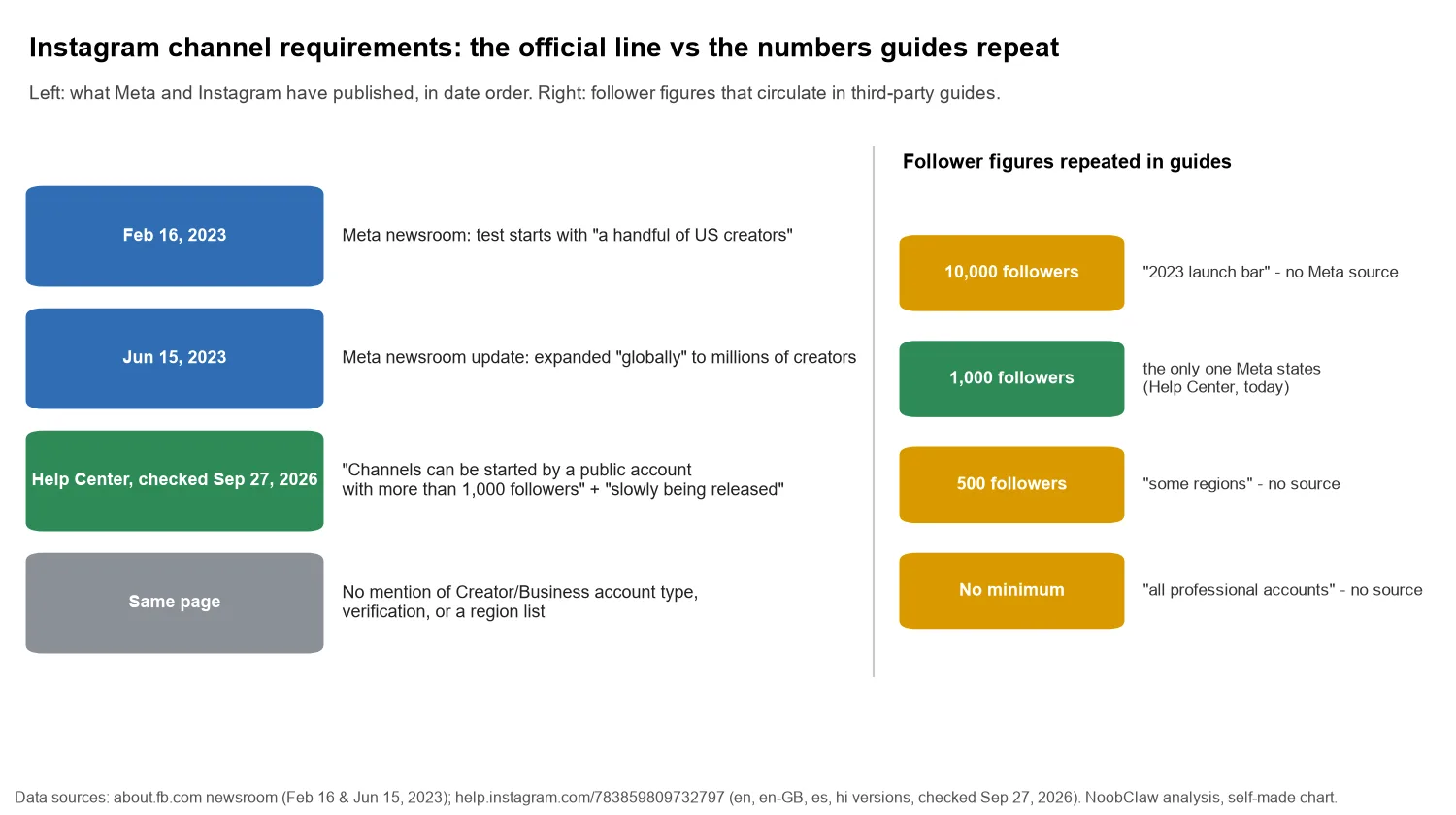
- Instagram's Help Center states the requirement in one line: "Channels can be started by a public account with more than 1,000 followers." The same page says channels are "slowly being released" and "a
- So there are two gates, not one: an account condition you can check (public, over 1,000 followers) and a rollout you cannot. Meeting the first does not guarantee the second.
- The page does not mention Creator or Business account types, verification, or a region list. The 10,000 and 500 figures in other guides do not appear on any Meta page we could find.
- The in-app check still settles it: Messages, then Compose, then look for Create channel. If it is missing and you meet the account condition, you are waiting on the rollout.
Instagram now publishes the requirement itself, which the earlier version of this page could not say. The Help Center article on creating a channel reads: "Channels can be started by a public account with more than 1,000 followers." One sentence earlier it adds that channels "are slowly being released on Instagram and aren't available to everyone at this time."
That gives you two separate gates. The first is an account condition you can check today: is the account public, and does it have more than 1,000 followers? The second is a rollout you cannot see or speed up. If you pass the first and the option is still missing, nothing is wrong with your account; the feature simply has not reached it. We pulled the same page in English, UK English, Spanish and Hindi on September 27, 2026, and all four state the same 1,000-follower public-account line.
What are the requirements for an Instagram broadcast channel?
Here is everything the current Help Center page says about who can start one, and what it leaves out:
- Public account. Stated. A private account does not qualify under the page's wording.
- More than 1,000 followers. Stated, in every language version we checked.
- Gradual availability. Stated: "slowly being released" and "aren't available to everyone," with a note that Instagram is "actively working" to reach more accounts.
- Professional (Creator or Business) account. Not stated in the page body. Many guides list it as required. We cannot confirm either way from Meta's text, so if your personal account is public, over 1,000 followers and still missing the option, switching to a professional account is a free test rather than a known fix. The trade-offs of switching are covered in professional vs personal accounts.
- Verification, a region list, account age. Not mentioned anywhere on the page.
The 10,000-follower figure you will still see in top-ranking guides is usually described as the 2023 launch bar. Meta's own launch post does not state it: when channels were announced on February 16, 2023, Meta said it was testing "with a handful of US creators," and its June 15, 2023 update on the same page said the feature was expanding "globally, giving millions of creators a new way to directly engage with their followers." Neither paragraph names a follower count. The 500-follower "some regions" figure has no Meta source we could find at all.
Two gates, only one of which is yours: the account condition you can meet, and the rollout you have to wait for.
How do you check if you can create a channel? (the 10-second test)
The Help Center describes the creation path, and it doubles as the eligibility check:
- Tap Messages.
- Tap Compose (the pencil icon).
- Look for Create channel. If it is there, you can start one: name it, choose an audience, choose when it ends, and decide whether to show it on your profile.
If the option is missing, work through the three things you control before concluding it is the rollout. Is the account public? Is it over 1,000 followers, not exactly 1,000? Is the app current? After that, the Help Center page describes no application form or waitlist; Meta's 2023 early-access waitlist is not mentioned anywhere on it today. It is the same kind of "the switch is not there" problem as Trial Reels not showing: Instagram grants the feature, you cannot request it.
One thing worth ruling out along the way is an account-level restriction. Nothing on the channel page links eligibility to your standing, so we are not claiming it does, but Account Status takes a few seconds to open and tells you whether anything else about the account is limited.
What can members do, and what happens when you send the first message?
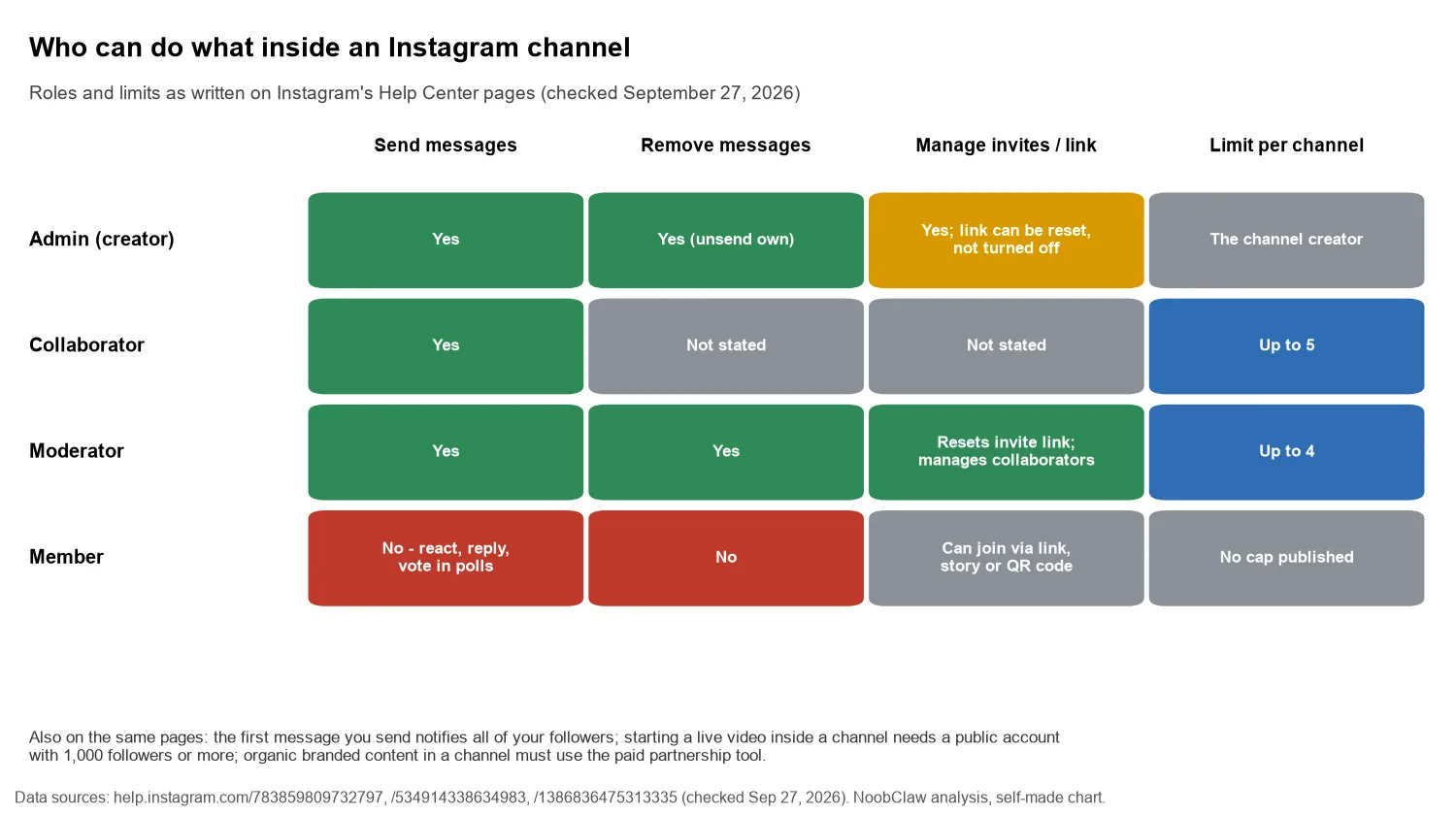
A lot of older advice, including the earlier version of this page, described channels as broadcast-only with members limited to polls. The current Help Center wording is broader: members "can react and reply to messages or vote in polls you create, but they cannot send messages." Replies exist; open conversation does not.
The detail that matters most for planning is on the same page: "When you send the first message in your channel, all of your followers will receive a notification inviting them to join the channel." The page describes that follower-wide invitation only for the first message, so make it one that explains why someone should join, not "testing, testing."
After that first notification, growth comes from invitations you choose: an invite link (which "can't be turned off," only reset), sharing the channel to your story, sharing a single message to your story, or a QR code. Channels are also public and "discoverable by anyone on Instagram."
The role limits are specific. The admin page says channels can have up to 5 collaborators, who can send messages like the admin, and up to 4 moderators, who can send and remove messages, manage collaborators and reset the invite link. Moderators must already be members. Starting a live video inside a channel has its own bar: "Only Instagram users who have a public account with 1,000 followers or more will be able to initiate a live video."
Is a channel worth it if you run more than one account?
Meta's own examples point at what the format is for. In the June 2023 update it named @armaniblanco and @justmaiko as accounts sharing "sneak peeks of upcoming content, asking for feedback via polls and sharing candid moments via voice notes." Those are low-frequency, high-attention uses. A channel lands in the inbox, so a weak message costs you more than a weak feed post: it arrives as an interruption, and the Help Center describes no second follower-wide invitation to win back people who drift away.
For operators with several accounts, two details on the Help Center pages shape the decision:
- Eligibility is per account. Each account that wants its own channel has to be public and past 1,000 followers, and each is subject to the rollout separately. Your main account having channels says nothing about your second one.
- Collaborators are the built-in way to join accounts up. Instead of copying the same announcement into several channels, one channel can carry up to 5 collaborator accounts that post into it. That keeps a single audience in one place rather than splitting it, and avoids posting the same text from several accounts.
Our judgment: if an account is below 1,000 followers, the channel question is premature and the effort belongs in the feed, where new followers come from. If you manage that feed work across several accounts, NoobClaw is one option that runs posting and engagement for each Instagram account from your own logged-in browser, with separate content per account. It cannot make a channel appear; that stays Instagram's decision.
Brand deals carry over into channels too. The Help Center says that organic branded content in a channel must use the paid partnership tool, and that branded content is only available to professional accounts. How that label differs across apps is in the paid partnership label on every platform.
FAQ
How many followers do you need for an Instagram broadcast channel?
More than 1,000, on a public account, according to Instagram's Help Center as of September 27, 2026. The same page says channels are still being released gradually, so meeting the follower condition does not guarantee the option appears.
Why is the broadcast channel option not showing on Instagram?
Check the account conditions first: public, over 1,000 followers, current app. If all three are true, the likely reason is the gradual rollout the Help Center describes. The Help Center describes no way to request access. A professional account is not listed as a requirement on the page, but switching costs nothing if you want to rule it out.
Can members reply in an Instagram channel?
Yes, within limits. Members can react to messages, reply to them and vote in polls, but they cannot send their own messages. Collaborators (up to 5) and moderators (up to 4) can send messages.
Sources
- Create a channel on Instagram — Instagram Help Center — checked September 27, 2026 — https://help.instagram.com/783859809732797
- What admins of channels on Instagram can do — Instagram Help Center — checked September 27, 2026 — https://help.instagram.com/534914338634983
- Start a live video in a channel on Instagram — Instagram Help Center — checked September 27, 2026 — https://help.instagram.com/1386836475313335
- Introducing Instagram Broadcast Channels (with June 15, 2023 update) — Meta Newsroom — February 16, 2023 — https://about.fb.com/news/2023/02/instagram-broadcast-channels-creators-deepen-connections-with-followers/
- Broadcast Channels — Instagram for Creators — undated — https://creators.instagram.com/create/broadcast-channels