TikTok Growth Bots: Check Claims, Access and Useful Output
- Ask whether the service creates content, publishes it or generates account activity.
- A browser session and an API token both provide access; neither proves account protection.
- Require a baseline, dates and defined measurements for any advertised follower result.
- No tested bot ranking, protective timing pattern or universal daily interaction quota is established here.
Before buying a TikTok growth bot, ask what it actually does and what evidence supports the promised result. A script assistant, a publishing integration and a service generating likes or follows are different products, even when they use the same growth language. We have no preserved four-bot experiment, ban comparison or follower result supporting a recommendation here. Evaluate the specific task, access and completed output instead of choosing the tool that promises to imitate a person most closely.
A vendor should be able to demonstrate the useful output you are buying without asking you to treat a simulated human pattern as proof of permission or growth.
Translate the growth promise into an exact action
Ask the vendor to describe the work without the words growth engine. Does the service draft a caption, assemble a video, coordinate publication, report metrics or carry out likes, follows and comments? Ask which account is involved and what input you provide. A product name alone does not answer these questions. A content assistant can be useful without manufacturing account activity, and a dashboard of interactions can be active without solving your content problem.
Use a demonstration matched to your bottleneck. If writing is the issue, provide confirmed product facts and inspect an editable draft. If video production is the issue, inspect the actual exported file. If publishing is the issue, request evidence of the supported method and resulting destination. Do not replace any of these acceptance checks with a claim that a tool stays below an undisclosed detection threshold. An action counter is evidence of activity, not necessarily useful work.
A proposed comparison should use the same input and required output for each product. Record what the creator still needs to do, including factual review, media corrections and publication approval. A tool that leaves a clear handoff may fit your workflow better than one that presents many unverified capabilities as a single outcome. This is a purchase method, not a four-product experiment or a claim that one named bot outperformed its competitors.
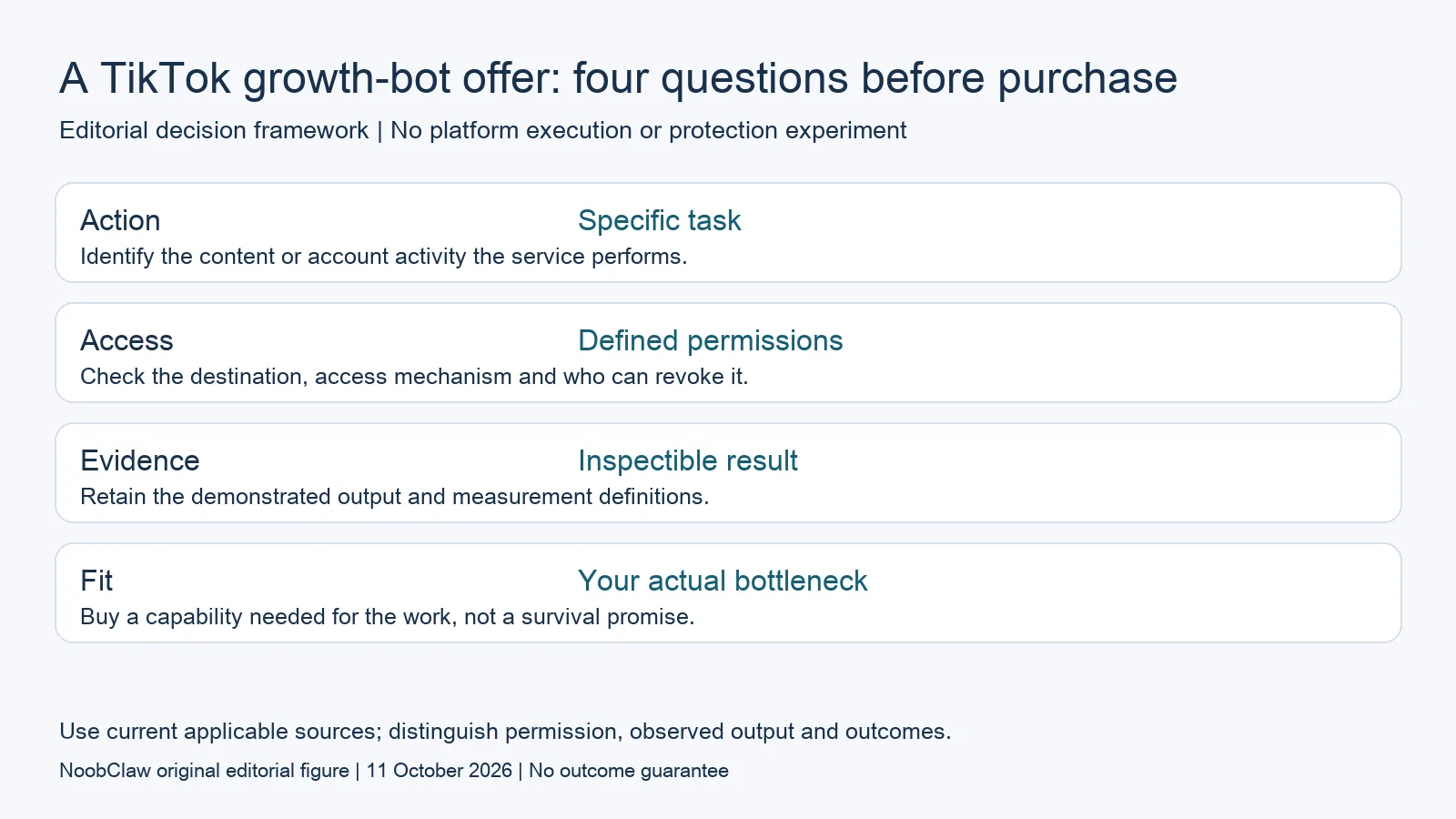
- Action: Specific task. Identify the content or account activity the service performs.
- Access: Defined permissions. Check the destination, access mechanism and who can revoke it.
- Evidence: Inspectible result. Retain the demonstrated output and measurement definitions.
- Fit: Your actual bottleneck. Buy a capability needed for the work, not a survival promise.
Examine access without inventing a safety ranking
Ask how the service accesses the account, what it can do and how that access is withdrawn. A password, an authorization token and an existing browser session represent different mechanisms. Session access still provides account capabilities; the absence of a password field does not make a tool incapable of acting on the account. Do not treat browser execution as automatically safer or official API use as inherently suspicious.
TikTok's March 2025 Security Checkup announcement describes linked recovery methods, two-step verification, device review, suspicious-activity information and passkeys. Those are documented account-security features. They do not provide a safe automated engagement quota or certify a bot. Review the actual account-security settings and access paths instead of assuming that random timing or a separate profile supplies equivalent protection.
Before a demonstration, define the destination and the allowed task. Prefer a bounded evaluation that produces an artifact you can inspect. If a service requires broader account capabilities than the task needs, ask why. Record the answer and unresolved questions. This advice does not diagnose an account compromise or claim that a specific login mechanism caused a restriction; such a diagnosis needs account-specific evidence.
Require evidence for follower and survival claims
A claim such as gained followers needs dates, the initial and final counts, the account, the data source and a description of other activity during the period. Ask whether content, advertising, promotions or audience conditions changed at the same time. A real increase can be observed while its cause remains uncertain. A count of automated follows is not a count of acquired followers, and neither is automatically a customer or a paid conversion.
Treat survival claims with the same care. A product review should not claim that accounts were protected by one setting unless the underlying comparison is available and supports that conclusion. This page establishes no four-bot test, six-month survival record, 90-day comparison or controlled browser-versus-API result. It also establishes no numerical limit below which likes, follows or comments become universally acceptable.
Ask which public documentation supports the specific action being sold. TikTok's Content Sharing Guidelines concern a publishing integration and creator control; they do not supply blanket authorization for every task marketed as growth automation. A vendor should identify the relevant method and scope. When that evidence is missing, record the capability as unverified rather than supplying an invented explanation of TikTok's private detection system.
Consider whether a content tool answers your actual need
If your real difficulty is creating a useful video consistently, evaluate a creation tool on its output. NoobClaw publishes this article and sells content software. Its public execution record documents one local video from an English script, with voiceover and subtitles. The reported output is a 32.6-second vertical MP4. That is evidence of a bounded creation step, not an observed TikTok follower campaign or proof of audited publishing access.
Some sampled stock material required further relevance review. Use the example to ask the right questions about your own output: does the narration match the brief, do subtitles preserve its meaning, are the visuals relevant and can remaining corrections be made? A rendered file does not establish a complete audiovisual or rights review. The product example is more useful when those limits remain attached to it.
A hypothetical repair-business creator might supply owned footage and confirmed information about a common maintenance question. The assistant could return a script and video draft for review. Reject any invented customer result or unsupported repair claim before publication. That proposed test evaluates whether the product helps explain the creator's work; it does not require automated comments under unrelated videos or predict a particular number of followers.
For the related content and workflow decisions, read Human-Like Automation: Execution Is Not Account Approval and TikTok Automation: Content Creation and Publishing Limits. Each review has its own evidence and scope.
Record a purchase decision in comparable units
Use one evaluation row per required output: the input supplied, task demonstrated, returned artifact, remaining corrections, account access and cost unit. An editable script can be compared with another editable script; a usage allowance cannot be compared directly with a connected-account limit. Include recurring fees and the work still needed after the demonstration. Mark unsupported follower and account-survival promises as unresolved claims. This is a proposed buying record, not a measured bot comparison. It lets you choose a content assistant, a supported publisher or a reporting product on the capability you need, and decline an offer that substitutes activity volume for a useful output.
NoobClaw publishes this article. Its script-to-video guide and public creative execution record document a local video result, not TikTok publication. Check the current product offer against the supported action you need.

Frequently asked questions
Is a TikTok bot safe because it uses my existing browser?
An existing session is an access mechanism, not proof of permission, account protection or genuine audience growth. Inspect the actual task and evidence.
Can a bot promise a fixed number of followers?
A promised number needs a defined measurement and supporting record. This review supplies no guarantee or controlled forecast for a buyer's account.
Does NoobClaw's video example prove TikTok growth?
No. It documents the local creative output. Publication, audience response and purchases require separate observations.
Sources
Official material reviewed on October 11, 2026. Document conditions apply to their stated service and scope; the editorial examples are explicitly hypothetical.