Blotato vs Canva: AI Allowances, Scheduling and Plan Fit
- Canva Pro currently lists social content scheduling; the Free matrix does not.
- Canva uses shared monthly AI allowances; Blotato separates writing from media credits.
- A plan allowance is not a measured count of approved videos or successful publications.
Blotato vs Canva is a choice about the creative work and distribution arrangement you need. Canva currently includes social content scheduling on Pro, so describing it as having no social connections is inaccurate. Blotato lists creative and publishing allowances in account-based bundles. Match the intended deliverable, review responsibility and quote rather than deciding from a category label.
Budget the accepted asset, the editing work and the release arrangement separately.
Specify the asset and release workflow
Begin with the deliverable: an image, carousel, narrated vertical video or several destination-specific versions. Include brand requirements, factual accuracy and asset rights in the definition of a usable result. A design editor, an AI allowance and a publishing connector each address part of that work. They are not interchangeable evidence that an approved asset is ready to release.
For a hypothetical weekly campaign, list the source material, versions, reviewer and release owner. If the team already has approved footage and templates, the remaining work differs from generating visuals and narration from a script. If several customers need separate account inventory, also map those destinations. The comparison contains no matched creative batch or observed acceptance rate through both products.
Evaluate the actual feature needed, such as editing the source layout or creating a particular media type. A missing label on one plan card is not proof that the whole product lacks that feature. Existing subscriptions and team responsibilities can change the purchase decision. Record them instead of declaring that one bundle always replaces every other editor, creator or scheduler.
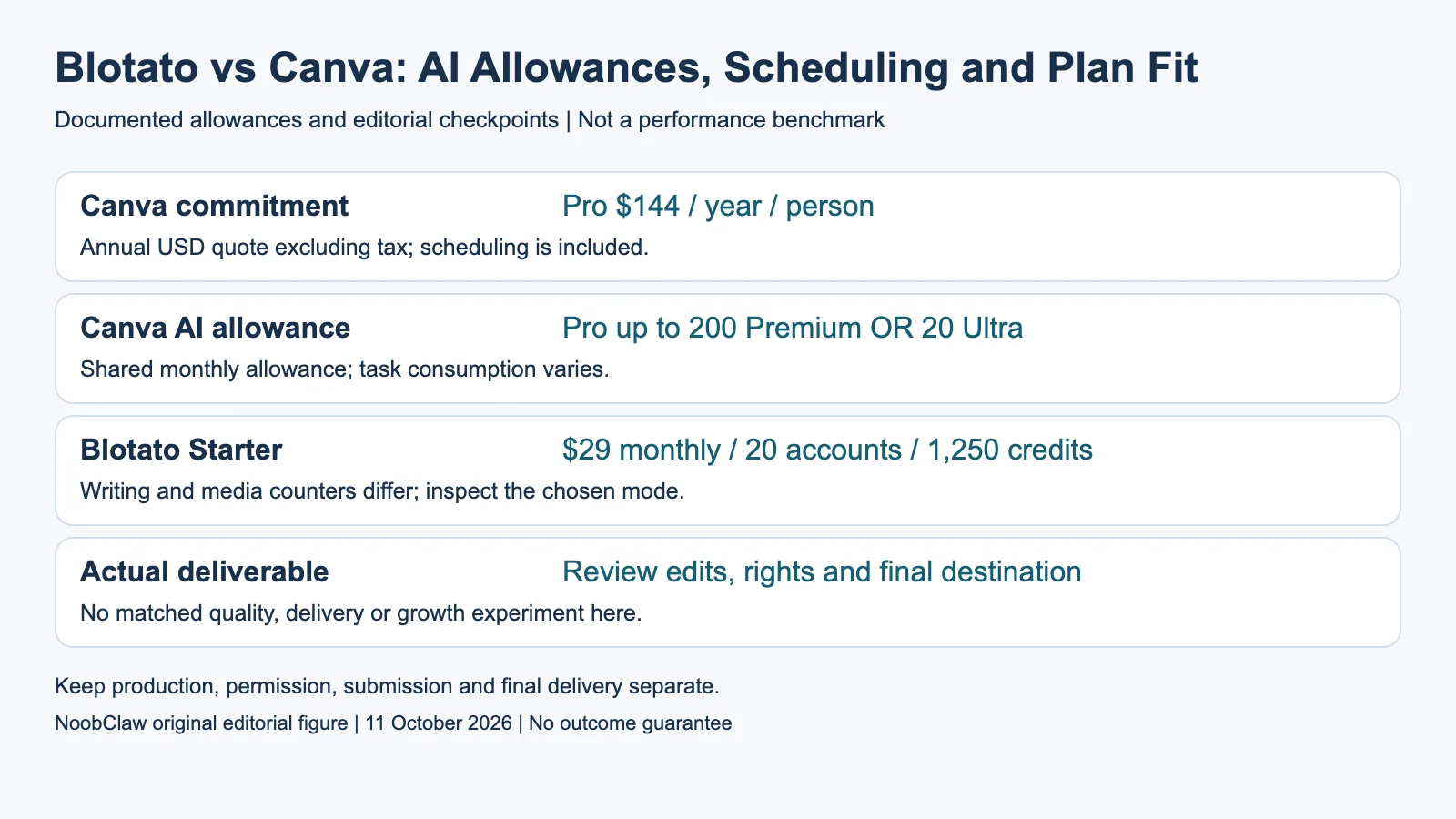
- Canva commitment: Pro $144 / year / person. Annual USD quote excluding tax; scheduling is included.
- Canva AI allowance: Pro up to 200 Premium OR 20 Ultra. Shared monthly allowance; task consumption varies.
- Blotato Starter: $29 monthly / 20 accounts / 1,250 credits. Writing and media counters differ; inspect the chosen mode.
- Actual deliverable: Review edits, rights and final destination. No matched quality, delivery or growth experiment here.
Read the current Canva commitment and allowance
Canva lists USD Pro at $144 yearly per person and Business at $250 yearly per person, excluding tax. Pro includes social scheduling. The arithmetic annual equivalents are $12 and approximately $20.83 monthly; these are not monthly subscription quotes.
Canva's shared monthly allowance is up to 200 Premium or 20 Ultra uses on Pro, and 400 or 40 on Business. Task complexity affects consumption; the counts are not additive. A use does not certify a finished video. Check the actual task before budgeting revisions.
Those plan facts answer only part of a purchasing decision. For the intended asset, inspect whether the available editing workflow lets the reviewer correct its actual errors. For scheduling, confirm the destination, format and account type within the product. This article has not completed a Canva checkout, matched media trial or publication test, and the pricing matrix is not evidence that every possible creative task succeeds.
Calculate Blotato media and account conditions separately
Blotato lists monthly Starter at $29 for twenty social accounts and 1,250 AI credits, Creator at $97 for forty accounts and 5,000 credits, and Agency at $499 with 28,000 credits. The Agency card does not publish an exact separate account count. Do not infer that it fits an arbitrary larger client inventory simply because its creative balance is larger.
Its pricing FAQ describes writing as unlimited and credits for image, video and voice generation. The rough explanation is not a full model-specific output schedule. Starter also lists up to nine hundred TikTok posts monthly; that is vendor-plan wording, not a global TikTok API quota. Creative balances, publishing counts and connected accounts are separate constraints. Inspect the intended mode and supported destination rather than collapsing them into one per-video price.
The annual promotion describes five thousand bonus credits with a $30 value, which does not establish an available $30 top-up purchase. Its seven-day trial excludes API access and limits media credits. A comparison of actual trial results must respect those gates. This article has not run a matched trial or observed how many drafts, revisions and failures yielded accepted assets on either product.
Choose using a bounded creative and distribution check
For an illustrative ten-video brief, estimate the work separately: preparing source material, generating candidates, editing, checking rights and releasing approved files. If only two candidates are approved, ten generated outputs are not ten usable videos. That is a hypothetical acceptance example, not competitor performance data. Use the exact task's quote rather than dividing two unrelated vendors' counters as if they measured identical results.
NoobClaw publishes this review. Its separate public creative record contains one 441-character script, a local 32.6-second export at 1080 by 1920 and 30fps, with observed audio and subtitles. Generic footage diverged from the topic, and voice quality and asset-rights review remained unresolved. That result is not a Canva or Blotato quality benchmark, a rights-cleared release or evidence of external-platform publication.
Choose Canva when its available design, editing and scheduling workflow fits the supported task and billing commitment. Choose Blotato when its documented creative modes and account bundle fit the workload. A separate creative workflow can also be relevant when the missing work is production, provided its actual limitations are understood. Keep subscriptions, accepted deliverables, destination delivery and audience outcomes as separate records; none establishes a guaranteed reach increase.
For the related content and workflow decisions, read Blotato API Alternatives: Access, Channels and Status Checks and AI Video Generator API Pricing: Rates and Usable Clip Costs. Each review has its own evidence and scope.
NoobClaw publishes this article. Its script-to-video guide and public creative execution record document a local video result, not external-platform publication. Check the current product offer against the supported action you need.
Frequently asked questions
Does Canva have no social scheduling?
That claim is outdated. Its current Pro page and pricing matrix include social content scheduling; verify the exact account, destination and supported format needed.
Are Canva uses and Blotato credits directly equivalent?
No equivalence is demonstrated. Counters have different task and mode conditions; neither establishes a fixed number of accepted videos.
Can I buy five thousand Blotato credits for $30?
The annual promotion assigns that value to bonus credits. It is not verified here as a publicly available identical top-up purchase. Check an actual purchasable quote.
Sources
Official material read on October 11, 2026. Canva annual USD amounts are current official yearly commitments excluding tax; they are not monthly checkout quotes. Upload-Post default annual displays and current monthly table are kept distinct. Prices identify their billing term; vendor allowances are not measured publishing results. Hypothetical inventory and cost examples are labeled; the public local-production record has its own limitations.