
Loomly Pricing (2026): $65 Covers 12 Accounts, the 13th Moves You to $332, and a Calendar Holds One Account per Network
- Starter: $65/month ($49 billed yearly) for 12 accounts and 3 users. Beyond: $332 ($249 yearly) for 60 accounts and unlimited users. Enterprise (61+ accounts) is quoted.
- A Free plan exists in the help centre, not on the pricing page: 1 user, 3 social accounts and 5 posts per rolling month, and Loomly says it "might not be available for all users".
- Each calendar holds one account per network, so three Instagram accounts need three calendars. Calendars are free, but each connection is a social account and each approver is a user.
- There are no add-ons on the pricing page. The 13th account or the 4th user means Beyond, which costs $25.54 per account at 13 accounts and only falls back to $5.53 at 60.
Loomly's pricing page has two prices on it: $65 and $332 a month. Everything interesting happens in between. Stay at 12 accounts and three people, and Loomly is a mid-priced scheduler. Connect a 13th account, or invite a client to approve posts as the fourth user, and the only option on the page is a plan that costs 5.1 times as much.
We read loomly.com/pricing (page text and its JSON-LD price data) and four Loomly help-centre articles on September 29, 2026. This guide covers what each plan costs, how Loomly counts accounts and users, and what 13, 30 and 60 accounts cost next to tools that charge per account.
How much does Loomly cost in 2026?
| Plan | Monthly billing | Yearly billing | Social accounts | Users | Where it is listed |
|---|---|---|---|---|---|
| Free | $0 | $0 | 3 | 1 | Help centre only; 5 posts per rolling month |
| Starter | $65 | $49/month ($588/year) | 12 | 3 | Pricing page |
| Beyond | $332 | $249/month ($2,988/year) | 60 | Unlimited | Pricing page |
| Enterprise | "Price tailored to your business" | 61+ | Unlimited | Pricing page | |
Source: loomly.com/pricing and the Loomly Help Center, fetched 2026-09-29. The page's structured data carries the same four numbers: Starter 65.0 monthly and 588.0 yearly, Beyond 332.0 and 2,988.0.
The toggle says "Save 25%". Check the arithmetic and it holds for Beyond ($2,988 against 12 × $332 = $3,984, which is 25.0% off) and is slightly under for Starter ($588 against 12 × $65 = $780, which is 24.6% off). The FAQ adds that the yearly plan is "charged upfront" and that "you will not be able to terminate early with our yearly plans". Upgrades are pro-rated; downgrades take effect at the end of the billing cycle. Nonprofits get a "50% lifetime discount" with a determination letter or equivalent document.
The Free plan article describes "1 user and 3 social media accounts" and "5 posts each month". The five posts are a "rolling one-month window, not a calendar month", and what uses a slot is "the post creation date", not the publish date. Loomly also warns that "the Free Plan might not be available for all users".
What the page does not show is any add-on: no price for one more account and none for one more user. One inconsistency we spotted while reading: the Beyond card lists "Custom roles & workflows" as a Beyond feature, while the comparison table below it marks the same row "Included" for Starter. If custom roles matter to you, confirm them during the trial before paying for Beyond.
What does Loomly count as a social account and a user?
This is the part most Loomly pricing guides skip, and it is the part that decides your plan if you run many accounts. Loomly's help article on what "Users" and "Social Accounts" mean explains that "Loomly was created on a calendar basis. In each calendar, you can connect one social media account of each platform". Its own example: "if you need to connect three Facebook pages, for example, you will currently have to create three calendars. And, it will be counted as 3 Social Accounts."
On Loomly, a calendar is one brand with at most one account per network. Five TikTok accounts are five calendars, and five of your twelve Starter slots.
Three rules follow, all from the same article and the connection guide:
- Calendars are free. "You can create as many calendars as you want, you will not pay per calendar." The meter is on connections, not calendars.
- Approvers are users. "Each person that would be participating in a calendar (including clients who simply need to approve posts) is considered a user." The same person invited to several calendars counts once. So on Starter, you plus two approving clients already fill all three seats.
- The network list is fixed. The supported-platforms article lists Facebook, Instagram, Pinterest, LinkedIn, Google Business Profile, YouTube, Snapchat, TikTok, Threads and Bluesky; the connection guide lists a similar set plus a Custom Channel. X does not appear on either list, which matters if your roster is X-heavy.
For contrast, the Hootsuite plans page gives the example of Standard's 10 accounts as "five Facebook pages and five Instagram profiles" in one dashboard. Both tools count accounts the same way in the end. The difference is how Loomly organises them: a roster of same-network accounts turns into many small calendars.
What do 13, 30 or 60 accounts cost on Loomly compared with per-account tools?
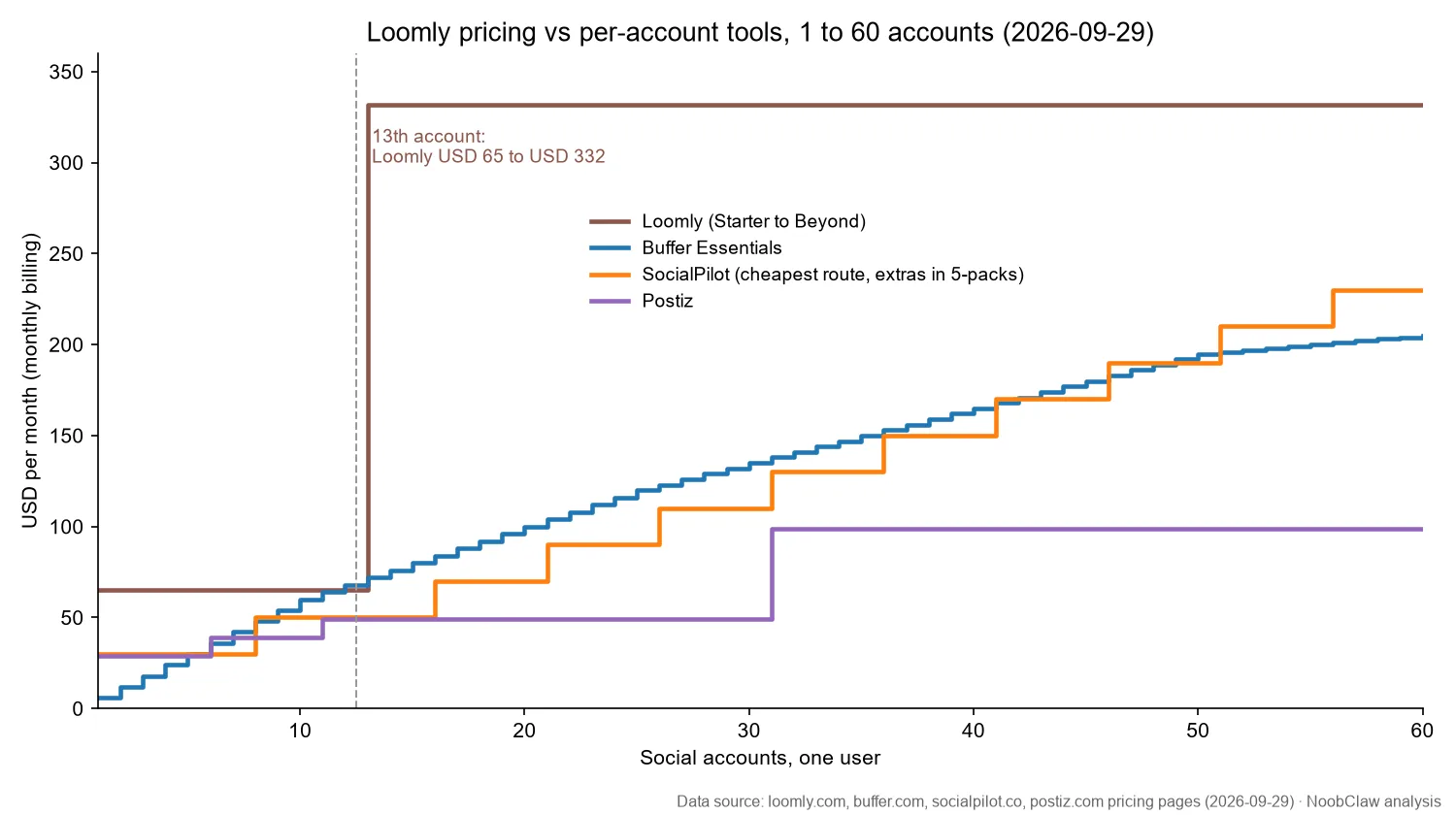
For one person on monthly billing, here is Loomly next to three tools that charge by channel or account, all checked on 2026-09-29: Buffer (Essentials $6 per channel for 1 to 10, $4 for 11 to 25, $3 for 26 to 50, $1 above 50), SocialPilot (Essentials $30 for 7 accounts, Standard $50 for 15, Premium $100 for 25, Ultimate $200 for 50, extra accounts in 5-packs at $20, which works out to $4 each) and Postiz ($29 for 5 channels, $39 for 10, $49 for 30, $99 for 100).
| 1 person, monthly | 12 accounts | 13 accounts | 30 accounts | 60 accounts |
|---|---|---|---|---|
| Loomly | Starter $65 | Beyond $332 | Beyond $332 | Beyond $332 |
| Buffer Essentials | $60 + 2 × $4 = $68 | $60 + 3 × $4 = $72 | $60 + $60 + 5 × $3 = $135 | $60 + $60 + $75 + 10 × $1 = $205 |
| SocialPilot (cheapest route) | Standard $50 | Standard $50 | $50 + 3 × 5-pack $20 = $110 | $50 + 9 × 5-pack $20 = $230 |
| Postiz | $49 (30 channels) | $49 | $49 | $99 (100 channels) |
| Hootsuite (annual rate, 1 seat) | Professional $199 | $199 | $199 | $199 |
Two checks on the SocialPilot row. Its plans page says extra accounts are "available in bundles of 5 at $20 per month", so counts round up to the next pack: at 12 accounts, Essentials (7) plus one pack is $30 + $20 = $50, the same as Standard; at 60, Ultimate plus two packs would be $240, so Standard plus nine packs stays cheaper. SocialPilot's markdown pricing file lists $4 per account with no bundle note, so confirm at checkout. Hootsuite's page prints only annual per-user rates (Standard $99 for 10 accounts, Professional $199 for unlimited), so it sits on a different billing basis from the rest.
The cost per account shows why Loomly only looks cheap when Beyond is almost full. On monthly billing, Starter at 12 accounts is $65 ÷ 12 = $5.42. Beyond at 13 accounts is $332 ÷ 13 = $25.54; at 30 it is $11.07; at 60 it is $5.53. Even completely full, Beyond ($5.53) costs slightly more per account than a full Starter ($5.42), which we also saw when comparing Loomly with Hootsuite.
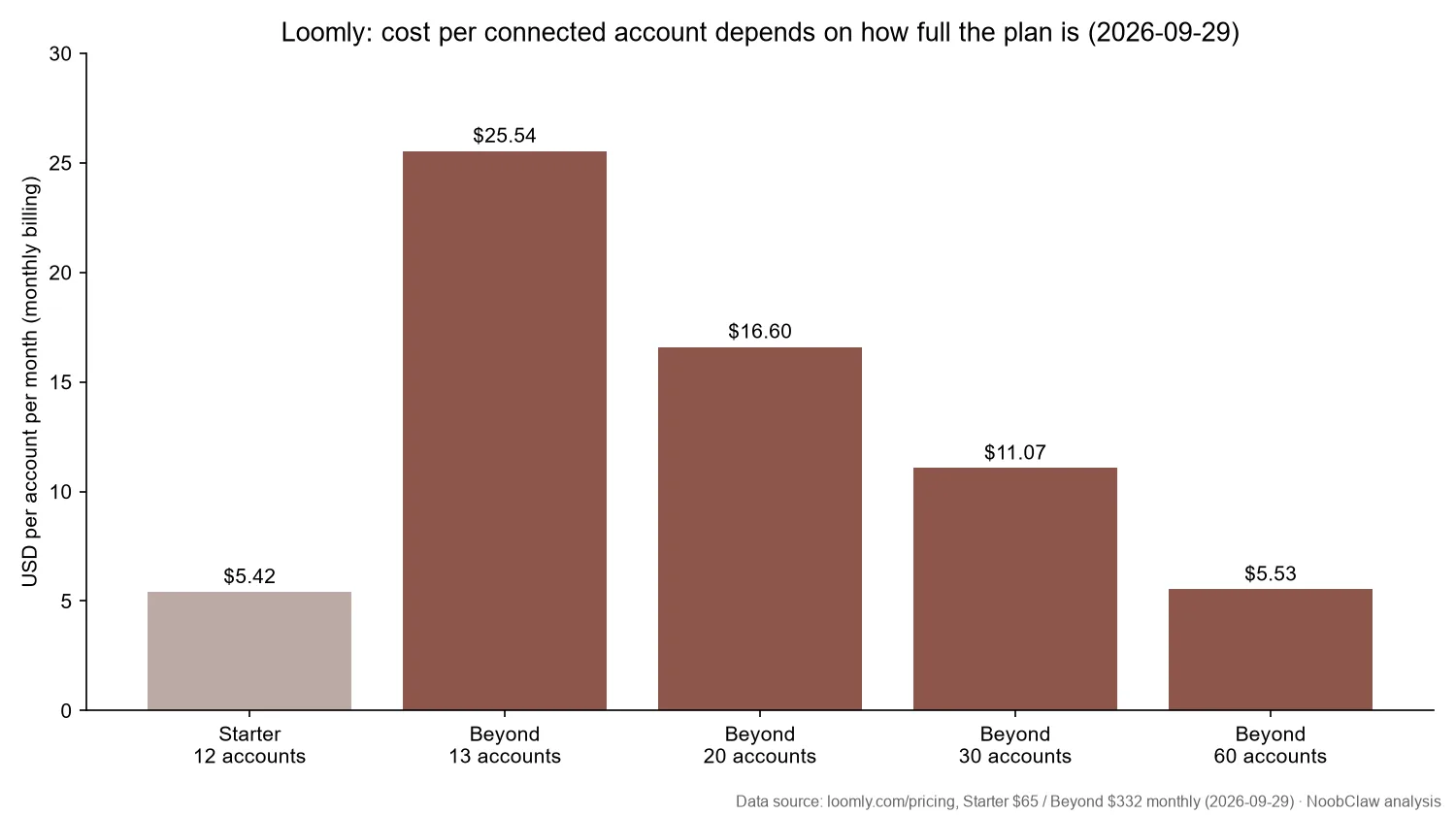
Our reading: the step from $65 to $332 is priced on people. Starter caps users at three; Beyond removes the cap. The account allowance rises too, but the price per account does not fall. That makes Loomly a seat-rationed product dressed as an account ladder. It is not the only way to buy unlimited users, though: Buffer's Team plan, Postiz's Team, Pro and Ultimate plans and SocialPilot Ultimate all list no user cap, and at 60 accounts they cost $275, $99 and $240 a month against Beyond's $332.
Who should pay for Loomly, and who shouldn't?
- Pay for Starter if you run up to 12 accounts across a handful of brands, with no more than three people including approvers, and you want the approval workflow and post previews. At 12 accounts it is within about $15 of Buffer ($68) and SocialPilot ($50).
- Pay for Beyond if many people need a login (agency staff plus client approvers) and you want Loomly's approval flow with its Beyond-only branding: the pricing table marks branded subdomain, custom logo and custom favicon "Not included" on Starter. Unlimited users alone is not a reason, because Buffer Team ($275 at 60 accounts: 10 × $12 + 15 × $4 + 25 × $3 + 10 × $2), Postiz Ultimate ($99 for up to 100 channels) and SocialPilot Ultimate ($200 + 2 × 5-pack $20 = $240) also have no user cap and cost less at 60 accounts. The closer you are to 60 accounts, the better Beyond's per-account figure. Our Planable vs Loomly comparison covers the other approval-first option.
- Skip Loomly if you are one or two people running 13 to 40 accounts, especially several accounts on the same network. A per-account tool will bill you a fraction of Beyond for the same roster, as the table shows. See also our SocialPilot pricing breakdown.
If your roster is several accounts per network, for example five X accounts with different niches, the constraint is often content rather than calendars: each account needs its own posts. NoobClaw is one option for that side. It is a desktop app where you log in to your own accounts in separate local browser profiles, without sharing passwords, and it drafts each account's posts from its own niche and persona, with X, Instagram, Facebook and Reddit among the platforms it can post to. Its video workflow can save output locally for review first. It has no approval calendar or client portal, so it does not do Loomly's main job. Membership tiers set the accounts allowed per platform; check current pricing on the NoobClaw site.
FAQ
Does Loomly have a free plan?
Yes, but not on the pricing page. Loomly's help centre describes a Free plan with 1 user, 3 social accounts and 5 posts in a rolling one-month window, counted by the date you create the post. Loomly says it may not be offered to every account, and tells existing users to check their billing page to see whether it is available.
Can I add one more account to Loomly Starter?
Not from anything on the public pricing page, which lists no add-ons. Starter includes 12 social accounts; the next listed plan with more is Beyond at $332 a month ($249 billed yearly). If you only need a 13th account, compare that with a per-account tool before upgrading.
Does Loomly support X (Twitter)?
X is not on the platform list in Loomly's help centre as of September 29, 2026. The listed networks are Facebook, Instagram, Pinterest, LinkedIn, Google Business Profile, YouTube, Snapchat, TikTok, Threads and Bluesky, and the connection guide adds a Custom Channel. If X is central to your plan, test it in the trial before you commit to a yearly plan you cannot cancel early.
Sources
- Loomly Pricing & Plans — Loomly — read 2026-09-29 (page text, FAQ and JSON-LD offers) — loomly.com/pricing
- New Free plan — Loomly Help Center — read 2026-09-29 — loomly.zendesk.com/…/39051127130779
- What do "Users" and "Social Accounts" mean in the pricing table? — Loomly Help Center — read 2026-09-29 — loomly.zendesk.com/…/38818583806875
- How do I connect my social media accounts? — Loomly Help Center — read 2026-09-29 — loomly.zendesk.com/…/38971313355547
- Which social media platforms does Loomly support? — Loomly Help Center — read 2026-09-29 — loomly.zendesk.com/…/38554893818267
- Hootsuite Plans — Hootsuite — read 2026-09-29 — hootsuite.com/plans
- Buffer Pricing — Buffer — read 2026-09-29 — buffer.com/pricing.md
- SocialPilot Plans & Pricing — SocialPilot — read 2026-09-29 — socialpilot.co/plans
- Postiz Pricing — Postiz — read 2026-09-29 — postiz.com/pricing