Buffer API Pricing and Rate Limits: Plans, Windows and Costs
- API access is included on Free, Essentials and Team; each has its own client and request allowances.
- Standard limits operate across rolling fifteen-minute, twenty-four-hour and thirty-day windows.
- The Free daily allowance differs between current official pages; verify the live account headers before relying on it.
- Channel billing, queue capacity, daily posting limits and final publication status measure different things.
Buffer includes API access on its current Free and paid plans. The practical cost question is which eligible channel plan and request budget cover your workflow, rather than whether an API key is sold separately. This review uses current official pricing, API and developer documents checked October 11, 2026. It explains the published rolling request windows, a reproducible channel-budget example and an unresolved Free daily-limit conflict. No authenticated API request, purchase or publishing test was performed for this review.
Count connections, requests and confirmed publications separately. An upgrade can change the published request allowance without making every limit or workflow requirement disappear.
Read API access and request windows together
Buffer’s developer rate-limit table lists one, three and five API keys or app clients for Free, Essentials and Team respectively. The standard fifteen-minute allowance is one hundred requests on each plan. The thirty-day allowances are 3,000, 7,500 and 15,000. These are rolling client windows, not a promise of the same number of successfully published posts. Read the exact required action and account type beside those allowances before deciding which plan fits.
The published standard table does not mean that higher limits are impossible at any price or under every arrangement. Buffer’s API FAQ and developer guide both describe contacting its team about higher limits. This review does not promise that a request will be approved or quote a custom arrangement. The documented standard allowance, an inquiry and an agreed account-specific entitlement remain separate evidence. Do not describe an identical table row as an immutable technical law.
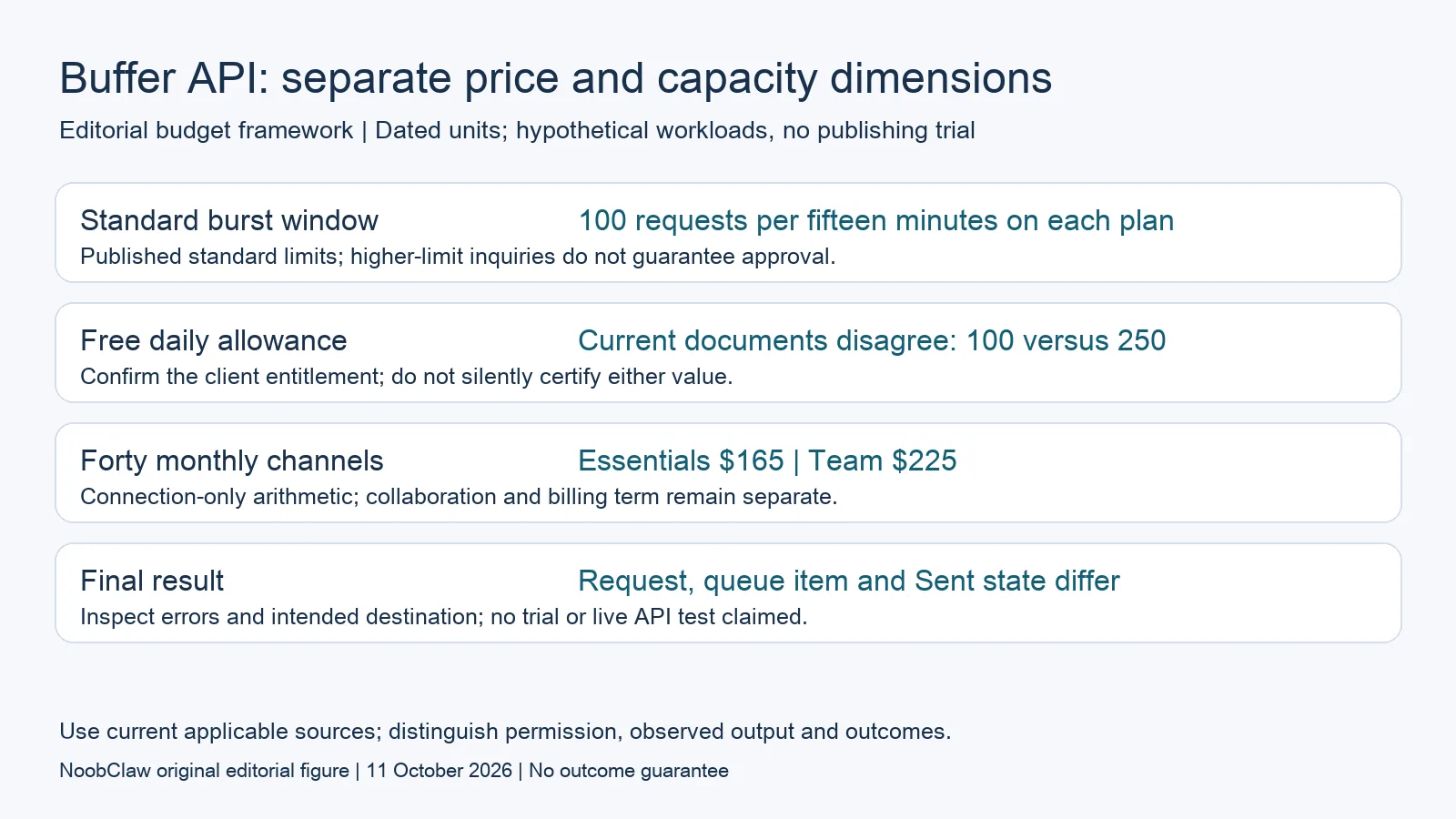
- Standard burst window: 100 requests per fifteen minutes on each plan. Published standard limits; higher-limit inquiries do not guarantee approval.
- Free daily allowance: Current documents disagree: 100 versus 250. Confirm the client entitlement; do not silently certify either value.
- Forty monthly channels: Essentials $165 | Team $225. Connection-only arithmetic; collaboration and billing term remain separate.
- Final result: Request, queue item and Sent state differ. Inspect errors and intended destination; no trial or live API test claimed.
Preserve the Free daily-limit conflict
The current developer guide and pricing document list 250 requests per twenty-four hours for Free, while the API landing-page FAQ lists one hundred. Essentials and Team are listed at 250 and 500 across those pages. This review cannot resolve the Free discrepancy through wording alone. Verify the limits shown for your actual client in the account settings and response headers, or obtain confirmation from Buffer before designing a workload that depends on the disputed allowance.
Do not silently choose the larger number, or label one page outdated without a documented revision history. A conservative planning threshold can reduce uncertainty, but it is still a planning choice rather than proof of the entitlement. Keep the dated source discrepancy in the evaluation record so the implementation owner knows what remains unresolved. The important purchasing question is whether the actual required workload fits the verified allowance, including existing use by the same client.
Calculate channel costs without inventing API invoices
Buffer’s monthly Essentials connection bands are $6 for channels one through ten, $4 for eleven through twenty-five, $3 for twenty-six through fifty and $1 thereafter. Team uses $12, $4, $3 and $2 for those respective bands. Each segment applies to its own channels. Forty channels therefore produce connection-only monthly totals of $165 for Essentials and $225 for Team, excluding applicable taxes and other services. These are editorial calculations under current terms, not observed invoices.
Between eleven and fifty channels, those listed monthly connection totals differ by $60. That arithmetic alone does not tell a buyer which plan to choose: Team’s collaboration and approval conditions differ from Essentials. Annual equivalents also describe a different commitment. The current pricing FAQ’s annual-discount wording and worked examples do not fully agree, so confirm an actual annual quote rather than declaring a universal discount from one sentence. Compare the same eligible workflow and billing term.
Inspect request errors and post lifecycle separately
Buffer documents response headers for remaining request capacity and reset timing. An exhausted rate window returns HTTP 429 with a Retry-After value; the developer FAQ says such rejected requests do not consume quota. Follow the documented wait instead of repeatedly resubmitting an exhausted operation. The same guide says MCP connections share a rate-limit bucket with personal API keys, so connecting another assistant does not create an additional personal allowance.
A post also has its own lifecycle. Buffer’s scheduling guide distinguishes Scheduled, Sent and Error states and recommends inspecting both success and mutation-error results. A returned post identifier or future due time is not yet a demonstrated public post. Define the intended timing and inspect the eventual destination when publication is expected. Request rate, channel posting allowance and queue capacity are independent checks; satisfying one does not establish that the others are satisfied.
Choose a plan from a bounded workload
For a hypothetical editorial workflow, list the clients involved, the approved assets and the operations expected during the busiest short window. Include reads and status checks in the request estimate. A calculation of eighty planned requests cannot certify eligibility when earlier work has already used the same window. A monthly estimate can also miss an intense batch. Compare the actual implementation and current remaining capacity, then identify which uncertainty requires an account-specific check.
Keep the content-production step visible as well. If the missing deliverable is a narrated video, an API request allowance does not supply evidence that the video has been created and approved. NoobClaw’s local record below documents one export with limitations, not a Buffer integration or an exemption from platform rules. Inspect the actual asset and authorized destination before publication. Later audience clicks and paid sales require their own measured records rather than being inferred from a successful request.
Choose the output you need: post-caption drafts, opening-line drafts or spoken-script drafts. These text tools have a limited anonymous allowance; they do not transcribe or publish a video.
For the related content and workflow decisions, read Buffer API Alternatives: Eligible Workflows and Growth Costs and Social Media Tool Pricing Models: Compare Workflow Costs. Each review has its own evidence and scope.
A production output, separate from API usage
NoobClaw publishes this article. Its public October 10, 2026 execution record documents one local creative run: 441 English input characters became a 32.6-second video at 1080 × 1920 pixels and 30 frames per second. This establishes an input and exported file, not an API integration, approval, external publication or audience response. Generic or off-topic footage needs scene-by-scene review; voice quality and footage rights were not independently approved. Use the bounded record to evaluate production independently of a publishing subscription.
The script-to-video guide and public creative execution record document a local video result, not external-platform publication. Check the current product offer against the supported action you need.

Frequently asked questions
Does Buffer charge separately for an API key?
Its current plans include API access with different client and request allowances. Check the eligible channel plan and actual entitlement; this review has not performed a checkout.
Can paying more raise the standard fifteen-minute allowance?
The standard plan table lists one hundred for all three plans. Buffer also invites higher-limit inquiries. Do not promise approval or claim that a custom arrangement is impossible.
Is the Free daily API allowance definitely 250?
The developer guide and pricing document say 250, while the API landing FAQ says one hundred. Verify the live client settings or headers, or ask Buffer; this review leaves the conflict unresolved.
Sources
Official material reviewed on October 11, 2026. Document conditions apply to their stated service and scope; the editorial examples are explicitly hypothetical.