Sendible vs Buffer: Workspaces, Channel Costs and Teams
- Sendible’s current USD monthly base plans are $35, $99, $199, $299 and $750, for 1, 3, 7, 15 and 50 workspaces. Each workspace includes six profiles.
- Buffer’s channel pricing is graduated; Team includes unlimited members, while Essentials is for one user. Current rates must be applied by band.
- A workspace bundle and a channel bill are different buying units. Price add-ons and required review features before choosing a tier.
- Both services offer AI drafting features. A capacity-price example is not a delivery test or a guarantee that one service fits every agency.
Sendible vs Buffer is a choice between organizing client workspaces and paying for connected channels, with team requirements layered on top. Begin with the accounts, client boundaries and people who need access. A starting price without those counts cannot establish the lower bill. The comparison below uses current official pricing, separates monthly from annual commitments and explains what a capacity calculation leaves out.
A channel count is not a client-workspace requirement. Count both before comparing the price of team access.
Count profiles, clients and collaborators separately
Make a small inventory before opening a pricing calculator: connected social profiles, clients that need separation, people who need access and the actions each person performs. One client can have several profiles; one person can work across several clients. Those counts should not be collapsed into a single account total. Include the reviewer who works only occasionally if that person still needs access.
Sendible’s current workspace model includes six profiles per workspace and unlimited users. Buffer prices paid access by connected channel; Essentials includes one user and Team includes unlimited members. These facts identify the billing units, not equivalent permission systems. Check how each product separates client material and limits editing or publishing before concluding that the same number of collaborators produces the same workflow.
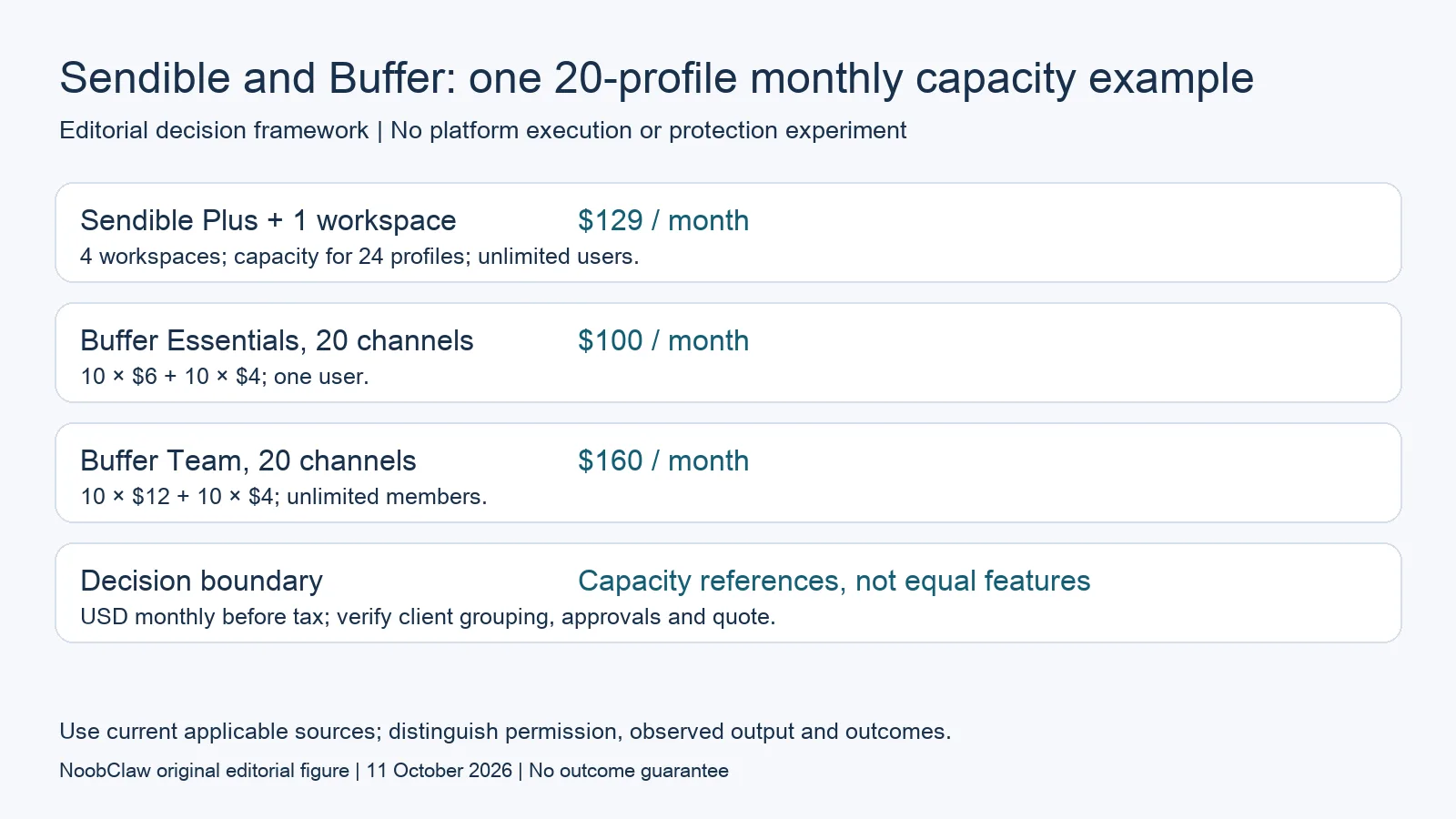
- Sendible Plus + 1 workspace: $129 / month. 4 workspaces; capacity for 24 profiles; unlimited users.
- Buffer Essentials, 20 channels: $100 / month. 10 × $6 + 10 × $4; one user.
- Buffer Team, 20 channels: $160 / month. 10 × $12 + 10 × $4; unlimited members.
- Decision boundary: Capacity references, not equal features. USD monthly before tax; verify client grouping, approvals and quote.
Read Sendible’s current workspace quote
The current USD monthly base cards are Core $35, Plus $99, Premium $199, Elite $299 and Enterprise $750. Their included workspace counts are 1, 3, 7, 15 and 50, corresponding to 6, 18, 42, 90 and 300 profile capacity. The workspace sequence is not a dollar-price sequence. Select currency and billing period in the live calculator rather than interpreting an empty static price field as an unavailable price.
The monthly calculator adds one workspace for $35 on Core, $30 on Plus, $25 on Premium, $20 on Elite and $15 on Enterprise. For example, Plus with one additional workspace shows $129 monthly and capacity for 24 profiles. This is a capacity reference before tax and any other services, not a tested publishing configuration. The page advertises annual savings; obtain the actual annual quote instead of carrying a rounded monthly-equivalent label into a precise invoice.
Apply Buffer’s channel bands correctly
Buffer’s current monthly Essentials bands are $6 for channels 1–10, $4 for 11–25, $3 for 26–50 and $1 thereafter. Team uses $12, $4, $3 and $2 for those respective bands. Each rate applies only to channels inside that band. Do not apply the lowest marginal rate to the entire account list, or assume that Team remains double Essentials at every scale.
A hypothetical 20-channel setup costs $100 monthly on Essentials and $160 on Team under those published bands. Sendible Plus with one extra workspace has capacity for 24 profiles at $129 monthly. These are different capacity packages: Essentials has one user, Team has unlimited members, and a Sendible workspace has its own grouping. A profile total alone cannot establish which package satisfies your client-separation or review requirements.
Check approval and publishing conditions before testing
Buffer Team lists approval workflows and access controls. Decide whether your reviewer must be unable to publish until approval, or whether you simply need feedback on drafts. Check the actual plan and role behavior rather than counting both as a checkmark called collaboration. For Sendible, confirm that the selected tier covers the client review and reporting functions you require; unlimited users alone is not evidence that every advanced feature is included.
Sendible’s public pricing material has described daily posting limits with different units in its table and FAQ. Ask which limit applies to the quoted plan and workflow before doing high-volume arithmetic. Buffer’s paid scheduling is subject to a 5,000-post-per-channel fair-use statement whose period is not defined there; it is not a documented annual allowance. Neither statement certifies the acceptance of a particular post by the destination network.
Compare the whole task, including drafting
Buffer provides AI Assistant writing tools and Sendible lists AI functionality in its current offer. This is therefore not a comparison between tools that cannot write and an AI product that can. Test the drafting result you actually need: a caption, a revised post or source material for a video. Then separately inspect the media, review controls and supported publication action. A generated draft is not a completed campaign.
In an illustrative agency decision, start with required client boundaries, then reject plans that cannot provide them. Compare the remaining quotes with the same currency and commitment, including extras. Record any unresolved throughput unit as an unanswered purchasing question. This method can support a bounded shortlist; it cannot prove that Sendible always wins for teams or Buffer always wins for a small operator. Feature fit and the actual quote can change the result.
For the related content and workflow decisions, read Buffer Pricing at Scale: Channel Tiers and Team Costs and SocialPilot vs Sendible: Prices, Profiles and Workspaces. Each review has its own evidence and scope.
A separate creative-production decision
NoobClaw publishes this comparison. Its public execution record documents a local production step: 441 English script characters became a 32.6-second, 1080 × 1920 video at 30 fps, with voiceover and subtitles. The record does not demonstrate a scheduler integration, an external upload, approval enforcement or a paid conversion. Some stock imagery was poorly matched, and full audiovisual quality and asset licensing were not approved. If your requirement is a narrated video draft, inspect that output and its limitations. If it is shared client review or publishing, evaluate the relevant service directly. Do not substitute one successful local export for evidence of another product’s delivery capacity. Keep the production, approval and acceptance records separate.
NoobClaw publishes this article. Its script-to-video guide and public creative execution record document a local video result, not external-platform publication. Check the current product offer against the supported action you need.

Frequently asked questions
How much does Sendible cost now?
The current USD monthly base plans show $35, $99, $199, $299 and $750. Select currency, billing period and required extra workspaces in the live calculator. Included capacity, taxes and any additional services need their own checks.
Is Sendible cheaper for 20 profiles?
A Plus-plus-one-workspace capacity reference is $129 monthly, compared with $100 for Buffer Essentials and $160 for Team at 20 channels. That does not establish equivalent permissions, grouping or advanced features. Use the plan that meets your requirements before ranking its quote.
Does Buffer Team cost twice Essentials?
Only some bands differ that way. The first ten monthly channels cost $12 versus $6, but channels 11–25 and 26–50 share the $4 and $3 rates. Apply each band separately.
Do either tools write content?
Yes, their current official offers include AI writing functionality. Evaluate those outputs and the supported workflow instead of treating both services as delivery-only products. This article contains no head-to-head execution test.
Sources
Official material reviewed on October 11, 2026. Document conditions apply to their stated service and scope; the editorial examples are explicitly hypothetical.