
SocialPilot vs Sendible (2026): One Bills Accounts and Seats, the Other Bills Workspaces and Daily Sends
- SocialPilot sells social accounts ($4 each beyond the plan) and user seats. Sendible sells workspaces: each one holds exactly 6 profiles, every plan has unlimited users, and each plan has a daily send
- For one owner, SocialPilot is cheaper up to 77 connected profiles and Sendible from 78 up (monthly billing, September 27, 2026). At 36 profiles it is $134 against $189; at 100 profiles $390 against $3
- Sendible lists bulk scheduling on its $35 Core plan; SocialPilot keeps bulk scheduling and CSV upload for Premium ($100) and up. If you need bulk tools and run fewer than 19 profiles, Sendible is the
- Neither refunds prepaid time. The 15% annual discount at both is a bet that you will stay the full year.
SocialPilot starts at $30 a month and Sendible at $35, so on the headline they look like the same purchase. They are not. SocialPilot charges for social accounts and for the people who log in. Sendible charges for workspaces, gives you six profiles per workspace, includes unlimited users, and caps how many posts go out per day. Which one is cheaper depends on how many profiles you run, how many clients they belong to, and how many staff log in.
We read SocialPilot's pricing page, its pricing file for AI assistants and Sendible's pricing page on September 27, 2026. Prices below are USD, monthly billing, before tax. Sendible's card prices are rendered by script; we read them from the page's own price attributes.
How do SocialPilot and Sendible count what you pay for?
SocialPilot counts accounts and seats. Its four plans run from $30 (7 accounts, 1 user) to $200 (50 accounts, unlimited users). Any plan can add accounts at $4 a month, and only Standard and Premium can add users, at $5. The full ladder, and why a second, older price list still loads on SocialPilot's site, is in our SocialPilot pricing breakdown.
Sendible counts workspaces. Core is $35 for 1 workspace, Plus $99 for 3, Premium $199 for 7, Elite $299 for 15, Enterprise $750 for 50. The page defines a profile as "a single connected account you publish to" and says "Profiles are allocated per workspace, with 6 in each". Users are unlimited on every plan. Extra workspaces cost $35, $30, $25, $20 or $15 a month depending on the plan you are on.
| Plan (monthly) | Price | Profiles | Users | Price per profile |
|---|---|---|---|---|
| SocialPilot Essentials | $30 | 7 | 1 | $4.29 |
| SocialPilot Standard | $50 | 15 | 3 | $3.33 |
| SocialPilot Premium | $100 | 25 | 6 | $4.00 |
| SocialPilot Ultimate | $200 | 50 | Unlimited | $4.00 |
| Sendible Core | $35 | 6 (1 workspace) | Unlimited | $5.83 |
| Sendible Plus | $99 | 18 (3) | Unlimited | $5.50 |
| Sendible Premium | $199 | 42 (7) | Unlimited | $4.74 |
| Sendible Elite | $299 | 90 (15) | Unlimited | $3.32 |
| Sendible Enterprise | $750 | 300 (50) | Unlimited | $2.50 |
The Sendible model is new. Its changelog entry of August 18, 2026, "Introducing Workspaces", describes them as a way to manage clients and locations, and earlier entries listed the feature as "replacing individual user logins". That explains an inconsistency we found on the pricing page: the plan table calls the send cap a "Daily posting limit per workspace", while the FAQ further down still says "we apply a daily posting limit for each user" and mentions a "Traction plan" that no longer exists. The FAQ appears to predate the change. The table is the newer text.
The six-profile rule matters more than it looks. A client with 10 profiles needs two workspaces, not one. An operator with 20 TikTok accounts in one niche needs four.
SocialPilot vs Sendible pricing: at how many profiles does each win?
We priced the cheapest valid setup on each tool for every profile count from 1 to 300, for one owner and one user. SocialPilot is cheaper up to 77 profiles (at 77 it is $298 against $299). From 78 profiles, Sendible's falling price per workspace wins.
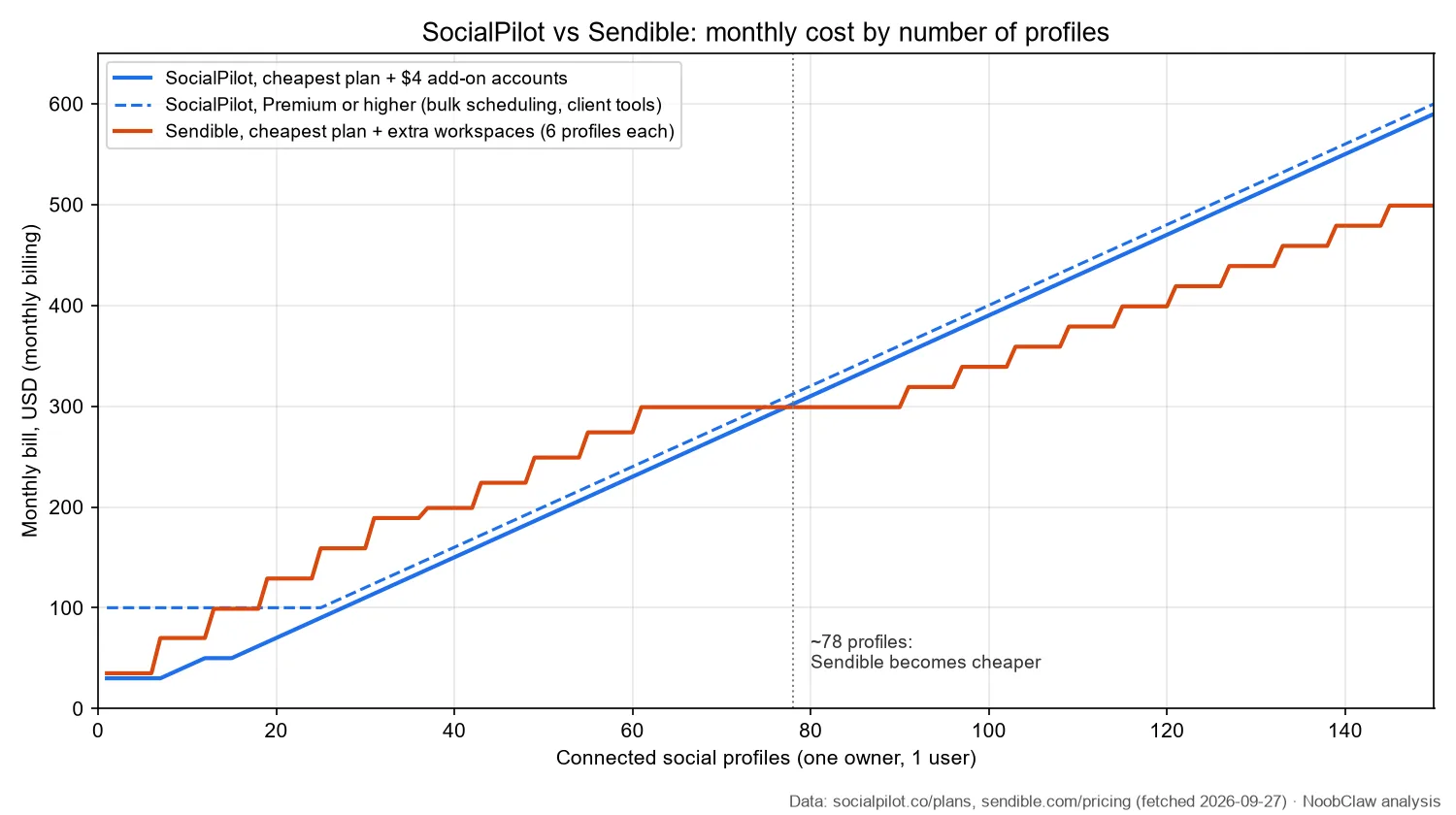
| Profiles (1 user) | SocialPilot, cheapest | SocialPilot with bulk scheduling | Sendible |
|---|---|---|---|
| 6 | $30 (Essentials) | $100 (Premium) | $35 (Core) |
| 20 | $70 (Standard + 5) | $100 | $129 (Plus + 1 workspace) |
| 36 | $134 (Standard + 21) | $144 | $189 (Plus + 3) |
| 50 | $190 | $200 | $249 (Premium + 2) |
| 100 | $390 | $400 | $339 (Elite + 2) |
| 300 | $1,190 | $1,200 | $750 (Enterprise) |
Two conditions sit under those numbers. SocialPilot's pages give no maximum for stacking $4 accounts, and the 100- and 300-profile rows assume dozens of them on one plan, so confirm with sales before you rely on that. And the "with bulk scheduling" column exists because the two tools gate that feature differently: Sendible lists bulk scheduling on its $35 Core card, while SocialPilot's pricing file says "Bulk Scheduling and CSV Upload are available starting with the Premium plan." If you need bulk tools and run fewer than 19 profiles, Sendible is the cheaper of the two.
A real account shows where one team lands. A Sendible customer wrote on Trustpilot on July 27, 2026 that they had used Sendible "for almost 8 months now to schedule content for over 36 accounts". On today's lists, 36 profiles is six Sendible workspaces: Plus with three extra workspaces at $189 a month, or Premium at $199 with a seventh workspace spare. The same 36 on SocialPilot is $134 on Standard, or $144 on Premium if they bulk-schedule. The headline $35 against $30 says nothing about a bill that ends up $45 to $55 apart.
SocialPilot's bill grows with accounts and people. Sendible's grows with clients, six profiles at a time. Count both before you compare the $30 and the $35.
Agencies change the picture, because Sendible's model puts each client in its own workspace (the FAQ says "Every calendar lives inside a dedicated workspace") even when a client has two profiles, and SocialPilot needs Premium for client management and client approval workflows. With those rules applied, SocialPilot was cheaper in four of the six agency shapes we priced, and the other two were within $1. What moves the Sendible bill in agency work is the number of clients, not profiles: 30 clients with four profiles each cost $480 on SocialPilot against $599 on Sendible.
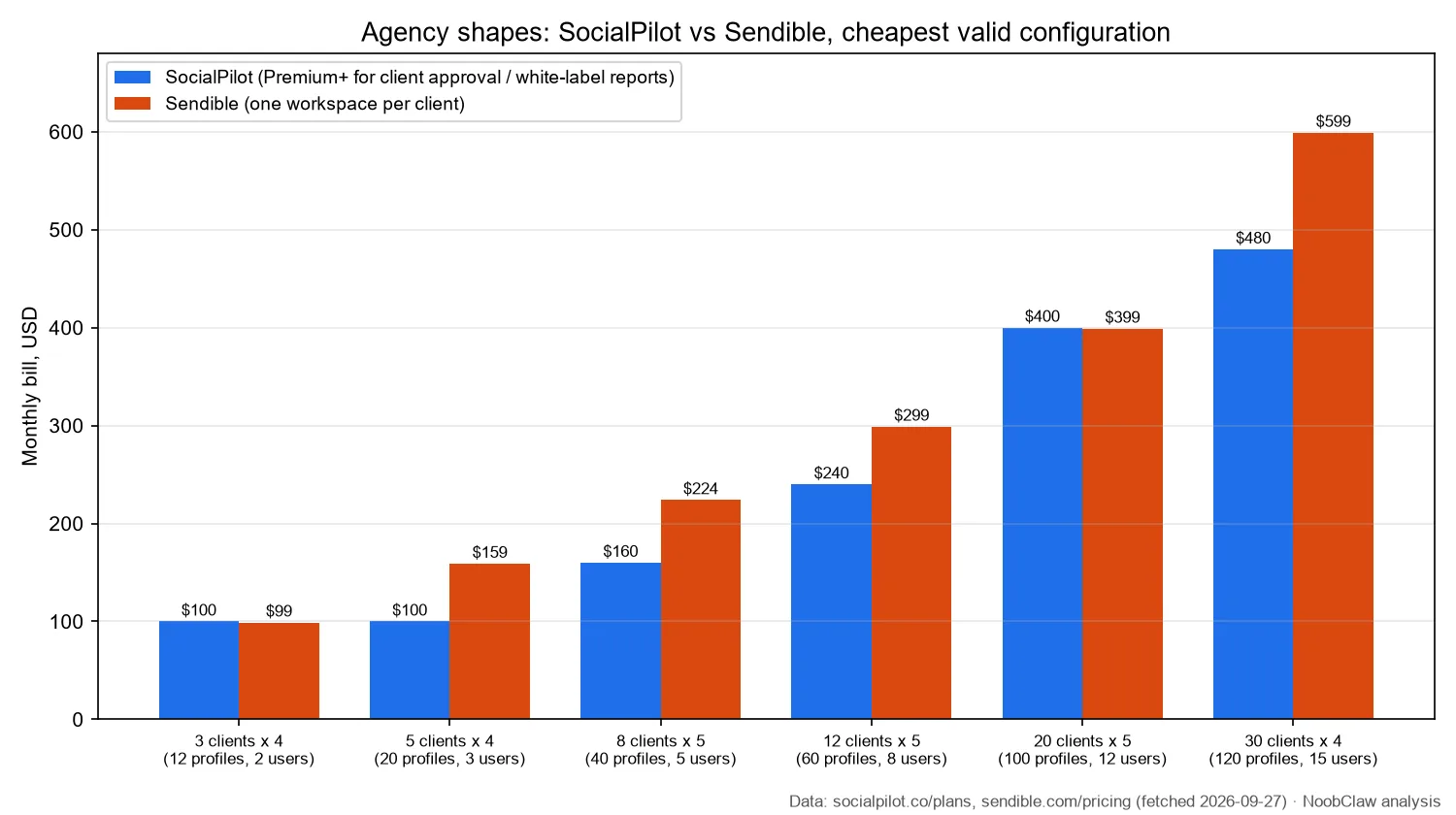
Three clients with four profiles each cost $100 on SocialPilot Premium and $99 on Sendible Plus. Twelve clients with five profiles and eight staff cost $240 on SocialPilot Ultimate against $299 on Sendible Elite. Twenty clients, 100 profiles and twelve staff cost $400 against $399.
Which limits do the pricing pages bury?
Sendible caps sends per day. The table lists 100, 200, 300, 500 and 500 "sends per day" for Core through Enterprise and explains that "this refers to the limit for posts being published per day per workspace in order to comply with guidelines outlined by social sites." The page does not define a send, and the FAQ's older "per user" wording makes the unit unclear. The difference is large. Read per workspace, Elite allows 500 a day in each of 15 workspaces. Read per plan, Elite allows 500 in total. Twenty X accounts posting ten times a day is 200 sends, which fits either reading on Elite but would hit the per-plan reading on Plus. Ask Sendible which reading applies to your account before you plan a high-frequency schedule.
SocialPilot publishes no daily cap of its own. Its vendor-written Sendible comparison says "Schedule unlimited posts per day". Platform limits still apply to any tool that posts through official APIs. Instagram's Content Publishing documentation says "Instagram accounts are limited to 100 API-published posts within a 24-hour moving period", while a later section of the same page says 50. Either number is far above a normal schedule, but it is a ceiling neither tool can lift.
White label costs extra on Sendible. The plan cards list white label as a paid add-on on Elite and Enterprise without a price; the FAQ quotes white-label pricing "starting at $349/month" for Elite and "$800/month" for Enterprise, which reads as a package price rather than the add-on alone, so get a quote. SocialPilot includes white-label reports from Premium and "Advanced White Label" on Ultimate.
Neither refunds prepaid time. SocialPilot's terms say "If you have an annual subscription, we are not able to process any refunds." Sendible's terms, section 4.1, say "Absolutely no refunds will be given for prepayment of Services or for proration of Services if there is a cancellation during the paid-up period." Both offer 15% off for paying yearly, and a 14-day trial with no card. Use the trial to count how many Sendible workspaces your client list really needs.
SocialPilot or Sendible: which should you pick?
Pick SocialPilot if you run up to roughly 75 profiles, most of them belong to one owner or a few clients, and your team is small. Its pricing file lists ten networks, including Threads, Bluesky and Google Business Profile, and an MCP server on all paid plans.
Pick Sendible if you run more than about 80 profiles, you need logins for a large team, freelancers or client approvers, or you want bulk scheduling below $100. Its page lists Threads and Bluesky too.
The case against each: SocialPilot's seats and its Premium gate on bulk tools punish large teams with small profile counts. Sendible's six-profile workspaces punish anyone whose accounts do not split neatly by client, and its daily send limit is written two different ways on the same page.
One thing neither tool changes: you still write every post. That is fine for an agency with approved client copy. It is the real constraint for a team running dozens of its own accounts that each need their own voice. For that case NoobClaw is one option to look at. It is a desktop app that drafts posts for each account from that account's niche and persona, then publishes through browser sessions you are logged into on your own machine. You pay per action or per piece of content, not per workspace or seat, though each plan still limits accounts per platform. It needs your computer running, and it does not use the platforms' official posting APIs.
Related reading: SocialPilot pricing (2026), Sendible vs Hootsuite, Sendible vs Buffer, and schedulers for multiple accounts, sorted by what they gate.
FAQ
Is Sendible cheaper than SocialPilot?
Only at scale. For one owner, SocialPilot is cheaper up to 77 profiles and Sendible from 78 ($390 against $339 at 100 profiles, monthly billing, September 27, 2026). Sendible is also cheaper below 19 profiles if you need bulk scheduling, because SocialPilot reserves it for Premium.
Does Sendible limit how many posts you can publish per day?
Yes. Its plan table lists 100 to 500 sends per day and calls it a limit "per workspace"; its FAQ still describes a limit "for each user" and 100 posts per day per user during the trial. Scheduling in advance is unlimited. Confirm the unit with Sendible if you post many times a day.
Does SocialPilot charge per user?
Partly. Essentials includes 1 user with no option to add more, Standard 3 and Premium 6 with extra users at $5 a month each, and Ultimate has unlimited users. Sendible includes unlimited users on every plan.
Sources
- SocialPilot: Plans & Pricing — SocialPilot — page modified 2026-07-06, fetched 2026-09-27 — https://www.socialpilot.co/plans
- SocialPilot Pricing (file for AI assistants, "Last updated: July 2026") — SocialPilot — fetched 2026-09-27 — https://www.socialpilot.co/socialpilot-pricing.md
- SocialPilot vs Sendible (vendor-written comparison) — SocialPilot — modified 2026-07-14, fetched 2026-09-27 — https://www.socialpilot.co/compare/socialpilot-vs-sendible
- Terms of Service (billing and refunds) — SocialPilot — fetched 2026-09-27 — https://www.socialpilot.co/terms
- Sendible Pricing — Sendible — fetched 2026-09-27 — https://www.sendible.com/pricing
- Changelog: Introducing Workspaces — Sendible — 2026-08-18 — https://www.sendible.com/changelog
- Terms and Conditions, section 4 — Sendible — fetched 2026-09-27 — https://www.sendible.com/terms
- Content Publishing — Meta for Developers (Instagram Platform) — fetched 2026-09-27 — https://developers.facebook.com/docs/instagram-platform/content-publishing
- "10/10 Recommend Sendible for your business!" (customer review) — Trustpilot — 2026-07-27 — https://www.trustpilot.com/reviews/6a677cf2a8a63d8fa4865ed5