X Video Limits: API, Premium Status and Upload Errors
- For API Post video, the September 1 note lists default 20 minutes/8 GB and Premium or verified 125 minutes/16 GB.
- API Direct Message video has a separate default 140 seconds/512 MB and Premium 10 minutes/1 GB row.
- Native web-upload documentation gives different limits; do not apply the API row to a browser composer.
- The documented duration error is one specific cause. Other errors, processing, permissions and formats need their own evidence.
X publishes different video limits for API and native upload surfaces. Its September 1, 2026 API note assigns the duration and size limits to the authenticated user’s Premium or verified status and media category, rather than the developer API plan. That distinction can help interpret a duration error, but it does not prove that every failed post needs a subscription upgrade. Check the actual surface, account, category and returned error before changing a purchase or implementation.
A completed upload is not a confirmed post. Match the documented surface and account entitlement, then inspect the exact failed operation.
Read the documented API row without changing its scope
The September 1 API changelog lists Post video at up to twenty minutes and eight gigabytes for default accounts, or one hundred twenty-five minutes and sixteen gigabytes for Premium or verified users. It names tweet_video and amplify_video. The note also preserves separate Direct Message values: one hundred forty seconds and 512 megabytes by default, or ten minutes and one gigabyte for Premium. These are dated API references, not universal native-app ceilings.
The distinction attaches a particular limit to the authenticated posting user and media category. An expensive developer arrangement is not evidence that the posting account has the required media entitlement. Conversely, an entitled account does not prove that every file, API operation or service condition is acceptable. Record the identity actually used by the request instead of inferring it from the developer account shown on another screen.
For an explicitly hypothetical example, a twenty-five-minute file falls above the documented default API Post duration and below the stated Premium duration. That comparison identifies an entitlement question; it is not an experiment demonstrating successful publication on one account and failure on another. The file’s size, format, processing result and required permissions still need assessment. A useful decision keeps the untested conditions visible.
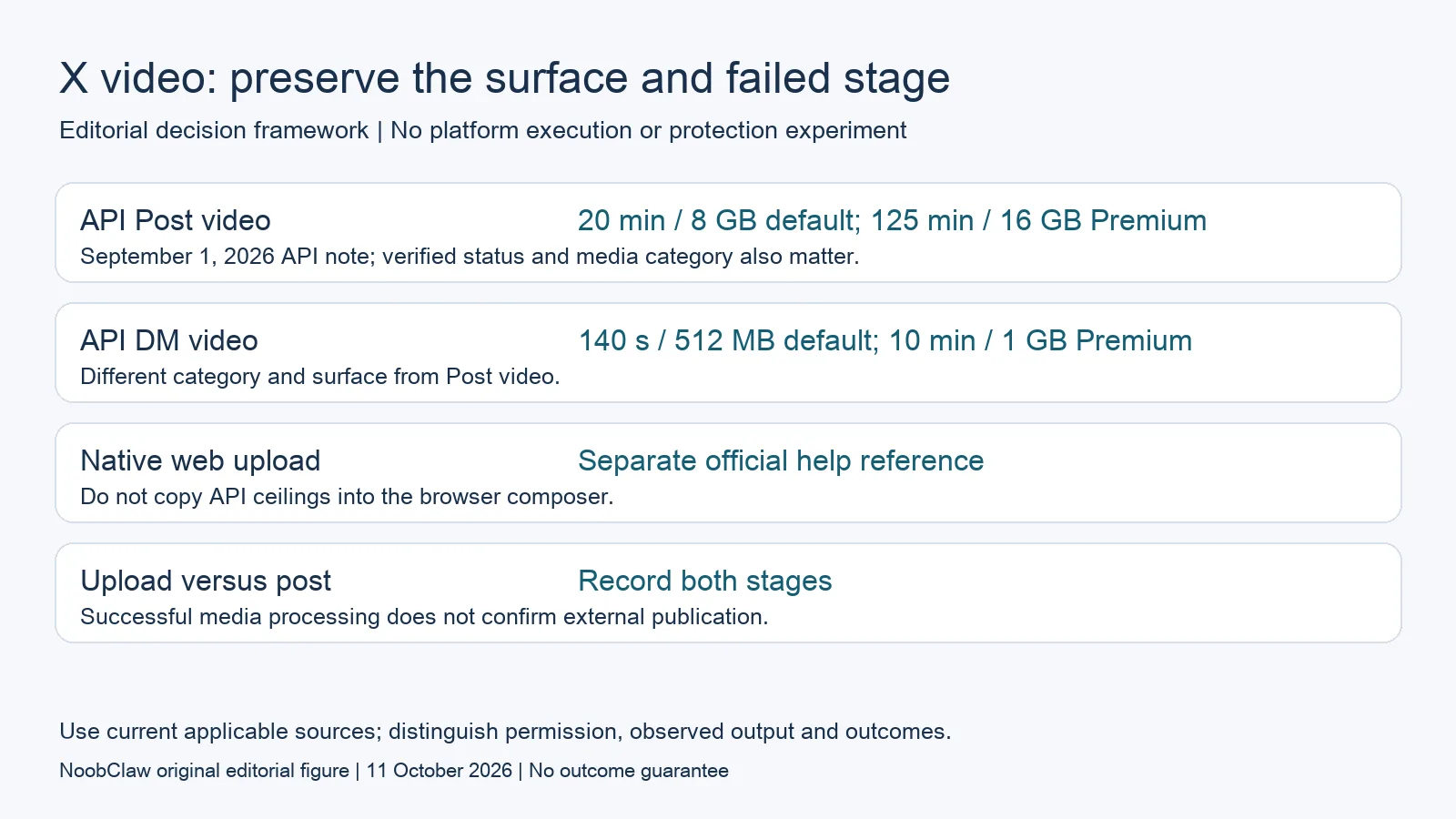
- API Post video: 20 min / 8 GB default; 125 min / 16 GB Premium. September 1, 2026 API note; verified status and media category also matter.
- API DM video: 140 s / 512 MB default; 10 min / 1 GB Premium. Different category and surface from Post video.
- Native web upload: Separate official help reference. Do not copy API ceilings into the browser composer.
- Upload versus post: Record both stages. Successful media processing does not confirm external publication.
A specific duration response is not every possible 403
The changelog documents a 403 message referring to a video exceeding the posting user’s allowed duration. Preserve the actual returned detail and the operation that returned it. If your response names that duration condition, compare it with the relevant account and media category. A generic 403 alone is not enough to conclude that Premium status is the cause or that purchasing it will resolve the request.
An error record should identify the stage, response status, sanitized detail, account context and media properties. Do not include access tokens or private user information in a shared diagnostic file. Distinguish a reported platform condition from your interpretation of its cause. If the requested operation failed before media processing, a later duration rule may be irrelevant to that observation.
For a hypothetical support handoff, an operator receives one upload response and a different post-creation response. The reviewer should assess both records instead of treating the first progress bar as proof of complete success. If evidence is missing, record the missing response and obtain it through the permitted workflow. This is a diagnostic design, not a reproduced outage or a guarantee that changing the account fixes an observed incident.
Upload, processing and attaching media are separate stages
The current chunked-upload guide describes dedicated initialize, append and finalize paths, followed by a status check when processing information is returned. It warns against using the previous INIT, APPEND and FINALIZE command-style parameters on the single upload path. The status GET retains its own STATUS treatment. Match the actual integration to the relevant current reference rather than declaring that every older implementation is broken.
The guide explicitly separates processing readiness from attaching the media identifier to a Post. A successful media upload can still encounter a rejection during post creation. Keep an upload identifier, processing result and actual creation response as separate evidence. An identifier alone is not an externally visible post, and a progress display does not establish delivery or audience access.
A buying decision should follow that evidence. If the actual failure concerns the stated media entitlement, evaluate the account or an appropriately edited asset. If the evidence concerns another requirement, investigate that requirement. Do not buy a developer upgrade merely because a duration error appears, and do not promise that no implementation problem exists because some uploaded bytes reached the service. The observed request has to support the diagnosis.
Native web upload has its own official reference
X’s current native-video help page says non-Premium web uploads can be up to one hundred forty seconds with a 512-megabyte maximum. Its Premium web instructions describe videos shorter than four hours and a sixteen-gigabyte maximum, with resolution-specific wording. The page includes overlapping descriptions of 1080p and 720p durations. Preserve the applicable instructions and actual composer result rather than inventing one rule that reconciles every surface.
These native values differ from the API note’s twenty- and one-hundred-twenty-five-minute Post rows. A difference between documented surfaces does not establish that one product is more generous for every account or format. It also does not certify that a browser-based automation product receives the API entitlement. The actual upload route and supported account conditions determine which reference belongs in the evaluation.
Method permission is a separate issue: X’s automation rules prohibit non-API website scripting. A native upload capability therefore does not authorize automated browser publication. This review describes the published limits without recommending a prohibited route, predicting enforcement or claiming that local sessions are safer. A human-reviewed file can be evaluated separately from the method proposed to deliver it.
Choose a creative output and permitted delivery route separately
A video-production tool can supply a draft file without establishing that X accepts or permits the intended posting workflow. Define the desired length, accepted media properties and review requirements before choosing a production route. Then evaluate the permitted destination workflow. A file suitable for a local preview can still need editing, rights review or a different format for the destination.
NoobClaw publishes this article. Its public local-video record concerns creative export, while its caption, hook and spoken-script tools draft text. That evidence does not contain a comparative X upload trial or certify an account-specific API entitlement. Evaluate these tools when preparation is the missing job. Do not treat the record as confirmation of browser publishing, approved automation or a guaranteed outcome after buying Premium.
The decision worksheet should have separate entries for the asset, destination surface, authenticated account, applicable limit and actual returned result. If a condition remains unknown, mark it unknown and keep the accepted creative work distinct from unfinished delivery. This avoids conflating production credits with an API access purchase or calling an uploaded file a successfully published campaign. Neither is evidence of clicks or paid conversion.
Choose the output you need: post-caption drafts, opening-line drafts or spoken-script drafts. These text tools have a limited anonymous allowance; they do not transcribe or publish a video.
For the related content and workflow decisions, read X MCP Server: API Access, Docs Search and Automation Rules and TikTok Automation: Content Creation and Publishing Limits. Each review has its own evidence and scope.
One local export does not reproduce an X entitlement test
The October 10, 2026 NoobClaw public record preserves a 441-character English input and a 32.6-second, 1080 × 1920, 30-frame-per-second local output. Its duration is below several published references, but that arithmetic does not prove destination acceptance. Generic or off-topic stock scenes still require review; audio quality and individual footage rights were not independently approved. No X upload, post response or externally visible publication is included. Use the record to inspect one creative artifact and the work remaining, keeping the account and delivery tests separate.
The script-to-video guide and public creative execution record document a local video result, not external-platform publication. Check the current product offer against the supported action you need.

Frequently asked questions
Will a higher developer API plan always allow a longer video?
The cited API note assigns its duration and size limits to the authenticated user’s status and media category. Other access conditions still need checking; a developer purchase is not proof of publication.
Does a successful upload prove my post succeeded?
No. Processing and media attachment are separate operations in the official guide. Preserve the actual post-creation response and destination result.
Can the same API figures be used for the web composer?
No. Native web-upload help has a separate reference. Read the actual surface and account conditions, and assess method permission independently.
Sources
Official material reviewed on October 11, 2026. Document conditions apply to their stated service and scope; the editorial examples are explicitly hypothetical.