
YouTube Auto Dubbing: When to Let It Run, When to Upload Your Own Audio Track, When to Open a Second Channel
- Auto dubbing is enabled by default for eligible creators, covers 27 languages, and can be switched off or set to "manually review dubs before publishing" in Studio → Settings → Channel → Advanced sett
- It skips videos over 120 minutes, videos with little or very fast speech, and videos that contain copyrighted content. Translation-repost channels are therefore mostly outside it from the start.
- Your own dubbed track (multi-language audio) keeps every language on one video and one channel, but you must delete an existing auto dub first, and YouTube may remove a track whose copyrighted audio d
- A channel per language splits your audience and puts each channel under the reused-content review on its own. Use it when the content itself differs by market, not to re-post the same video.
"I got an email from someone offering to dub all of my videos into Spanish to help tap into the Latin American algorithm." That was a creator on r/PartneredYoutube on September 24, 2026, and the first reply was suspicion: it would be easy to sell that service and then just run an AI over the videos. Both sides missed something. YouTube already runs an AI over your videos: auto dubbing is on by default for eligible creators, and since February 2026 YouTube says it is available to everyone.
So the real decision is not whether to dub. It is who produces the translated voice (YouTube, you, or a vendor) and where it lives (on the original video or on a separate channel). We read YouTube's help pages for automatic dubbing and multi-language audio on September 27, together with the monetization policies that decide what happens to translated content. The three routes break in different places, and translation channels get stuck on copyright and reused-content rules, not quality.
What does YouTube auto dubbing actually do for creators in 2026?
It generates translated audio tracks for your video and publishes them according to your settings. The help page is blunt about the default: "This feature is enabled by default for eligible creators." New uploads get dubs automatically, and "over time, we may also generate dubs for previously published videos." Dubbed videos are marked "auto-dubbed" in the description, and viewers can switch tracks in the player or set a preferred language.
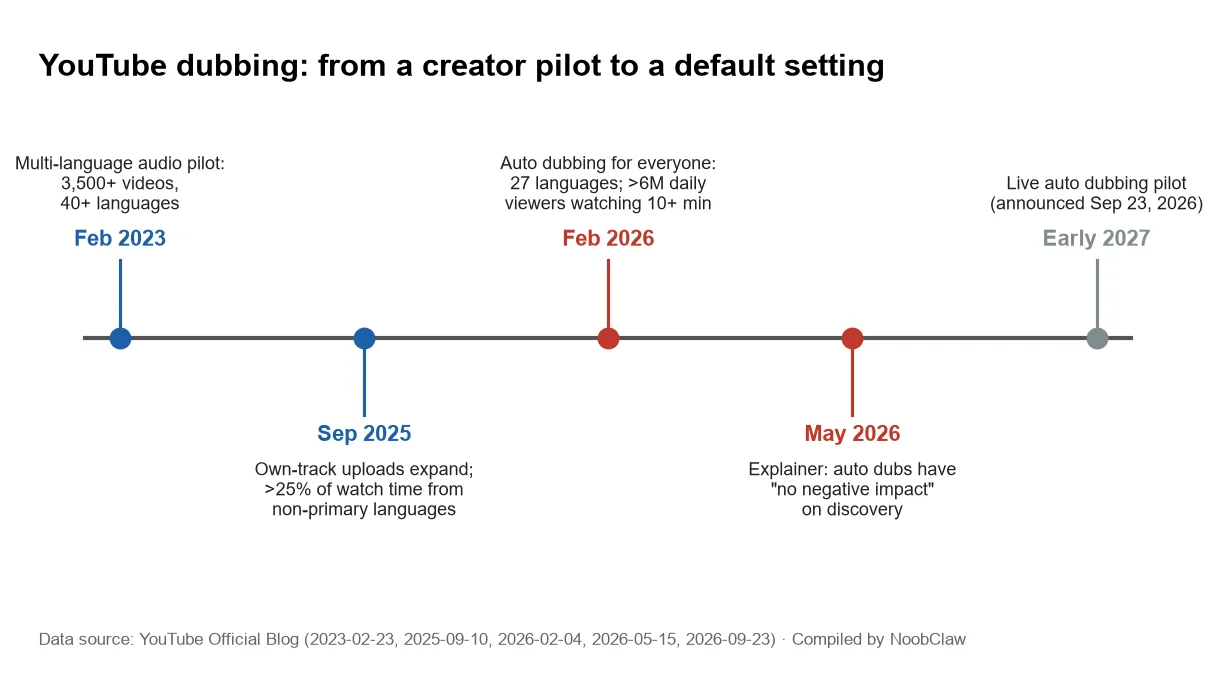
Scale is no longer a pilot. In a February 4, 2026 post YouTube said auto dubbing was "now available to everyone" in 27 languages, that it averaged more than 6 million daily viewers watching at least 10 minutes of auto-dubbed content in December 2025, and that Expressive Speech (tone and energy carried over) covers 8 of those languages. A lip-sync option exists but is experimental and limited to select channels.
What it will not dub matters more than what it will. A video is ineligible when:
- it runs longer than 120 minutes;
- it has no speech, only music, or very little speech, or the source language is unsupported or undetected;
- "the speech in the original audio is too fast";
- it "contains copyrighted content" (the page links this to Content ID claims).
On discovery, YouTube's May 15, 2026 explainer says dubbing "has no negative impact on viewer discovery". That is YouTube's own claim with no published data behind it, so treat it as a statement of intent. The practical risk is a mistranslated line published under your name. Checking "Manually review dubs before publishing" in Advanced settings holds every dub until you preview it, read its transcript, and publish or delete it (dub management is desktop Studio only).
Auto dub, your own audio track, or a channel per language: which one fits?
The short version: if you talk on camera, own everything in the video, and your content is not built on wordplay, leave auto dubbing on with manual review. If your audience in one language is already large enough that a flat joke costs you, upload your own track for that language. Open a separate channel only when the videos themselves would be different for that market.
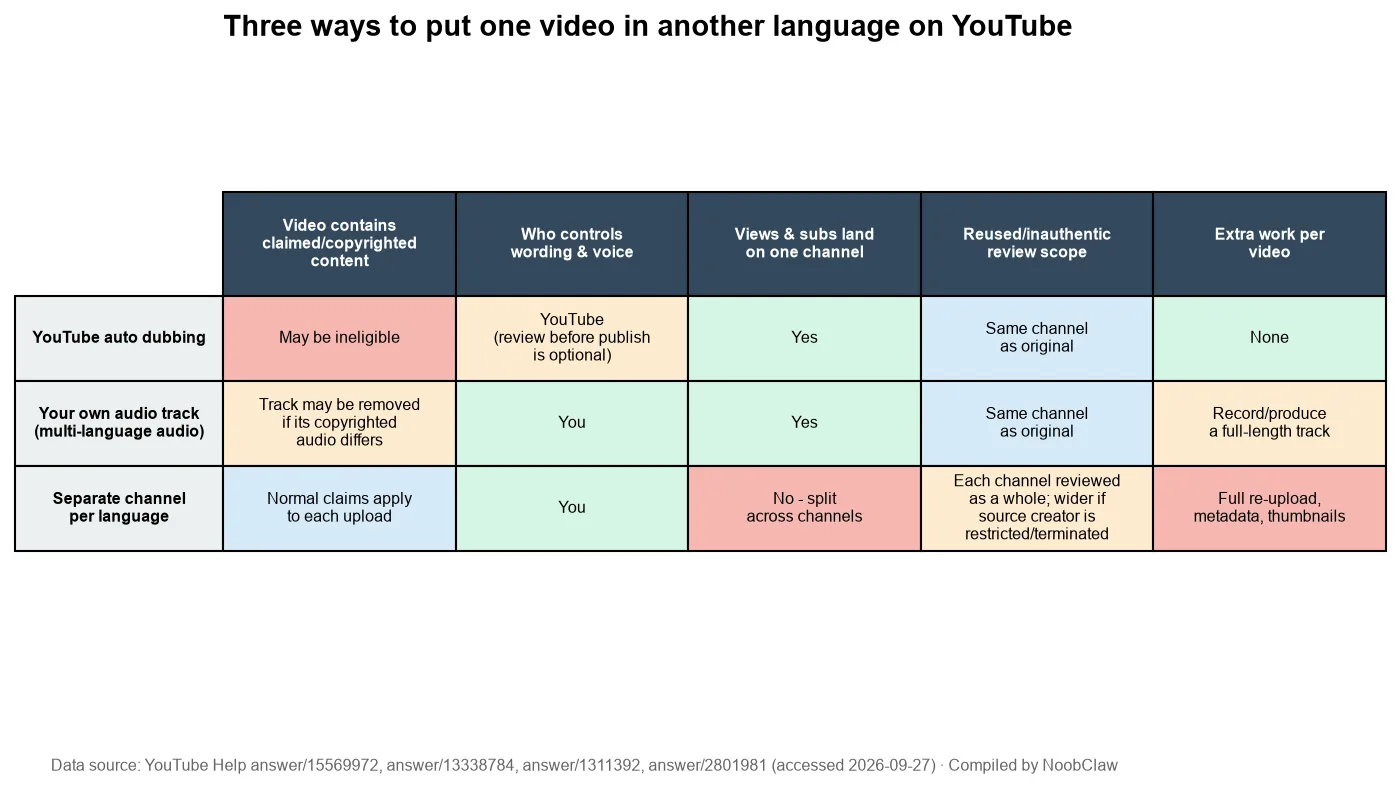
Your own track is the route YouTube built first. It is a separate feature, and the multi-language audio page says so directly: it "does not automatically create these tracks." Three conditions from that page decide whether it works for you:
- It needs Advanced features, which means phone verification plus channel history or ID/video verification.
- The file must be audio-only and "roughly the same length as your video". A translation that runs 20% longer has to be edited, not just generated.
- "If an automatic dub has already been generated for your selected language, you first have to delete the auto dub in that language." And: "If we detect that the copyrighted content in the secondary audio track is different from the original audio, the file may be removed."
YouTube reports the payoff: creators who uploaded their own tracks saw over 25% of their watch time come from the video's non-primary language (YouTube, September 10, 2025, data as of July 2025). That post also says Mark Rober averages over 30 languages per video.
The case that settled the channel question is MrBeast. Before tracks existed he ran dubbed copies of his videos on nearly a dozen side channels, which, as Tubefilter reported, he called "a lot more work". When YouTube launched the feature in February 2023, its announcement said he had dubbed his most popular videos in 11 languages and wanted to bring international viewers to his main channel. The pilot behind it: 3,500+ videos in 40+ languages. Speaking with YouTube's creator liaison, he said adding tracks on his main channel "added a lot of views per video for us." Our reading is that tracks win because they keep one video, one set of comments and one subscriber count. For the same video in another language, a second channel is the costlier route and gains you little.
A separate channel still has a job when the content is different: a Spanish channel with its own hosts, topics or formats. You can manage up to 100 channels from one Google Account. What changes is policy scope, which is the next section.
Why translation-repost channels hit a wall on every route
If your plan is to translate other people's videos, all three routes hit the same problem.
Auto dubbing excludes videos that contain copyrighted content, so a claimed repost usually won't get a YouTube dub. Your own track does not help: it still sits on a video that fails the monetization policy. YouTube's channel monetization policies define reused content as material repurposed "without adding significant original commentary, substantive modifications, or educational or entertainment value", and add a sentence channel owners tend to miss: "This policy applies even if you have permission from the original creator." It is judged per channel: "monetization may be removed from your entire channel."
A new voice is not new content. YouTube checks what you added, and a translated voice track only puts the same content into another language.
A channel per language doesn't escape it either. Each channel is reviewed as a whole, and YouTube's additional policies treat publishing content from restricted or terminated creators as circumvention that "may also apply to other channels you own". If the source creator is restricted or terminated, the risk is not limited to one channel. We covered that chain in how the circumvention policy treats multiple channels. Translating your own videos is a different case. Our reading: the reused test asks whether YouTube can tell you made the content, and your original upload is the evidence.
So what counts as "added" when the source is someone else's? A reworked script for the new audience, replaced examples, commentary that did not exist in the original: in effect, a new video. For tracks on your own videos the advice runs the other way. The multi-language audio page recommends that second-language tracks "match the primary language translation as closely as possible". A creator in a separate r/aitubers thread on AI dubbing put the quality problem in one line: most AI dubs "translate words instead of function." A six-second joke rarely survives as a literal nine-second sentence.
How do you set this up without losing control of your voice?
A setup for channels publishing their own work:
- Turn on manual review. Studio → Settings → Channel → Advanced settings → keep "Allow automatic dubbing" checked and check "Manually review dubs before publishing". Nothing ships unheard.
- Preview two videos per language in Studio → Content → Languages, and read the dub transcript. Look at names, idioms and jargon first; the help page lists these as the hard cases.
- Pick one or two languages to own. YouTube's own advice on the multi-language audio page is to "focus your efforts on one or two languages". For those, delete the auto dub and upload your own track.
- Translate titles and descriptions for the languages you dub. Search matches translated metadata, per the same page.
- Measure by audio track. Analytics can split views and watch time by audio language. Keep the languages that hold attention and let the rest stay auto.
If you produce the dubbed track yourself, the work is transcription, translation, a voice, and timing the new line to the old one. NoobClaw's translation engine runs that pipeline (ASR transcript, translation, a target-language voice and subtitles) and renders a finished video. It does not upload into YouTube's Languages tab, and it does not export a separate audio file for you; extracting a track is an extra step. Use it on footage you own, for the reasons in the section above. For how the same video behaves across channels, see posting the same video on two YouTube channels, and for the policy background, YouTube's inauthentic content policy.
YouTube said on September 23, 2026 that it will pilot live auto dubbing "starting in early 2027". That is a plan, not a feature yet.
FAQ
How do I turn off YouTube auto dubbing on my channel?
In YouTube Studio on a computer, go to Settings → Channel → Advanced settings, uncheck "Allow automatic dubbing" and save. To keep dubbing but approve each one, leave it checked and tick "Manually review dubs before publishing" instead. Single dubs can be unpublished or deleted per video under Content → Languages. A deleted dub cannot be republished.
Why didn't my video get an auto dub?
Check the five reasons on the help page: over 120 minutes, little or no speech, an unsupported or undetected language, speech too fast to dub cleanly, or copyrighted content in the video. Music-heavy vlogs and anything carrying a Content ID claim are the usual cases. The Languages page in Studio lists which languages are available for each video, including experimental ones.
Should I open a separate channel for each language instead?
Only if the videos themselves differ. For the same video, tracks keep all views, comments and subscribers on one channel, the route MrBeast took when he moved his dubs from side channels to his main channel. Separate channels are each reviewed for reused content on their own; see how many YouTube channels you can have for the account limits.
Sources
- Use automatic dubbing — YouTube Help — accessed 2026-09-27 — https://support.google.com/youtube/answer/15569972?hl=en
- Add Multi-language features to your videos — YouTube Help — accessed 2026-09-27 — https://support.google.com/youtube/answer/13338784?hl=en
- Get access to intermediate and advanced features — YouTube Help — accessed 2026-09-27 — https://support.google.com/youtube/answer/9891124?hl=en
- Unlocking a global audience with auto dubbing — YouTube Official Blog — 2026-02-04 — https://blog.youtube/news-and-events/youtube-auto-dubbing-expressive-speech/
- YouTube auto dubbing, explained — YouTube Official Blog — 2026-05-15 — https://blog.youtube/creator-and-artist-stories/youtube-auto-dubbing-explained/
- Unlock a world of viewers with multi-language audio — YouTube Official Blog — 2025-09-10 — https://blog.youtube/news-and-events/multi-language-audio/
- MrBeast, now in Spanish! Say hello to multi-language audio on YouTube — YouTube Official Blog — 2023-02-23 — https://blog.youtube/news-and-events/multi-language-audio-mrbeast-interview/
- MrBeast says YouTube's new multi-language dub tracks are a "giant win" for creators — Tubefilter — 2023-02-23 — https://www.tubefilter.com/2023/02/23/youtube-multi-language-tracks-tool-mrbeast-interview/
- YouTube channel monetization policies — YouTube Help — accessed 2026-09-27 — https://support.google.com/youtube/answer/1311392?hl=en
- Additional policies on YouTube — YouTube Help — accessed 2026-09-27 — https://support.google.com/youtube/answer/2801981
- Manage multiple channels — YouTube Help — accessed 2026-09-27 — https://support.google.com/youtube/answer/3046356
- New YouTube Live tools for fan funding, dubbing and more — YouTube Official Blog — 2026-09-23 — https://blog.youtube/news-and-events/made-on-youtube-live-tools-fan-funding-dubbing/
- Offer to dub my videos into Spanish (user post) — r/PartneredYoutube — 2026-09-24 — https://www.reddit.com/r/PartneredYoutube/comments/1wooyir/
- AI dubbing workflows and translation quality (user post) — r/aitubers — 2026-09-24 — https://www.reddit.com/r/aitubers/comments/1woy7u6/