
YouTube Shorts Scheduler for Multiple Channels (2026): What Studio Does Free, What Tools Charge per Channel
- YouTube Studio schedules Shorts for free, but one video at a time and one channel at a time (up to 15 uploads at once). A paid scheduler is worth it mainly when you run several channels or want one qu
- Some limits no scheduler can lift: YouTube's daily upload limit counts desktop, mobile and API uploads together; a Community Guidelines strike holds scheduled videos private; and API uploads from unau
- Per YouTube channel, Buffer Essentials is cheapest at 1 to 4 channels and again at 6 and 7 ($6 each; free for up to 3 channels with 10 queued posts each). SocialBee Bootstrap is cheaper at 5 and from
- Auto-published Shorts cannot carry YouTube library sounds on Buffer, Later only handles Shorts between 15 seconds and 3 minutes, and the API rejects near-miss sizes such as 1078 × 1920.
If you post Shorts to one channel, you probably do not need a scheduler: YouTube Studio already schedules for free. The question changes at three, ten or thirty channels, because Studio makes you schedule every video separately, channel by channel. A scheduler removes that work. It does not raise any of YouTube's own limits, and its price depends on how the tool counts a channel.
We read YouTube's help pages and Data API documentation, plus the pricing pages and Shorts help articles of Buffer, Later and SocialBee, on September 26, 2026. Prices are monthly billing in USD before tax.
Can you schedule YouTube Shorts for free in YouTube Studio?
Yes. YouTube's scheduled publishing help page describes the flow: upload, choose the Schedule card, set date, time and time zone. It works in Studio on desktop and in the YouTube app. The upload help page adds that "You can upload up to 15 videos at a time."
What Studio does not do is queue: each upload gets its own schedule, and each channel is a separate session. SocialBee's own Shorts help article puts it plainly: "You can upload multiple Shorts at once, but you must schedule each video individually."
Our rule of thumb: one or two channels, YouTube only, stay in Studio.
Which YouTube limits does a scheduler not remove?
These limits decide whether a multi-channel plan works.
The daily upload limit is shared. The upload help page says "There's a limit to how many videos a channel can upload each day across desktop, mobile, and YouTube API." A scheduler uploads through the API, so it draws from the same limit; it cannot add capacity. YouTube does not publish the number, though the same page links to a way to raise it through account feature eligibility (we covered what changes it in YouTube Shorts upload limit per day).
Strikes freeze the queue. The scheduling help page notes that if your channel has a Community Guidelines strike, "your scheduled video won't publish during the penalty period" (the upload page words it almost identically). It is set to private and you have to reschedule it afterwards. The strike help page sets that period at one week for a first strike and two weeks for a second within 90 days. Shorts scheduled to go live inside that window do not go out and have to be rescheduled by hand, whichever tool queued them.
The scheduler's API project has to be audited. YouTube's videos.insert reference states that "All videos uploaded via the videos.insert endpoint from unverified API projects created after 28 July 2020 will be restricted to private viewing mode," until the project passes an audit. The API getting-started guide gives each project a default of 100 videos.insert calls per day, "subject to change", with a form to request more. Established schedulers have cleared this; for a DIY script or an unknown tool it is the first thing that breaks, so ask whether its project is audited.
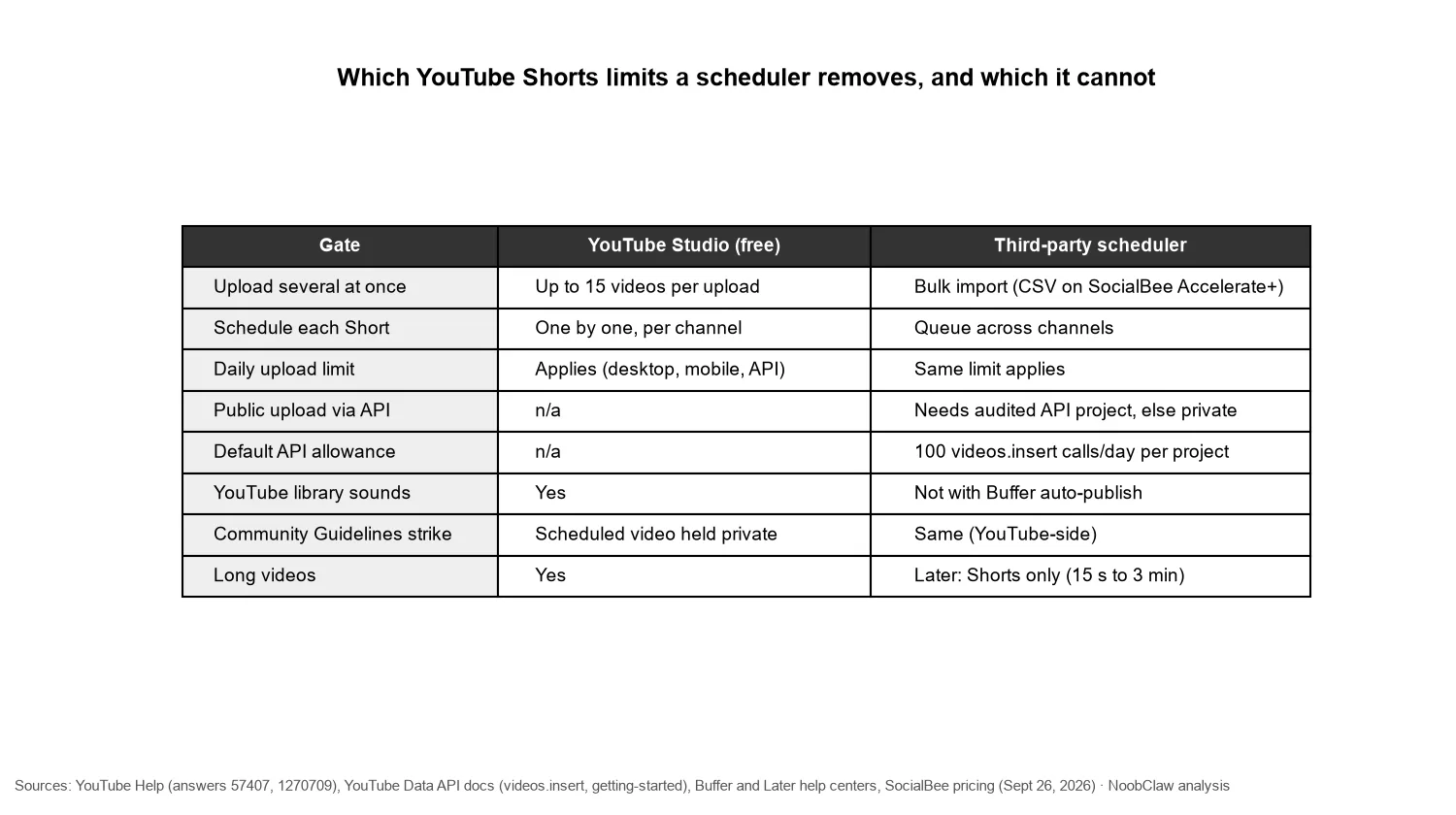
API uploads are stricter about files. Buffer's video troubleshooting page warns that Shorts need an exact 1:1 or 9:16 ratio and that "YouTube's API is stricter than its native uploader, so a slightly different size, such as 1078 × 1920, may upload directly to YouTube but still be rejected." Its Shorts help page adds that sounds and music from YouTube's library "aren't available for Shorts published automatically by Buffer"; to use them you switch to notification publishing and finish in the YouTube app.
A scheduler saves you the clicks. It does not buy you more uploads, it does not survive a strike, and it cannot attach a library sound for you.
How much does a YouTube Shorts scheduler cost per channel?
All three tools below auto-publish Shorts, and each counts a channel differently. Buffer bills per channel on a sliding scale: on Essentials the first 10 channels cost $6 each, channels 11 to 25 cost $4 and 26 to 50 cost $3. Its Free plan covers 3 channels with 10 queued posts each. SocialBee bills per profile in plans: Bootstrap $29 for 5, Accelerate $49 for 10, plus $15 per 5 extra profiles; CSV uploads and the bulk editor start at Accelerate. Later bills per "social set", and a set holds one profile from each network, so each YouTube channel needs its own set: Starter $25 for one, Growth $50 for two, then $15 per extra set.
| YouTube channels | YouTube Studio | Buffer Essentials | SocialBee (Bootstrap / Accelerate route) | Later |
|---|---|---|---|---|
| 1 | $0 | $6 (or Free) | $29 / $49 | $25 |
| 3 | $0 | $18 (or Free) | $29 / $49 | $65 |
| 5 | $0 | $30 | $29 / $49 | $95 |
| 6 | $0 | $36 | $44 / $49 | $110 |
| 7 | $0 | $42 | $44 / $49 | $125 |
| 8 | $0 | $48 | $44 / $49 | $140 |
| 10 | $0 | $60 | $44 / $49 | $170 |
| 20 | $0 | $100 | $74 / $79 | $320 |
| 30 | $0 | $135 | $104 / $109 | $470 |
| 61 | $0 | $206 | $209 / $214 | $935 |
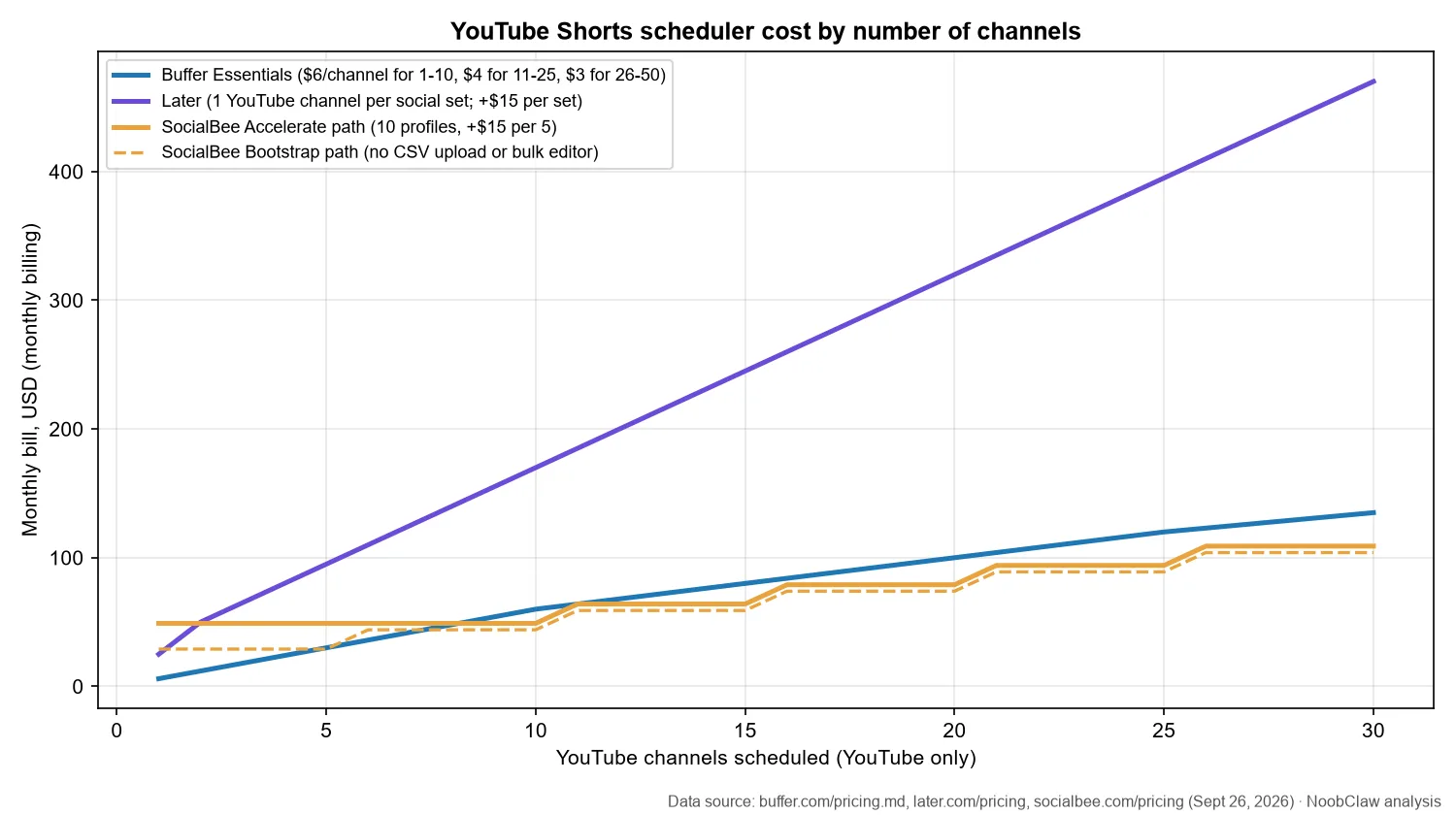
The Buffer figures for 1, 3, 5 and 10 channels match Buffer's own example table. Buffer is cheapest at 1 to 4 channels and again at 6 and 7 ($36 and $42 against $44), because SocialBee's sixth profile triggers a $15 pack. SocialBee Bootstrap wins at 5 ($29 against $30) and from 8 channels up ($44 against $48), until Buffer's $1-per-channel tier above 50 takes over: Buffer is cheaper at 61 to 63 channels ($206 against $209 at 61), the two tie at 64 ($209), SocialBee is $1 cheaper at 65, and from 66 Buffer is cheaper for good. If you need SocialBee's CSV upload, the Accelerate route passes Buffer at 9 channels ($49 against $54) and ties it at 11 ($64 each). Later is priced for one brand across many networks, and its pricing page caps scheduled posts at 30 per profile per month on Starter (180 on Growth), although its YouTube help page says current paid plans have no posting limit for Shorts; confirm with Later before relying on either. The same help page limits Later to Shorts of 15 seconds to 3 minutes, from desktop or iOS. SocialBee states no maximum for stacking 5-profile packs; confirm before planning many.
Which scheduler should you use for multiple YouTube channels?
Up to 3 channels: YouTube Studio, or Buffer Free if you want a single calendar. 4 to 8 channels: Buffer Essentials and SocialBee Bootstrap are within $8 of each other; Buffer is cheaper at 4, 6 and 7, SocialBee at 5 and 8, so choose on features. 9 to 65 channels: SocialBee, on Bootstrap plus 5-profile packs (always $5 cheaper than the Accelerate route); move to Accelerate only if you need CSV import and the bulk editor. 66 channels and up: Buffer's $1 tier is cheaper again. Later makes sense for YouTube only as one slot in a brand's set; from five channels up, buying a set per YouTube channel costs about three times the cheapest alternative or more ($95 against $29 at five channels).
YouTube renamed "repetitious content" to "inauthentic content" in its monetization policies on July 15, 2025, and the page is explicit that mass-produced content falls under it. Running many channels is allowed (one Google account can manage up to 100), but channels that repost the same Shorts across a network are what that policy and the spam policy are written for: it names "automated or synthetic mass-production" and says it covers "coordinated networks of channels". (Separate rules on linked channels and circumvention apply once a channel is terminated or restricted; we covered them in YouTube's circumvention policy.) A scheduler makes volume easy; it does not make each channel's content different.
One real example of the volume involved: the Japanese short-drama channel GOKKO CLUB, which YouTube featured in its Shorts series announcement, showed about 1.9K videos on its channel page when we checked on September 25. We have no information on how that channel schedules its uploads, but at that volume, scheduling each video separately in Studio is the bottleneck a scheduler removes.
All three tools above expect finished videos. NoobClaw is one option if the bottleneck is making the Shorts rather than timing them: a desktop app with video engines (for example remixing your own local footage, or narrated videos built on licensed stock footage) that can save videos locally for review or publish them to YouTube and other platforms through browser sessions you log into yourself. Because it uploads through the browser rather than the Data API, the unaudited-project rule does not apply. That is not a loophole: YouTube's Terms of Service prohibit accessing the service "using any automated means" without YouTube's prior written permission, so this route carries account risk that an audited API tool does not. Upload limits, strikes and the reused-content policy apply as usual, and your computer has to be on. We walk through what is safe to automate in YouTube Shorts automation tools and how bulk uploads behave in bulk uploading to YouTube.
FAQ
Does scheduling a Short hurt its views?
YouTube's help pages do not say scheduled Shorts are treated differently; a scheduled Short is a private video that turns public at the set time. API schedulers add their own constraints (exact aspect ratios, no library sounds on Buffer auto-publishing), and those can matter.
What is the best free YouTube Shorts scheduler?
YouTube Studio itself, for any number of channels, as long as you schedule each video by hand. Among third-party tools, Buffer's Free plan covers up to 3 channels with 10 queued posts per channel (September 2026). Unknown free tools risk the unaudited-project rule.
Can I schedule Shorts to several channels from one account?
In Studio you switch channels and schedule each one separately; one Google account can manage up to 100 channels. Buffer, SocialBee and Later let you connect several channels and queue them in one calendar, but each channel counts toward your bill (a channel on Buffer, a profile on SocialBee, a whole social set on Later), and each channel keeps its own daily upload limit.
Sources
- Schedule video publish time — YouTube Help — fetched 2026-09-26 — https://support.google.com/youtube/answer/1270709?hl=en
- Upload YouTube videos — YouTube Help — fetched 2026-09-26 — https://support.google.com/youtube/answer/57407?hl=en
- Videos: insert (quota impact, unverified project rule) — YouTube Data API documentation, Google for Developers — fetched 2026-09-26 — https://developers.google.com/youtube/v3/docs/videos/insert
- YouTube Data API overview: quota usage — Google for Developers — fetched 2026-09-26 — https://developers.google.com/youtube/v3/getting-started
- YouTube channel monetization policies (inauthentic content update, 2025-07-15) — YouTube Help — verified 2026-09-23 — https://support.google.com/youtube/answer/1311392
- Buffer Pricing (machine-readable, per-channel tiers) — Buffer — pricing last updated November 2025, fetched 2026-09-26 — https://buffer.com/pricing.md
- Using YouTube Shorts with Buffer — Buffer Help Center — fetched 2026-09-26 — https://support.buffer.com/article/562-using-youtube-shorts-with-buffer
- Troubleshooting video uploads in Buffer — Buffer Help Center — fetched 2026-09-26 — https://support.buffer.com/article/935-troubleshooting-video-uploads-in-buffer
- SocialBee Pricing — SocialBee — fetched 2026-09-26 — https://socialbee.com/pricing/
- How to schedule YouTube Shorts — SocialBee Help Documentation — fetched 2026-09-26 — https://help.socialbee.com/hc/en-us/articles/37970703514775-How-to-schedule-YouTube-Shorts
- Later Pricing Plans — Later — fetched 2026-09-26 — https://later.com/pricing/
- Schedule & Publish YouTube Shorts — Later Help Center — fetched 2026-09-26 — https://help.later.com/hc/en-us/articles/14720878941463-Schedule-Publish-YouTube-Shorts
- Community Guidelines strike basics — YouTube Help — fetched 2026-09-26 — https://support.google.com/youtube/answer/2802032?hl=en
- Spam, deceptive practices and scams policies — YouTube Help — fetched 2026-09-26 — https://support.google.com/youtube/answer/2801973?hl=en
- Terms of Service — YouTube — fetched 2026-09-26 — https://www.youtube.com/t/terms
- GOKKO CLUB Shorts (channel page) — YouTube — checked 2026-09-25 — https://www.youtube.com/@gokko5club/shorts