YouTube Shorts Upload Limit Per Day: No Published Number
- There is no published YouTube Shorts upload limit per day. YouTube's Help Center says it limits "how many videos a channel can upload in a 24-hour period across desktop, mobile, and YouTube API" and t
- Two things that change your limit are written down: strikes ("Community Guidelines strikes will affect how much you can upload"; a first strike blocks uploads for a week) and your feature-access tier
- Shorts, long videos, the app, Studio, a scheduler and an API script all draw on one counter. The Data API returns "uploadLimitExceeded" when the channel has "exceeded the number of videos that it may
- When you hit the wall: check strikes, check Feature eligibility in Studio, count every upload path, then "try again in 24 hours". The figures in forum answers (10 to 15 a day, 100 after verification)
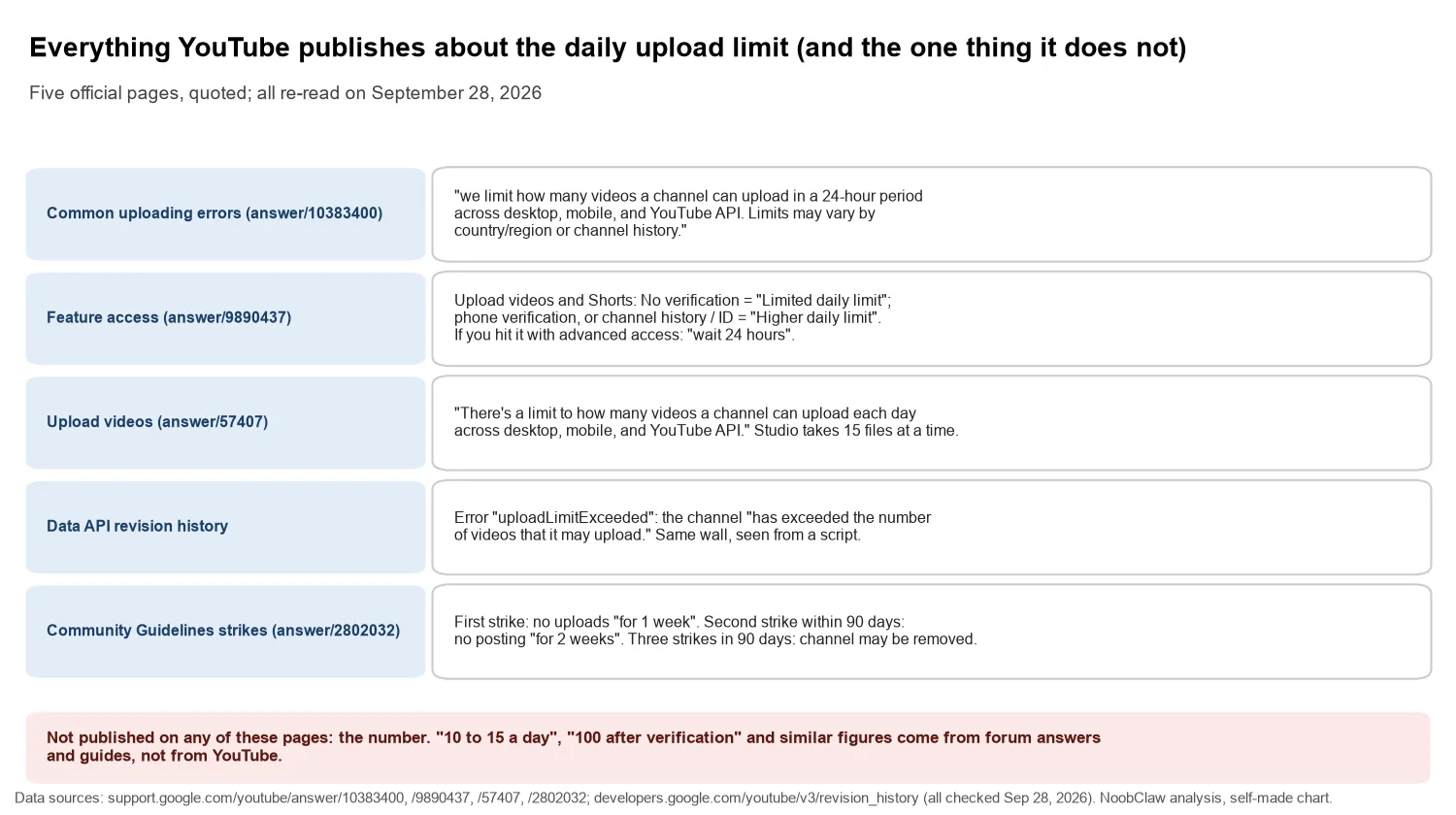
YouTube does not publish a Shorts upload limit per day. What it publishes, on the Common uploading errors page, is this: "To ensure safety at YouTube, we limit how many videos a channel can upload in a 24-hour period across desktop, mobile, and YouTube API. Limits may vary by country/region or channel history. Copyright strikes may impact channel history eligibility. Community Guidelines strikes will affect how much you can upload." The instruction when you hit it is "try again in 24 hours".
That paragraph is the whole official answer, and it is more useful than a number, because it tells you what moves the ceiling. We re-read five YouTube pages on September 28, 2026 to collect everything they say about the limit; this article is that collection, plus what to do in the order the pages imply.
What is the YouTube Shorts upload limit per day?
A per-channel, rolling 24-hour cap with an unpublished value that depends on where the channel is and how it has behaved. Three things follow from the wording. It is per channel, not per format: the sentence says "how many videos a channel can upload", and nothing gives Shorts (videos up to three minutes, vertical or square) their own counter. It is one counter across every door: "across desktop, mobile, and YouTube API" appears on the errors page and again on the Upload videos page, so a scheduling tool posting through the API is not a second allowance. And it is personal: "Limits may vary by country/region or channel history", which means any specific number you read is someone's observation of their own channel on a given day.
The Upload videos page does state one hard number: in Studio "You can upload up to 15 videos at a time". That is a batch size for the upload dialog, not the daily cap, and the two get merged in guides.
Which variables change your upload limit?
Verification tier. The feature access page has a table. The row "Upload videos and Shorts" reads "Limited daily limit" under No verification, and "Higher daily limit" under both Verification via phone number and Verification via channel history OR identity. The page adds what happens when you hit it: "Intermediate access: You might be able to verify your identity to upgrade to advanced access, which usually has higher limits. If you already have advanced feature access: You'll need to wait 24 hours before using that feature again." Your tier is under Studio, Settings, Channel, Feature eligibility. Phone verification is the documented step from Limited to Higher; identity verification is "usually" higher again, not a separate published cap.
Strikes. The strike basics page says how they bite: after a first strike "you will not be allowed to do the following for 1 week: Upload videos or live streams", a second strike within 90 days means "you will not be allowed to post content for 2 weeks", and "3 strikes in the same 90-day period may result in your channel being permanently removed". A strike is not a lower daily number; it is a block with a length, and waiting 24 hours does nothing about it. Copyright strikes, separately, "may impact channel history eligibility", which feeds the tier above.
Region. Named, not explained, and not something you can change. It is the reason two channels with identical histories can see different ceilings.
Missing from all of this is any statement that channel age, subscriber count or Partner Program status raises the limit. Those may correlate with "channel history", but YouTube does not say so.
Do Shorts, long videos and API uploads share the same counter?
Yes, and the API side is where the wall is most visible, because it comes back as an error string. The Data API revision history defines <code>uploadLimitExceeded</code>: "The videos.insert method returns this error to indicate that the channel has exceeded the number of videos that it may upload." That is the same channel-level wall seen from a script; an older tooling issue shows the exact message developers receive, "The user has exceeded the number of videos they may upload."
On top of it sits a second, project-level limit only API users see. The videos.insert reference lists "Quota impact: 100 calls per day" in its own Video Uploads bucket, and a GitHub issue opened May 27, 2026 documents uploads failing with a 429 for "Video Uploads per day" while the project's unit quota still had headroom. A self-built uploader can therefore hit two ceilings: the channel's daily limit and the project's API quota. If the tool uploads to your channel, its uploads count; if it posts through the API, its project quota counts too. Nothing about the route gives the channel a larger day. Which schedulers post which way, and what unverified API projects do to visibility, is in YouTube Shorts schedulers for multiple channels.
YouTube publishes the variables, not the value. Your number is whatever went through before the error, and it can be different next month.
What should you do when you see "Daily upload limit reached"?
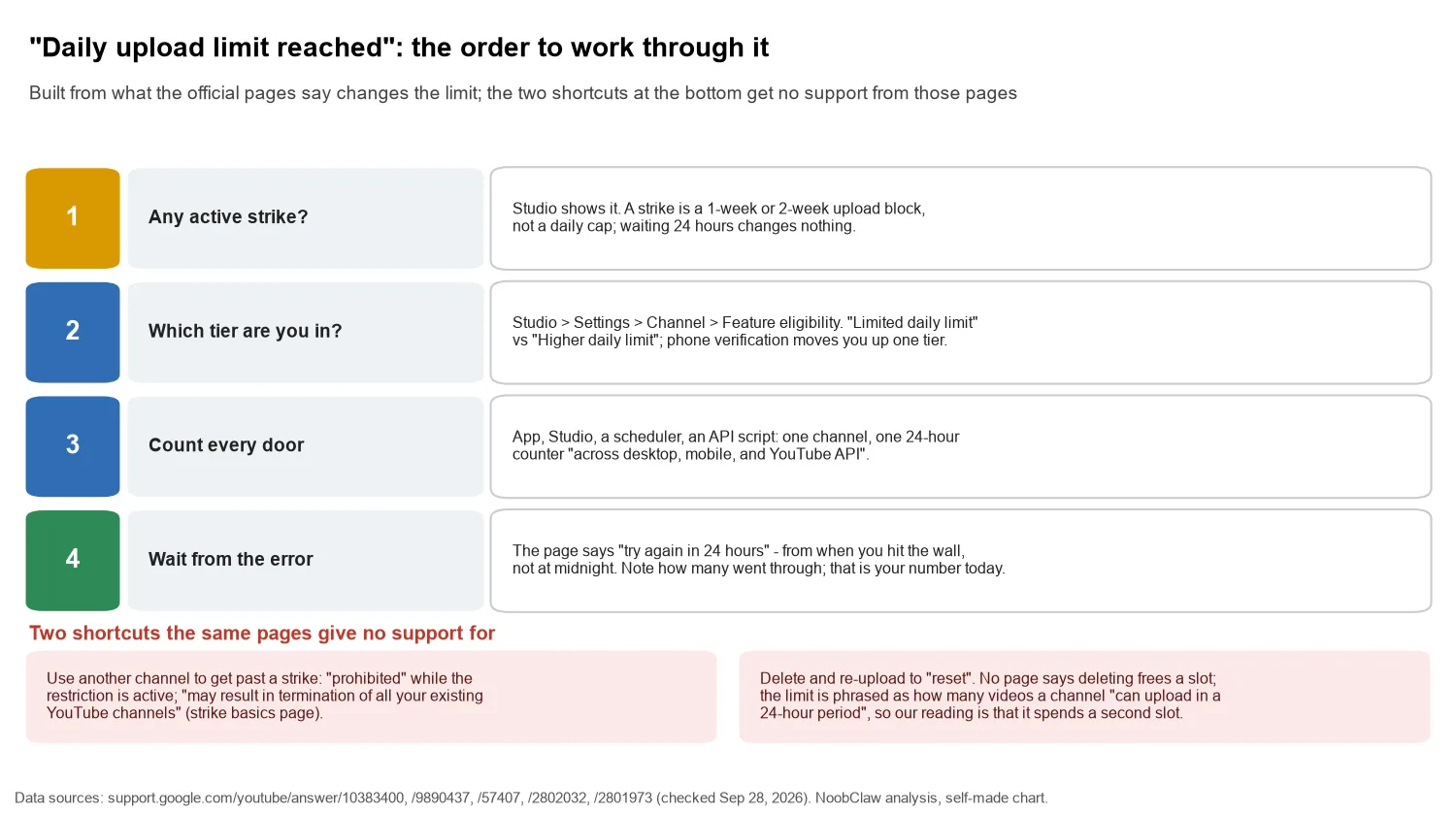
- Look for an active strike first. Studio shows it. A strike is a one-week or two-week block, and the 24-hour advice does not apply to it.
- Check your feature tier. Studio, Settings, Channel, Feature eligibility. On the Limited tier, phone verification is the documented step up. On advanced access, the page's own answer is to wait.
- Count every door. Uploads from the app, Studio, a scheduler and any script all landed on the same counter today.
- Wait 24 hours from the error, and write down the count. "Try again in 24 hours" reads as a rolling window from when you hit the wall, not a reset at midnight. The number that went through before the error is the closest thing to your personal limit, with YouTube's caveat that it moves with channel history.
Two shortcuts the same pages give no support for. If the wall you hit is a strike, opening or using another channel to keep uploading is circumvention: the strike basics page says you are "prohibited from using, creating, or acquiring another channel to get around these restrictions" while the restriction is active, and doing so "may result in termination of all your existing YouTube channels, any new channels that you create or acquire, and channels in which you are repeatedly or prominently featured." If the wall is the plain daily limit and the second channel is there to take the same clips, the spam policy applies instead: "we don't allow use of these tools to flood our platform with repetitive content," including "coordinated mass-production." Nor do YouTube's pages say that deleting a video frees a slot. The limit is phrased as how many videos a channel "can upload in a 24-hour period", so our reading is that a delete-and-reupload spends a second slot to end up where you were; plan on it not helping. If the reason you need dozens of uploads a day is the same video going to several channels, see posting the same video on two YouTube channels.
For operators with several channels, the useful reading is that the limit is per channel and per behaviour, so more daily output comes from more channels with clean histories and distinct content, not more uploads through one. NoobClaw is one tool that works that way: it publishes to each YouTube channel from your own logged-in browser with per-channel content, and each channel's uploads count against that channel's own limit exactly as a Studio upload would.
Why does every guide give a different number?
Because the number is real for whoever observed it. A YouTube Help Community thread from September 19, 2025 shows both halves: a user uploaded ten Shorts of a grandson's football plays, then the eleventh would not process ("No error, nothing. Just exclamation point; not uploaded"). The recommended answer, from a volunteer product expert rather than YouTube, states that YouTube "typically allows users to upload between 10 and 15 videos per day" and that verified accounts "can upload up to 100 videos per day". Neither figure appears on any YouTube page we read. The thread is worth reading for the symptom, which matches the Help Center's description, and for how confidently a non-official number gets attached to it: Uploading short video. Is there a limit a day.
A quick way to tell the two kinds of statement apart: YouTube's text names conditions ("vary by country/region or channel history", "Limited daily limit", "wait 24 hours"); the guides name integers. When you see an integer, ask whose channel it came from. And keep the reason for bulk-uploading separate from the wall itself. Volume does not move the monetisation thresholds, which count qualified views and hours rather than uploads (the arithmetic is in Shorts strategy under the 10 million threshold), and the spam policy is explicit that "posting a few variations of a video is ok" while flooding with "repetitive content" is not. A day that hits the upload wall with near-identical clips has a bigger problem than the wall; what that looks like when it reaches a channel is in a demonetised AI series.
FAQ
How many Shorts can you upload per day on YouTube?
YouTube does not publish a figure. Its pages say the limit varies by country or region and by channel history, that Community Guidelines strikes reduce it, and that unverified channels have a "Limited daily limit" while phone-verified channels have a "Higher daily limit". Figures such as 10 to 15 a day come from forum answers, not from YouTube.
Does the daily upload limit reset at midnight?
The Help Center says "try again in 24 hours" and describes a "24-hour period", which reads as a rolling window from the moment you hit it. Plan on a full day from the error rather than the next calendar date.
Does verifying my account raise the Shorts upload limit?
Phone verification moves "Upload videos and Shorts" from "Limited daily limit" to "Higher daily limit" in YouTube's table; the page does not say how much higher. Identity or channel-history verification gives advanced features, which "usually" have higher limits, and once there the stated remedy for hitting the limit is waiting 24 hours.
Sources
- Common uploading errors ("Daily upload limit reached") — YouTube Help — checked September 28, 2026 — https://support.google.com/youtube/answer/10383400?hl=en
- Learn about feature access for YouTube Creators — YouTube Help — checked September 28, 2026 — https://support.google.com/youtube/answer/9890437?hl=en
- Upload videos (How many videos you can upload per day) — YouTube Help — checked September 28, 2026 — https://support.google.com/youtube/answer/57407?hl=en
- Community Guidelines strike basics on YouTube — YouTube Help — checked September 28, 2026 — https://support.google.com/youtube/answer/2802032?hl=en
- Spam, deceptive practices & scams policies — YouTube Help — checked September 28, 2026 — https://support.google.com/youtube/answer/2801973?hl=en
- YouTube Data API revision history (uploadLimitExceeded) — Google for Developers — checked September 28, 2026 — https://developers.google.com/youtube/v3/revision_history
- Videos: insert (quota impact) — Google for Developers — checked September 28, 2026 — https://developers.google.com/youtube/v3/docs/videos/insert
- YouTube Data API videos.insert returns hidden "Video Uploads per day" 429 (issue #2753) — googleapis/google-api-python-client on GitHub — May 27, 2026 — https://github.com/googleapis/google-api-python-client/issues/2753
- "uploadLimitExceeded" returns exit code 0 (issue #206) — tokland/youtube-upload on GitHub — October 23, 2017 — https://github.com/tokland/youtube-upload/issues/206
- Uploading short video. Is there a limit a day (community thread) — YouTube Help Community — September 19, 2025 — https://support.google.com/youtube/thread/374458433/uploading-short-video-is-there-a-limit-a-day?hl=en