Free AI Social Media Post Generators: Limits and Draft Quality
- Choose the text you need: a post description, an opening line or spoken narration. A text generator is not automatically a transcription or publishing tool.
- NoobClaw's caption tool has a limited anonymous allowance; signed-in generation uses account credits. Buffer advertises optional free AI writing assistance.
- Use audience, visible content and supported facts as inputs, then review the result. This checklist does not guarantee a good answer from every interface.
- One public caption test demonstrates returned text, not task execution, account management or audience results. A separate desktop record demonstrates a local video draft.
A free AI social media post generator is useful when it returns a draft you can understand, edit and tie to real material. The useful comparison is therefore less about a universal best model and more about the requested output, input fields, allowance and review work. This page uses a public NoobClaw caption-generation record and current Buffer documentation to show what is actually established. It avoids guessing a provider's running costs or promising that free text tools will remain unlimited forever.
A useful draft says something your content can support. A successful generation does not demonstrate a successful post.
Decide whether you need a caption, hook or script
A post caption introduces a video or image in its accompanying description. A hook supplies an opening line for the video itself. A script is the spoken body you intend to record or synthesize. These can share a topic while requiring different wording. A caption that invites somebody to watch a demonstration is not the same thing as the demonstration's narration. Pick the output before comparing services.
NoobClaw's public caption page takes text about the video topic and a selected tone, then returns caption drafts. It does not upload a video, transcribe speech or add subtitles to footage. If your request is to turn existing audio into text, this is the wrong starting action. The related hook and script pages address other text outputs; none of these browser tools alone establishes a finished video or external publication.
For an illustrative recipe video, a description can name the dish and the step shown. An opening line can state the problem the recipe solves, while a spoken script needs the actual sequence and quantities you can substantiate. This is editorial guidance, not a generated example or a measured retention improvement. Do not insert an invented cooking result, time saving or personal experience merely because a draft sounds fluent.
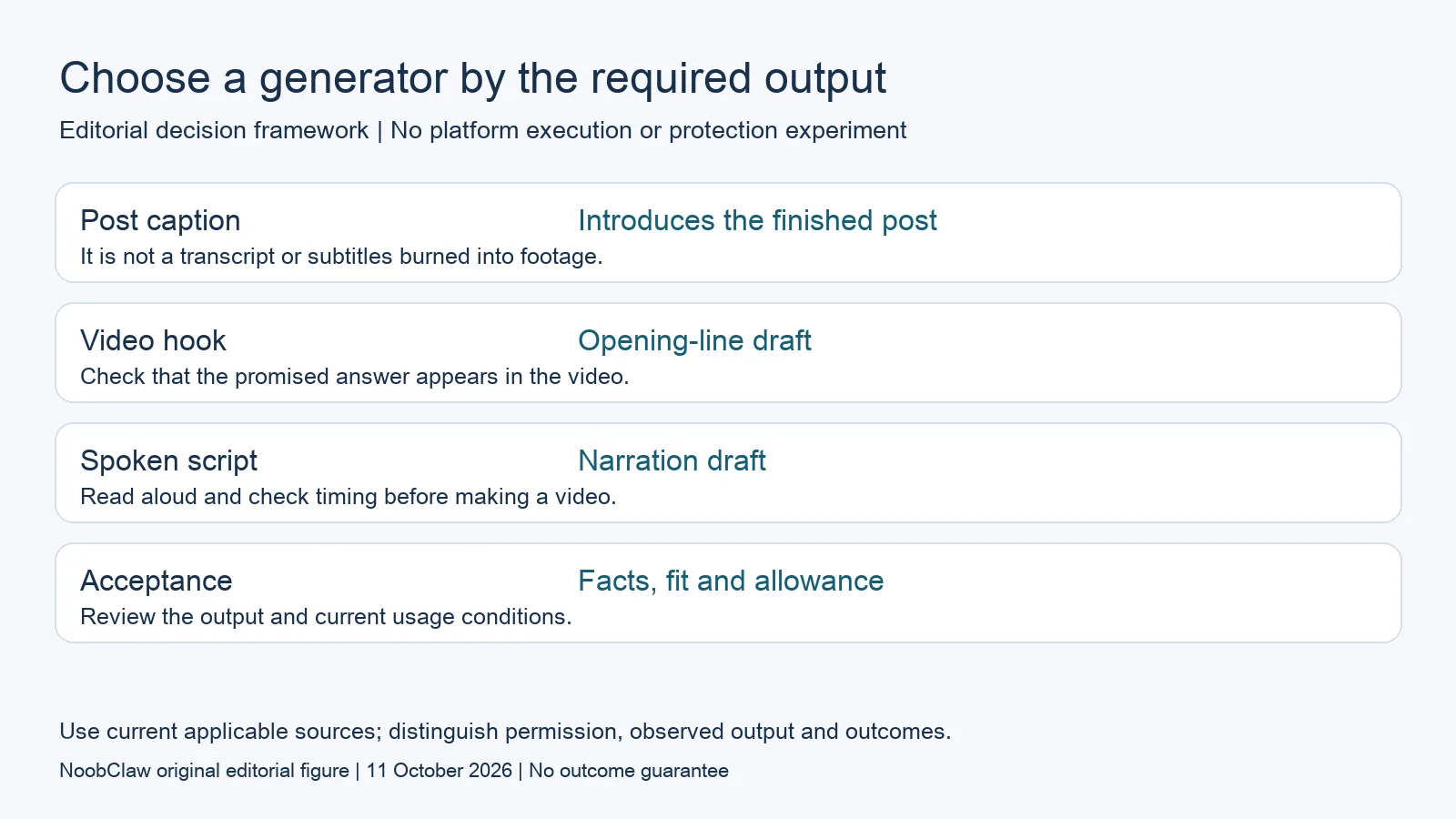
- Post caption: Introduces the finished post. It is not a transcript or subtitles burned into footage.
- Video hook: Opening-line draft. Check that the promised answer appears in the video.
- Spoken script: Narration draft. Read aloud and check timing before making a video.
- Acceptance: Facts, fit and allowance. Review the output and current usage conditions.
Compare inputs and free conditions honestly
The caption page accepts a text input of up to 400 characters. Anonymous visitors have up to five successful generations per tool, subject to shared browser/IP allowance and rate limits; signing in uses account credits. This is a limited entry offer, not unlimited free access and not a verified daily reset promise. Check the current interface and plans before designing a repeated production routine around it.
Buffer advertises an optional AI Assistant for brainstorming, rewriting and repurposing text, including use with a free account. That is an alternative advertised capability, not a quality comparison we measured against NoobClaw. Its separate scheduling and account conditions still matter if you intend to use it for publication. A writing allowance should not be interpreted as unlimited team access, connected accounts or supported media formats.
Do not infer a permanent business model from the fact that text can be generated. The cost of an individual request depends on the provider, model, input, output and commercial arrangement; this page has not measured those costs. A free interface can have operational limits even when its subscription price is zero. Compare what is available to you now, including any account or credit requirement, rather than predicting how the supplier will fund it indefinitely.
Give a supported brief instead of a bare topic
Describe the audience, what the viewer will actually see and the single useful detail the post should introduce. Add the tone and any important exclusions in fields the interface supports. If the tool only accepts a short topic, keep the brief within that constraint and edit afterward. A context checklist is a writing method, not evidence that every model responds equally well or that the method always improves a result.
Here is an illustrative brief: a beginner desk-setup video shows one cable-management change, using materials already visible in the footage. Ask for a plain description that does not promise faster work or a professional result. Compare a returned sentence with the footage: can somebody find the change it mentions? If not, revise the sentence or change the brief. The example does not prove that any tool generated a usable answer.
For several accounts, supply the relevant audience and material separately instead of assuming that regenerating one prompt creates distinct editorial identities. Any interface that supports different briefs may return different drafts. NoobClaw does not gain an exclusive ability to vary content merely because a competitor's marketing page describes scheduling. Choose wording that belongs to the actual author and account; never invent an identity or firsthand experience to make a draft sound personal.
Review a real output without turning it into a result claim
The public October 9 caption record saved a request about explaining how to organize three social accounts, review an AI draft and record task status. The response contained five caption options and was marked anonymous. It shows that the public text tool returned those options for that request. It does not show that three accounts were managed, that a workflow was executed or that any caption was posted to a social network.
One returned option introduced a simple way to organize three accounts and check a draft. Another used a first-person formulation about how the speaker organizes them. Before selecting that wording, the actual author would need to check whether the video and personal experience support it. A generated first-person sentence is not evidence of the author's experience. Keep the request, returned options and chosen edit together so the review can be reproduced.
Read a candidate aloud and inspect specific claims, numbers, promises and calls to action. Remove unsupported details and wording that points to material the video does not contain. There is no universal rule to delete the first and last sentence: a needed opening or safety instruction may be there. Judge each line by the job it performs, and do not describe stylistic edits as proof that viewers cannot recognize AI-assisted text.
Keep the next creative and publishing steps separate
If you need a video rather than a caption, inspect a documented video workflow and its prerequisites. NoobClaw's separate public desktop record used a supplied English script and exported a local 32.6-second, 1080-by-1920 video draft with an audio stream and visible subtitles. Some automatically selected stock imagery was generic or off-topic. That single case establishes a local output for that combination, not full audiovisual quality, licensed publication or reliable output for every brief.
The desktop offer includes sign-up credits and optional paid top-ups or subscriptions. A free download does not mean free unlimited execution. Check the selected task's current in-app quote and requirements rather than converting the saved video duration into a universal cost or generation-speed claim. Use the existing guide for the operational steps; this comparison should help you choose the action, not create a second tutorial for the same workflow.
Finally, review where the content will be published and what the service is authorized to do. Copying a draft yourself, receiving a reminder and delegating publication through an integration are different methods. A creative output does not certify account protection, audience growth or permission for another task. The useful endpoint of this page is a reviewed draft and a clearly chosen next step, with any external publication conditions checked separately.
Choose the output you need: post-caption drafts, opening-line drafts or spoken-script drafts. These text tools have a limited anonymous allowance; they do not transcribe or publish a video.
For the related content and workflow decisions, read TikTok Caption vs Hook vs Script: Choose the Right Draft and AI Content Generation for Social Media: Drafts to Video. Each review has its own evidence and scope.
Evidence you can inspect
The October 9 public caption record contains the original request and all five returned options. The separate October 10 desktop record contains one local video workflow and its output limits. They are different tests. Neither includes a measured search CTR, social engagement result or customer conversion, and the caption request did not perform the account tasks it described.
NoobClaw publishes this article. Its script-to-video guide and public creative execution record document a local video result, not external-platform publication. Check the current product offer against the supported action you need.

Frequently asked questions
Is a free AI post generator unlimited?
Check the specific offer. NoobClaw's browser tools have a limited anonymous allowance and account-credit conditions; another supplier's writing offer does not remove its separate scheduling or team limits.
Can this caption generator add subtitles?
No. The NoobClaw caption tool returns post-description text. Transcription, subtitles and video creation are separate actions.
How do I choose a usable draft?
Match it to the intended audience and actual material, check facts and personal claims, then edit. A supported brief helps guide review but does not guarantee output quality or audience results.
Sources
Official material reviewed on October 11, 2026. Document conditions apply to their stated service and scope; the editorial examples are explicitly hypothetical.