Tailwind vs Pinterest Schedulers: Accounts, Credits and Costs
- Current Tailwind products are priced per Pinterest account. Scheduling & Creation includes a shared credit allowance, not an independent unlimited allowance for every action.
- Buffer counts each connected channel, and its Free queue slots refill after publication; they are not a fixed monthly post quota.
- Compare the same billing term and the features you actually require. A raw price gap does not establish product parity.
- Both vendors offer creative assistance. NoobClaw’s local video example is a separate production record, not proof of Pinterest publishing or higher traffic.
Compare a Pinterest scheduler with Tailwind by the current account, credit and workflow conditions. Tailwind’s current pricing page sells individual Pinterest products per Pinterest account; an older three-network triplet table should not be used as its current offer. Buffer counts connected channels instead. Both also offer creative assistance, so a simple distinction between tools that schedule and tools that create would be misleading. This review uses dated official terms and explicitly hypothetical budgets to help you choose the required workflow, without declaring a universal winner.
Count the Pinterest accounts and the required actions first. A lower subscription price and a more useful workflow are different conclusions that need different evidence.
What Tailwind currently sells per Pinterest account
The current Tailwind offer separates Pin Scheduling & Creation, Pinterest SEO and Pinterest Engagement. Each is sold per Pinterest account. Scheduling & Creation is $29.99 on monthly billing or a $17.99 monthly equivalent with annual billing; its allowance is 300 credits per month. The current pricing data labels those billing terms separately. Treat an annual equivalent as a different commitment rather than a monthly cancel-anytime charge or an unexplained permanent promotion.
That changes the buying question from an old Pro, Advanced or Max triplet comparison. List each Pinterest account you need to operate and the product you require for it. An unused Instagram or Facebook slot in an earlier offer is not the denominator for this current purchase. Preserve any historical capture as a dated record, but use the current account definition and checkout conditions for a new budget. This review does not reconstruct when every historical package changed.
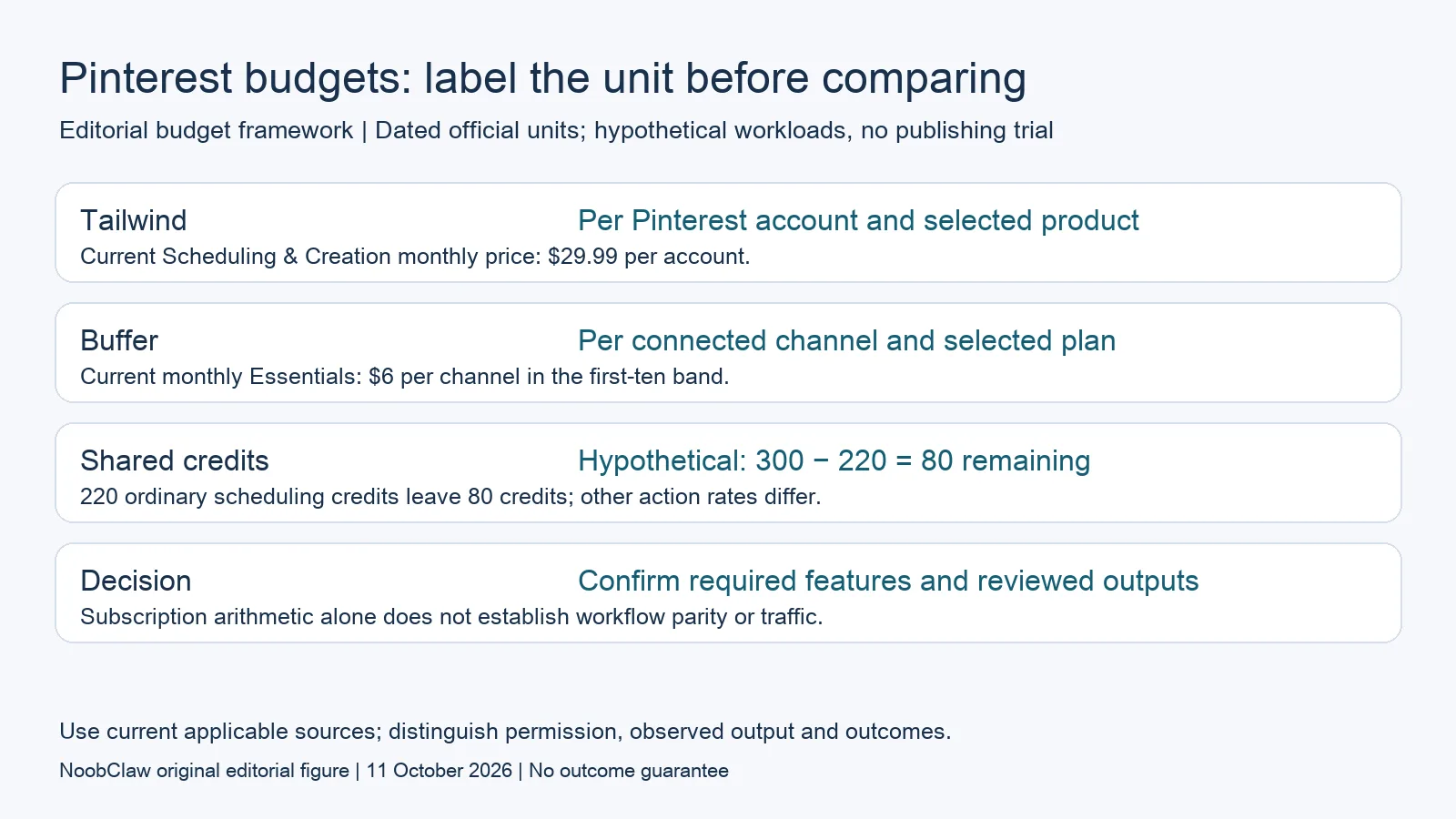
- Tailwind: Per Pinterest account and selected product. Current Scheduling & Creation monthly price: $29.99 per account.
- Buffer: Per connected channel and selected plan. Current monthly Essentials: $6 per channel in the first-ten band.
- Shared credits: Hypothetical: 300 − 220 = 80 remaining. 220 ordinary scheduling credits leave 80 credits; other action rates differ.
- Decision: Confirm required features and reviewed outputs. Subscription arithmetic alone does not establish workflow parity or traffic.
Treat Tailwind credits as a shared action budget
Tailwind’s FAQ says scheduling a Pin consumes one credit and the allowance also supports other credit-based actions, including SmartPin and keyword searches. It lists additional credits at $10 for 100 and an optional auto-refill. Do not interpret 300 credits as 300 Pins plus another independent allowance for every other feature. Identify the operations you intend to use and check their current consumption rules before estimating a mixed workload.
Here is a hypothetical ledger, not a publication experiment. Start with 300 credits and reserve 220 for ordinary scheduling at the documented one-credit rate. That leaves 80 credits for other eligible credit-based work. It does not establish that you can run 80 keyword searches, create 80 SmartPins or complete every requested action. Record the applicable action rate and any repeated work separately. If your estimate is uncertain, budget a bounded evaluation and inspect the actual usage record rather than assuming the missing units.
Compare Buffer on its own units and billing term
Buffer’s current official pricing document defines one channel as one connected social account. Monthly Essentials starts at $6 per channel for the first ten channels, with graduated rates thereafter. Its Free plan supports up to three channels and ten scheduled posts per channel at a time, with slots available again after publication. Those queue slots and Tailwind’s monthly shared credits measure different resources; a ratio between them would not be a like-for-like production comparison.
For four required Pinterest accounts, a simple monthly subscription calculation is four times $29.99, or $119.96, for Tailwind Scheduling & Creation and four times $6, or $24, for Buffer Essentials. These are budget calculations using the published units, before applicable taxes or additional services, not a verified checkout or comparative trial. The difference does not price the value of Tailwind’s Pinterest-specific production and research features, nor establish that Buffer meets every required action in your account mix. Compare those requirements before calling either setup better value.
Choose by the work you need to complete
Consider Tailwind when you want to evaluate its Pinterest-specific creation, scheduling and optional research tools together. Consider Buffer when your purchasing question includes connected channels across multiple networks and its supported workflow fits. If team approvals matter, compare the relevant plan and access conditions; Buffer’s Team plan includes unlimited members and approvals, which should not be silently assumed for Essentials. These are shortlist criteria, not measured recommendations that one provider will increase your traffic.
Creative assistance is not exclusive to a separate production category: Tailwind lists creation and copywriting, while Buffer lists its AI Assistant. Assess their actual outputs if that work matters to you. Prepare a brief with the source page, intended viewer question, permitted media and desired destination. Review the returned copy and images for accuracy and relevance. A feature being included does not prove that its output is original, useful or approved for publication, and a different prompt does not guarantee those results.
Keep production, scheduling and results separate
Before switching, document the existing tasks: draft the content, review it, approve the version, place it in a queue and inspect the visible destination. Name the owner of each step and the record you expect to keep. If a step is already handled outside the scheduler, evaluate the handoff instead of assuming you must buy the same feature twice. Conversely, a cheap scheduling subscription does not explain how an unfinished asset becomes a reviewable piece of content.
If the missing work is a narrated video, evaluate that production output separately. NoobClaw’s local example below documents one exported file with known limitations, rather than a test of Pinterest scheduling. Keep the required format and current product offer beside your decision. Inspect the actual file before publishing anywhere, and measure any subsequent audience or business response under its own destination and time window. A queue entry, export or tool subscription does not establish clicks, leads or paid sales.
Choose the output you need: post-caption drafts, opening-line drafts or spoken-script drafts. These text tools have a limited anonymous allowance; they do not transcribe or publish a video.
For the related content and workflow decisions, read Social Media Tool Pricing Models: Compare Workflow Costs and X API Costs in Schedulers: Base Fees, Add-ons and Usage. Each review has its own evidence and scope.
A bounded example of the separate production step
NoobClaw publishes this article. Its public October 10, 2026 execution record documents one local creative run: 441 English input characters became a 32.6-second video at 1080 × 1920 pixels and 30 frames per second. This establishes one input and exported file. It does not establish Pinterest or X publication, scheduler integration, copyright clearance, approval or audience response. Generic or off-topic stock footage still needs scene-by-scene review; voice quality and footage rights were not independently approved. Evaluate that separate production step before assuming it replaces a distribution or reporting service.
The script-to-video guide and public creative execution record document a local video result, not external-platform publication. Check the current product offer against the supported action you need.

Frequently asked questions
Does Tailwind still require equal Pinterest, Instagram and Facebook slots?
That is not the current pricing model checked here. The current page sells separate products per Pinterest account. Use its current billing and credit definitions rather than an older symmetric triplet table when preparing a purchase budget.
Are 300 Tailwind credits always 300 publishable Pins?
Ordinary scheduling is listed at one credit per Pin, but the same allowance also funds other actions. Keep those uses in the same ledger, check their rates and inspect the actual output and publishing status. A credit budget is not proof that every planned asset will be approved or published.
Which tool guarantees more Pinterest traffic?
This review measures no comparative traffic outcome and identifies no guarantee. Compare required account support, features, billing commitments and reviewed output. If you later publish, report actual clicks separately from a generated asset, a scheduled item or a subscription purchase.
Sources
Official material reviewed on October 11, 2026. Document conditions apply to their stated service and scope; the editorial examples are explicitly hypothetical.