Loomly vs Buffer: Account Bundles, Channel Rates and Teams
- Loomly’s current monthly cards are $65 Starter for twelve accounts and three users, and $332 Beyond for sixty accounts and unlimited users.
- Buffer monthly Essentials rates are $6, $4, $3 and $1 in successive channel bands; Team rates are $12, $4, $3 and $2.
- Sixty channels total $205 Essentials or $275 Team at those public monthly rates before tax. Buffer Team is not a $600 monthly flat-rate example.
- Buffer Team includes approvals and unlimited team members. Both vendors advertise AI assistance; waiting queues, creation slots and accepted assets remain distinct.
Loomly vs Buffer cannot be reduced to a straight line against a staircase. Buffer’s current paid channel rates have multiple price bands, and both products offer team approval features. Loomly bundles account connections and users into its published plans. This review uses monthly USD references to compare a representative inventory, explains the separate capacity counters and marks the workflow questions a price table cannot resolve. Official material was reviewed on October 11, 2026. The arithmetic examples are hypothetical, not a checkout quote or proof of equivalent product performance.
Graduated channel rates change the total. Compare the same billing interval and required approval workflow on both sides.
Calculate the graduated rates for the actual inventory
Buffer’s original pricing document lists monthly Essentials rates of $6 for channels one through ten, $4 for eleven through twenty-five, $3 for twenty-six through fifty and $1 after fifty. Team’s corresponding rates are $12, $4, $3 and $2. Each band contributes to the total. Treating every channel as a single $5 or $10 monthly rate mixes an old annual reference with the monthly calculation and ignores the published graduated structure.
At sixty channels, Essentials is ten times $6, plus fifteen times $4, plus twenty-five times $3, plus ten times $1: $205 monthly before tax. Team is ten times $12, plus fifteen times $4, plus twenty-five times $3, plus ten times $2: $275. At twelve channels, the respective totals are $68 and $128. These examples use the public monthly bands and do not establish a completed checkout, a negotiated price or exact feature equivalence with Loomly.
Loomly’s public monthly Starter card is $65 for twelve connections and three users; Beyond is $332 for sixty and unlimited users. Annual cards use different commitments. At the displayed sixty-connection inventory, the Buffer Team arithmetic is below the Loomly Beyond monthly card, so a claim that Loomly necessarily wins at scale because Buffer costs $600 does not follow. A purchasing decision still needs the required destinations, approvals and other functions.
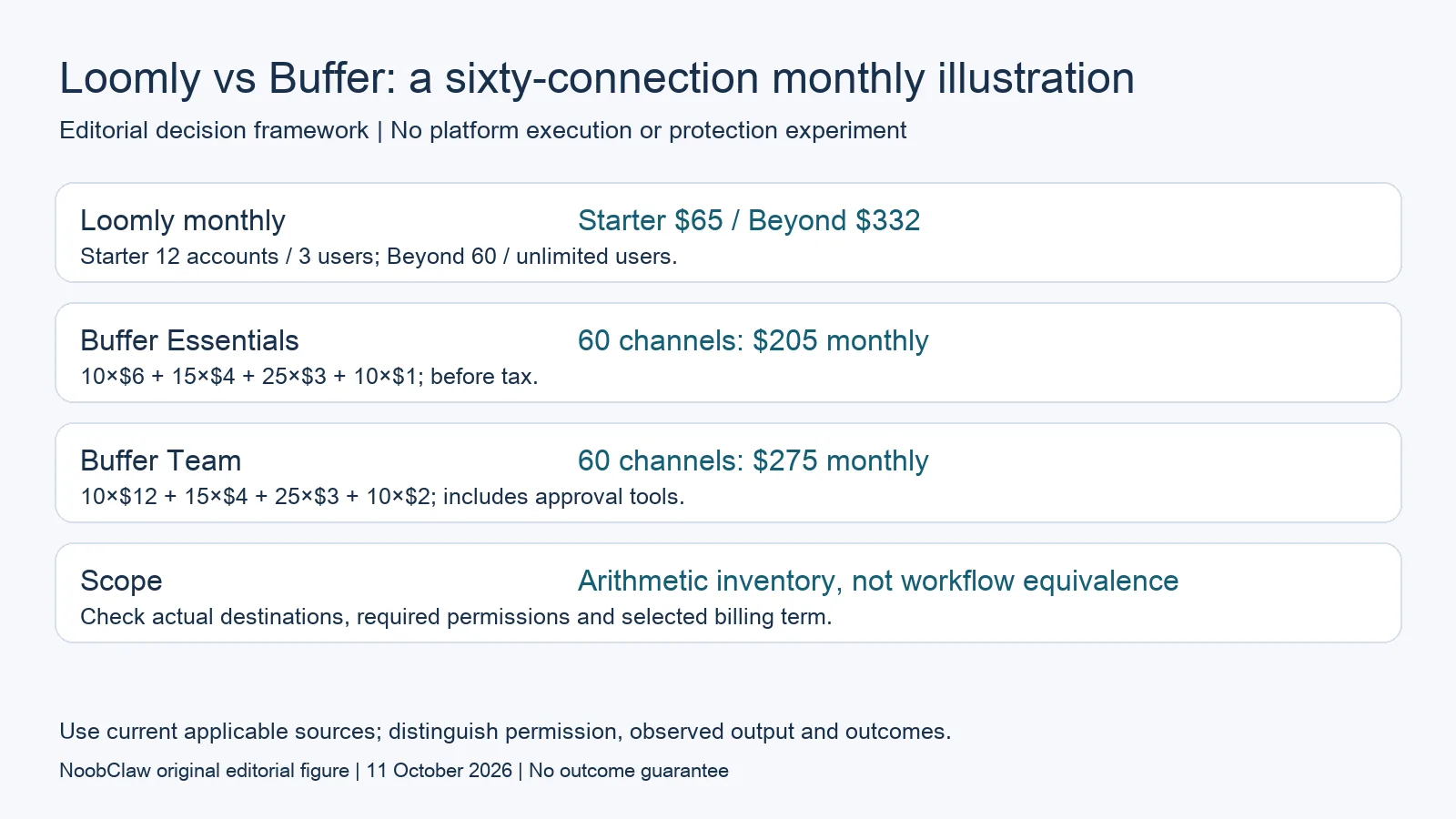
- Loomly monthly: Starter $65 / Beyond $332. Starter 12 accounts / 3 users; Beyond 60 / unlimited users.
- Buffer Essentials: 60 channels: $205 monthly. 10×$6 + 15×$4 + 25×$3 + 10×$1; before tax.
- Buffer Team: 60 channels: $275 monthly. 10×$12 + 15×$4 + 25×$3 + 10×$2; includes approval tools.
- Scope: Arithmetic inventory, not workflow equivalence. Check actual destinations, required permissions and selected billing term.
Count actual connections and participating people
Loomly’s current account-definition help says each calendar can connect one account of each supported platform. Three Facebook pages therefore require three calendars and consume three social-account connections. Calendars themselves are not the paid unit. The help says connecting the same social account to multiple calendars still counts each connection. Do not equate the allowance with distinct brands or assume a repeated connection is free.
The same help describes everyone participating in a calendar, including a client who only approves posts, as a user. Inviting the same person to several calendars counts that person once. For a hypothetical team of one editor and two client approvers, those three people fill Starter’s published three-user allowance. A fourth distinct collaborator is a different inventory question even if the number of connected accounts stays below twelve.
Begin with a small inventory showing each calendar, account connection and person who needs access. Record whether a person needs approval authority rather than general viewing. Check the actual destination and format support before pricing the complete workflow. A vendor’s supported-network list does not demonstrate that your account type, file and chosen delivery route have been tested, and an unused connection slot cannot substitute for a missing release permission.
Compare approval needs on the appropriate plans
Buffer’s Team pricing document includes approval workflow tools and unlimited team members. Loomly’s current table lists approval workflows on its paid plans and includes unlimited users on Beyond. Both advertise AI assistance, so neither is accurately described here as incapable of helping draft content. Those feature references do not demonstrate that the actual approval rules, client visibility or generated outputs are equivalent for the intended project.
Suppose an editor and two client approvers need access. Loomly’s public Starter inventory covers three users, subject to the workflow and destination requirements. Buffer Essentials is not an interchangeable comparison if Team’s approval tools are needed. Price the relevant plan and verify who can make the release decision. A user count by itself cannot show whether a rejection blocks scheduling or whether a changed accepted file requires renewed approval.
Use a harmless draft that represents the client’s account, asset format and reviewer relationship. Inspect visibility, version changes and the configured publication rule before relying on it for delivery. Preserve the observed result and any unresolved requirement. This is a suggested evaluation, not an authenticated test of either service or a guarantee that inviting a client ensures the approved version is the one ultimately published.
Check the documented expansion route before upgrading
The public pricing page presents Starter with twelve accounts and Beyond with sixty, then a custom Enterprise arrangement for sixty-one or more. Loomly’s newer customization help, updated June 18, 2026, separately describes self-service account add-ons for accounts needing sixty or more: the Beyond billing controls adjust capacity in multiples of ten. It does not publish the additional price in that help article. Check the actual billing configuration instead of concluding that no add-ons exist anywhere.
For fewer than sixty connections, that customization help directs customers who reach their social-account limit to the available predefined plans. It describes upgrades at any time and downgrades at the next billing cycle. These references explain the documented route; they do not establish a personally negotiated quote or every account’s available arrangement. The pricing page and help have different descriptions for larger inventories, so confirm the applicable option before committing.
A hypothetical roster growing from twelve to thirteen connections exceeds the published Starter allowance. If it moves between the displayed monthly Starter and Beyond cards, the public difference is $332 minus $65, or $267 monthly. That is a difference between two subscription cards, not the price of one individually purchased account and not a guaranteed invoice for every customer. A sixty-five-connection request also needs the documented larger-capacity route and its actual price confirmed.
Distinguish missing assets from missing approvals
The presence of a calendar does not show that a team has finished assets. Equally, a finished export does not show that a client has accepted the claim, that the destination account is connected or that a live post exists. Write down which step is missing before adding another subscription. Candidate products can cover more than one step; a category label is not evidence that a feature is absent, and advertised AI assistance is not a measured equivalence of finished outputs.
NoobClaw publishes this comparison and offers separate caption, hook and spoken-script outputs alongside a documented local script-to-video workflow. These are relevant when preparing material for review. Its public record does not establish integration with either scheduler, enforce a client’s approval rules or demonstrate publication to external accounts. Choose the supported production action you need, inspect the actual output and keep delivery and approval requirements in the purchasing decision.
A hypothetical team may already have an accepted script but need a vertical video. Another may have the final file but be waiting for the client’s decision. Those teams have different immediate requirements even when they operate the same number of accounts. Compare a representative asset and its reviewer permissions rather than infer suitability from a tool’s name. A locally successful export does not establish audience reach, click-through rate, rights clearance or a paid conversion.
Choose the output you need: post-caption drafts, opening-line drafts or spoken-script drafts. These text tools have a limited anonymous allowance; they do not transcribe or publish a video.
For the related content and workflow decisions, read Loomly Pricing: Monthly Plans, Account Limits and Free Tier and Buffer Free Plan Limits: Queue Slots, Users and Upgrades. Each review has its own evidence and scope.
A separate local production example
NoobClaw publishes this article. Its public October 10, 2026 execution record documents one local creative run: 441 English input characters became a 32.6-second video at 1080 × 1920 pixels and 30 frames per second. This establishes the input and exported file for that run. It does not establish a client approval, scheduler integration, external publication, copyright clearance, monetization acceptance or audience response. Generic or off-topic stock footage still requires scene-by-scene review, and voice quality and footage rights were not independently approved. Use the bounded example to assess the separate production step. A paid plan or a successful export cannot replace review of the actual asset, the rights available for its intended use and the destination’s requirements.
NoobClaw publishes this article. Its script-to-video guide and public creative execution record document a local video result, not external-platform publication. Check the current product offer against the supported action you need.

Frequently asked questions
Is Buffer pricing a flat line at every channel count?
The current monthly reference has graduated bands. Sixty channels total $205 on Essentials or $275 on Team before tax using those bands; the appropriate plan depends on required features.
Does only Loomly offer approvals?
No. Buffer Team lists approval workflow tools and unlimited team members. Confirm each product’s actual settings and access requirements rather than asserting equivalent enforcement.
Does unlimited scheduling mean unlimited finished assets?
No. Connected accounts, people, generation allowances and accepted outputs are separate questions. A public scheduling description does not establish rights, publishing success or audience response.
Sources
Official material reviewed on October 11, 2026. Document conditions apply to their stated service and scope; the editorial examples are explicitly hypothetical.