Mixpost Pricing: License, Updates and Self-Hosting Costs
- Self-hosted Lite is free; Pro lists $299 and Enterprise $1,199. Cloud is a separate hosted subscription.
- Paid licenses include one year of updates and a fallback right to use the downloaded version; that is not guaranteed future integration compatibility.
- A license-only division is a limited comparison. Include hosting, required services and operating work before estimating payback.
- Check the exact publishing action: a supported-network name and a software license do not establish application approval.
Mixpost’s self-hosted pricing is a software-license purchase, while Mixpost Cloud is a separate subscription offer. The one-time license fee is useful to know, but it does not establish the running cost or a guaranteed payback date. Compare the software, hosting, update entitlement and required integrations against a genuinely replaceable subscription. This review uses current official documents checked on October 11, 2026, and hypothetical arithmetic with explicit assumptions. We have not installed Mixpost or run a comparative publishing test.
A license permits use of software under its terms. It does not establish that every required network, asset or publishing action will work in your installation.
Separate the self-hosted license from the Cloud offer
The current self-hosted price page lists Lite as free, Pro at $299 and Enterprise at $1,199, excluding VAT. Paid editions list one domain or subdomain and one year of free updates. Lite lists lifetime updates. Mixpost Cloud is linked as a separately hosted service; its terms describe recurring billing. Do not take a Cloud trial banner as evidence of a free trial for the same self-hosted license or treat the two purchase types as identical.
Make your comparison sheet identify both the edition and hosting model. The same product name can appear in a license offer, a hosted offer and an integration guide, but the operating responsibility differs. If you already have infrastructure, record which parts can genuinely be reused and which require new work. Existing hardware or a server subscription may reduce additional spending without making installation, backups and maintenance disappear from the workload.
Write down the required job before deciding whether Enterprise is relevant. The current terms distinguish internal use from selling access as a SaaS. A license suited to your team does not automatically authorize a different resale arrangement. Check the named business and installation in the applicable terms; do not infer a permission from an unlimited-account slogan. This article reports the public conditions and does not certify your contract or application approval.
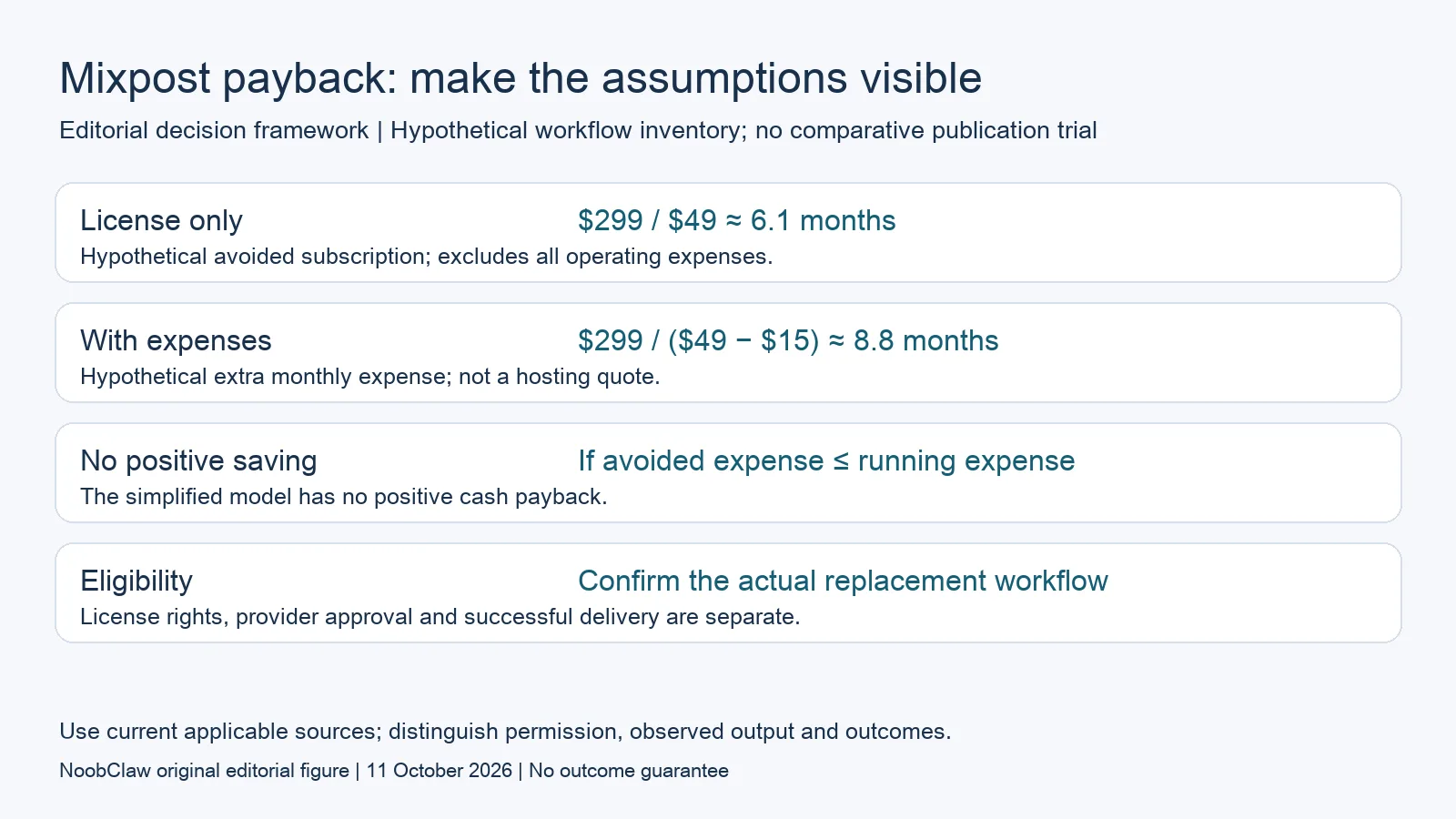
- License only: $299 / $49 ≈ 6.1 months. Hypothetical avoided subscription; excludes all operating expenses.
- With expenses: $299 / ($49 − $15) ≈ 8.8 months. Hypothetical extra monthly expense; not a hosting quote.
- No positive saving: If avoided expense ≤ running expense. The simplified model has no positive cash payback.
- Eligibility: Confirm the actual replacement workflow. License rights, provider approval and successful delivery are separate.
Read update rights separately from operating compatibility
The current self-hosted terms bind a license to one domain or subdomain, require another for a different installation address and prohibit sharing the same license across different businesses. They allow use of the latest downloaded version after license expiry and require renewal for later updates. Those conditions should sit next to the fee in your budget. A fallback right to use a version is not a promise that external services keep accepting its requests indefinitely.
Avoid two opposite assumptions: that an expired update entitlement immediately makes an installation fail, or that a perpetual fallback makes future operation certain. Neither follows from the license. Record the version you install, the integrations you require and the available update path. If a relevant change appears, evaluate whether your version needs it. The practical question is the supported behavior of that installation, not a prediction that every connection fails in month thirteen.
Keep renewal cost unresolved when a current applicable quote is unavailable. Do not insert a guessed percentage into a multi-year total or call the first payment the whole lifetime cost. Compare an option with continued updates and an option that keeps the downloaded version, describing the work each would require. That gives a buyer a visible decision without treating optional renewal as either universally unnecessary or guaranteed protection from every integration change.
Use a payback equation with explicit assumptions
A license-only calculation can answer a narrow question: how many months of a genuinely cancelled subscription equal the initial license payment? At a hypothetical $49 per month, $299 divided by $49 is about 6.1 months. This excludes operating expenses, taxes, updates, migration and differences in coverage. It is an arithmetic comparison, not a claim that Mixpost pays for itself in six months or that the subscription is actually replaceable.
For a simple cash scenario, let L be the initial license outlay, M the monthly subscription you would actually cancel and H the additional monthly hosting and required-service expense. The illustrative payback expression is L divided by M minus H, only when M exceeds H and the required work is equivalent. With L = $299, M = $49 and H = $15, that is $299 divided by $34, about 8.8 months. The hosting number is hypothetical, not a server quote.
If M is less than or equal to H, this simplified comparison has no positive monthly cash saving to repay the license. If you keep the existing subscription, M is not an avoided expense and cannot be counted as a saving. Price migration or internal time on separate lines under an explicitly chosen method. A calculation can become more detailed without becoming a measured business return; keep the assumptions and the observed invoices distinguishable.
Budget provider setup and the actual publishing action
Mixpost’s current services guide says developer apps and provider keys require setup on self-hosted instances; the integrations are configured per application rather than separately for every workspace. Cloud already has the provider setup in place. This describes a hosting-model difference, not a claim that every user will wait weeks or that every provider has the same requirements. Inventory your required networks and investigate the specific service conditions before buying.
TikTok illustrates the difference between a listed connector and an eligible action. Mixpost’s current self-hosted integration guide places internal Pro use in Sandbox mode, where Direct Post is unavailable, and reserves its App Review path for Enterprise. Automatic publication requires the applicable Direct Post approval. A Pro license therefore does not by itself establish your intended public TikTok workflow. Ask about that exact installation and action instead of interpreting a pricing-page platform name as approval.
Plan a bounded evaluation with an account you are permitted to operate and an asset you have reviewed. Record configuration, consent, the returned status and the final destination separately. Keep secrets out of screenshots and purchasing notes. A queued item or accepted request is not a confirmed visible post. This review has not performed the installation or that evaluation, so it makes no claim about your approval time, delivery reliability or future audience response.
Decide what part of the workflow the license replaces
A self-hosted scheduler may be relevant when your team wants to maintain its publishing workspace and has the capacity to operate it. Check the actual roles, handoffs and destinations you need; an unlimited account allowance does not establish unlimited server capacity or every required feature. For someone who wants the provider to run the service, inspect the hosted offer separately. Neither operating model is automatically the cheapest once the required work is included.
If the missing work is creative production, evaluate scripts and assets before assuming a different scheduler is the answer. NoobClaw’s public local video record below offers a bounded artifact to inspect, while its current text tools offer drafts for specific creative jobs. These are not evidence that a desktop production workflow replaces a server scheduler, approval process or analytics suite. Budget the missing step and require a corresponding output record.
Finish with a dated decision record: hosting model, edition, installation scope, required providers, update assumption, cancellable expense and observed evaluation result. Leave uncertain costs and permissions visible. Revisit the sheet when your workflow or the documents change. The useful outcome is a defensible purchase calculation for work you can actually replace, rather than a headline saying one payment removes every limit or ensures a return.
Choose the output you need: post-caption drafts, opening-line drafts or spoken-script drafts. These text tools have a limited anonymous allowance; they do not transcribe or publish a video.
For the related content and workflow decisions, read Mixpost Lite vs Pro: Networks, Updates and Publishing Limits and Postiz Self-Hosted Costs: Server, Providers and Maintenance. Each review has its own evidence and scope.
A separate local creative output
NoobClaw publishes this review and sells a desktop product. Its public October 10, 2026 record documents one local run: a supplied 441-character English script produced a 32.6-second video at 1080 × 1920 and 30 frames per second. Some sampled visuals were generic or off-topic. The record establishes an exported file, not a Mixpost integration, client approval, external publication, rights clearance or audience result. Voice quality and footage rights were not independently approved. Inspect the actual draft and the work needed to make it acceptable before budgeting a production layer. This single case does not establish scheduler parity or a cheaper finished deliverable.
The script-to-video guide and public creative execution record document a local video result, not external-platform publication. Check the current product offer against the supported action you need.

Frequently asked questions
Is Mixpost a one-time payment?
The self-hosted price page lists one-time paid licenses; Mixpost Cloud is a separate hosted subscription. The first license fee does not establish total operating cost. Record the hosting model and edition, check the applicable terms and keep the update entitlement separate from the right to use a downloaded version.
When does the license pay for itself?
No measured payback is established here. License-only division omits running expenses and assumes a subscription you actually cancel. Use the stated hypothetical equation only when the replaced workflow is equivalent and the monthly avoided expense exceeds the additional running expense. Include other costs under explicit assumptions.
Does Pro include unrestricted TikTok auto-publishing?
That is not established by the listed connector. The current self-hosted guide describes Pro’s internal Sandbox path without Direct Post and an Enterprise App Review path. Check the intended action and required approval. A purchased license or a scheduled status does not prove public publication.
Sources
Official material reviewed on October 11, 2026. Document conditions apply to their stated service and scope; the editorial examples are explicitly hypothetical.