Planable vs Buffer: Workspace Prices, Channels and Approvals
- Planable Basic and Pro list monthly USD references of $39 and $59 per workspace before tax; annual billing has a different commitment.
- Buffer Essentials and Team start at $6 and $12 per channel monthly, with graduated rates. Team includes approval tools; it is not a scheduler without review features.
- Planable counts created entries; Buffer Free limits waiting scheduled entries to ten per channel on three channels. These are different counters.
- Both vendors advertise AI assistance. NoobClaw’s separate local export does not establish integration, client approval or publication through either service.
Planable vs Buffer is a question about workflow and billing units before it is a question about the smallest displayed price. Planable charges for workspaces with page and creation limits; Buffer charges paid subscriptions by connected channels. Both advertise AI assistance, and Buffer Team includes approvals. This review compares current public references, explains the different counters and offers an inventory you can adapt to your own client work. Official material was reviewed on October 11, 2026; the examples are hypothetical, and we have not authenticated a trial or completed a checkout.
Count the connected destinations, required approvals and newly created entries before comparing subscription totals.
Compare prices with the same billing interval
Planable’s current pricing help lists Basic at $39 per workspace per month or $390 yearly, and Pro at $59 monthly or $590 yearly. Its linked pricing document is dated June 2026 and remains available; the newer help article corroborates the monthly references. A rounded $33 or $49 monthly equivalent on an annual card should not be presented as a month-to-month charge. Applicable tax and the selected configuration still need checking.
Buffer’s original pricing document lists monthly channel rates in bands: Essentials $6 for channels one through ten, $4 for eleven through twenty-five, $3 for twenty-six through fifty and $1 after fifty. Team’s corresponding rates are $12, $4, $3 and $2. A hypothetical twenty-channel subscription therefore totals $100 on Essentials or $160 on Team before tax. These are arithmetic examples from public monthly rates, not an observed checkout, and Essentials does not substitute for Team’s approval features.
A cost comparison also needs the workspace structure. Four clients with separate Planable workspaces are a different purchase from one workspace with several client destinations. A lower public total may fail the required approval, client separation or format requirement. Use the same account inventory and payment term, then check the actual settings. Do not describe one product as universally cheaper because a small illustration produces a lower number.
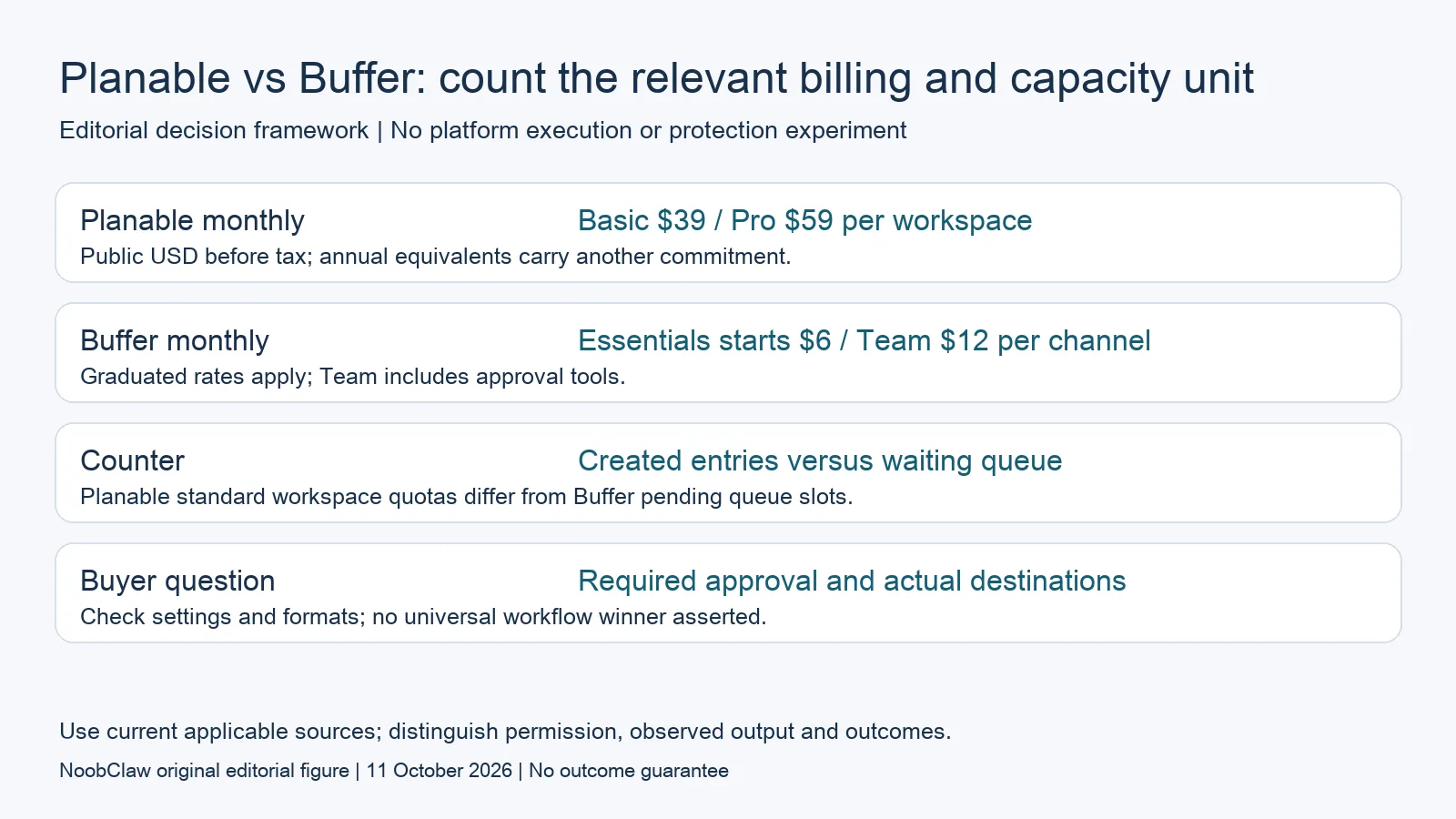
- Planable monthly: Basic $39 / Pro $59 per workspace. Public USD before tax; annual equivalents carry another commitment.
- Buffer monthly: Essentials starts $6 / Team $12 per channel. Graduated rates apply; Team includes approval tools.
- Counter: Created entries versus waiting queue. Planable standard workspace quotas differ from Buffer pending queue slots.
- Buyer question: Required approval and actual destinations. Check settings and formats; no universal workflow winner asserted.
Choose the approval workflow, not just a user count
Planable’s help distinguishes optional approval, where content can proceed without approval, from required approval on Pro. Enterprise adds multiple levels. Paid plans list unlimited users, but that user count does not turn Basic’s optional workflow into a required one. Confirm who can approve and how changes after approval are handled; permissions and an acceptance record are part of the workflow requirement, not a consequence of the number of invited colleagues.
Buffer Team’s current pricing document includes unlimited team members and approval workflow tools. Buffer also advertises its AI Assistant, while Planable lists AI assistance in its paid-plan feature material. Neither vendor can accurately be described here as incapable of helping draft content. These public feature references do not establish equivalent access controls, equal output quality or a successful trial of your team’s exact process.
For an illustrative agency requiring a client decision before release, specify the editor, approver, asset version and publication rule. Optional approval does not satisfy an enforced-approval requirement just because the client can leave a comment. Evaluate the appropriate paid plan and its configuration on each side. Keep the eventual publication result separate from the recorded approval, especially when the asset changes after the decision.
Keep Buffer’s waiting queue separate from Planable creation
Buffer Free currently provides three channels and ten waiting scheduled entries per channel; publication can free a slot. Its pricing FAQ lists a five-thousand-post per-channel fair-use cap without specifying a monthly reset there. Do not convert that number into a monthly publication guarantee or assume a team can never encounter it. The displayed queue capacity and a completed live publication answer different questions.
Imagine ten accepted posts waiting on a single free channel. When one publishes, a queue slot may be available for the next entry. That is different from a monthly creation counter that records entries when they are made. Count each destination’s actual waiting inventory and check the supported format. One asset reused across accounts does not automatically prove that every destination can receive the same file with the same caption and account permissions.
A team creating drafts ahead of a campaign should track creation time, proposed publication time and successful delivery separately. That inventory gives the software comparison a useful basis without promising unlimited production or a higher click rate. If a queue or creation counter behaves differently from the public description in your permitted test, preserve the observed counter and ask for clarification before purchasing additional capacity.
Check the creation counter and the actual upgrade route
Planable’s post-count help article says paid limits depend on creation date in the current calendar month. Reaching that limit prevents new creation until reset, while editing, reviewing, approving, scheduling and publishing existing entries remain available. Free has fifty created entries in total, not fifty renewed each month. Removing an entry does not restore that lifetime free allowance. A publication date therefore does not identify when a creation cap will be reached.
The newer pricing help article lists an extra-post add-on for Pro at $49 monthly or $490 annually and describes five hundred created posts a month across all workspaces. This company-wide description differs from the standard per-workspace limits. Ask the vendor to confirm how that option applies to your configuration and how it interacts with standard quotas before buying it. Additional capacity is not necessarily a requirement to buy another workspace, and the older post-count article does not describe this newer add-on.
For a hypothetical workspace using four pages with thirty newly created entries for each, the inventory is four connections and one hundred twenty entries. All four Basic page slots are used and its sixty-entry monthly creation limit is exceeded. It is not half the page allowance. The date the cap is reached depends on entry creation. If the same proposed publications are entered in advance, a publication calendar alone cannot establish the creation month or the reset available to that workflow.
Distinguish missing assets from missing approvals
The presence of a calendar does not show that a team has finished assets. Equally, a finished export does not show that a client has accepted the claim, that the destination account is connected or that a live post exists. Write down which step is missing before adding another subscription. Candidate products can cover more than one step; a category label is not evidence that a feature is absent, and advertised AI assistance is not a measured equivalence of finished outputs.
NoobClaw publishes this comparison and offers separate caption, hook and spoken-script outputs alongside a documented local script-to-video workflow. These are relevant when preparing material for review. Its public record does not establish integration with either scheduler, enforce a client’s approval rules or demonstrate publication to external accounts. Choose the supported production action you need, inspect the actual output and keep delivery and approval requirements in the purchasing decision.
A hypothetical team may already have an accepted script but need a vertical video. Another may have the final file but be waiting for the client’s decision. Those teams have different immediate requirements even when they operate the same number of accounts. Compare a representative asset and its reviewer permissions rather than infer suitability from a tool’s name. A locally successful export does not establish audience reach, click-through rate, rights clearance or a paid conversion.
Choose the output you need: post-caption drafts, opening-line drafts or spoken-script drafts. These text tools have a limited anonymous allowance; they do not transcribe or publish a video.
For the related content and workflow decisions, read Buffer Free Plan Limits: Queue Slots, Users and Upgrades and Planable vs Loomly: Monthly Prices, Accounts and Approvals. Each review has its own evidence and scope.
What the local production record establishes
NoobClaw publishes this article. Its public October 10, 2026 execution record documents one local creative run: 441 English input characters became a 32.6-second video at 1080 × 1920 pixels and 30 frames per second. This establishes the input and exported file for that run. It does not establish a client approval, scheduler integration, external publication, copyright clearance, monetization acceptance or audience response. Generic or off-topic stock footage still requires scene-by-scene review, and voice quality and footage rights were not independently approved. Use the bounded example to assess the separate production step. A paid plan or a successful export cannot replace review of the actual asset, the rights available for its intended use and the destination’s requirements.
NoobClaw publishes this article. Its script-to-video guide and public creative execution record document a local video result, not external-platform publication. Check the current product offer against the supported action you need.

Frequently asked questions
Does Buffer support approvals?
Its current Team pricing document includes approval workflow tools. Confirm the required settings and reviewer access rather than describing Buffer as having no comparable review function.
Is Planable Basic enough for mandatory sign-off?
Planable documents none or optional approval on Basic and required approval on Pro. Unlimited users do not change that distinction. Evaluate the plan against the actual requirement.
Must a Planable user buy another workspace for more posts?
The newer pricing help describes a Pro extra-post add-on and a company-wide five-hundred-entry monthly allowance. Confirm how it applies to the intended configuration; another workspace is not the only documented option.
Sources
Official material reviewed on October 11, 2026. Document conditions apply to their stated service and scope; the editorial examples are explicitly hypothetical.
- Planable: current pricing and extra-post option
- Planable: creation counting and existing-content behavior
- Planable: optional, required and multi-level approvals
- Planable: linked monthly billing document and plan conditions
- Buffer: original current pricing markdown and graduated rates
- Planable: current workspace pricing, creation counter and approval types